Hey, I am deciding for the best cpu/gpu combo mainly for msfs2024 and Iracing. What would you guys think is better? 9900x combined with 4070 TI super, or 7800x3d combined with 4070 TI? I always play on 2k Ultrawide. 64gb ddr5. Thanks for your opinions.
1 Like
Hi Don.
Changed my opinion!
It’s clear that I’m bottlenecked by my 3090 Ti 24GB. I run the sim @ 4K with no frame generation. My GPU is pretty comparable to the 4070 Ti Super.
The 4070 Ti has 12GB VRAM, while the Ti Super has 16GB. VRAM seems very important in FS2024.
So I would go for the 7800X3D (changed from the 9900X) and the 4070 Ti Super.
Don’t chase the fastest RAM. I’m using DDR5-6400/CL32 and my system is very stable. But DDR5-6000/CL30 would be just as good. I don’t recommended anything faster than 6400. You want stability. Just make sure the specific RAM you choose is on the motherboard’s QVL (Qualified Vendor List.)
I’m not sure what you meant here:
Did you mean “Racing”?
Happy Flying. 
Thanks! That sure helped a lot. Now my choice is clear. And I meant I racing, the driving simulator, those are the only games I play.
Thanks for the detailed explanation and happy hollidays!
Don
Buy an x3D, you won’t regret it.
2 Likes
Yes, FS2024 is heavily bottlenecked in my config by the GPU (RTX 3090), and I play at 3440x1440. In your case, at 4K it’s even worse.
X3D CPUs are much faster than those without 3D Vcache in gaming.
I’m changing my opinion after the tests I ran, which I’ve posted below.
I think these tests prove you are correct!
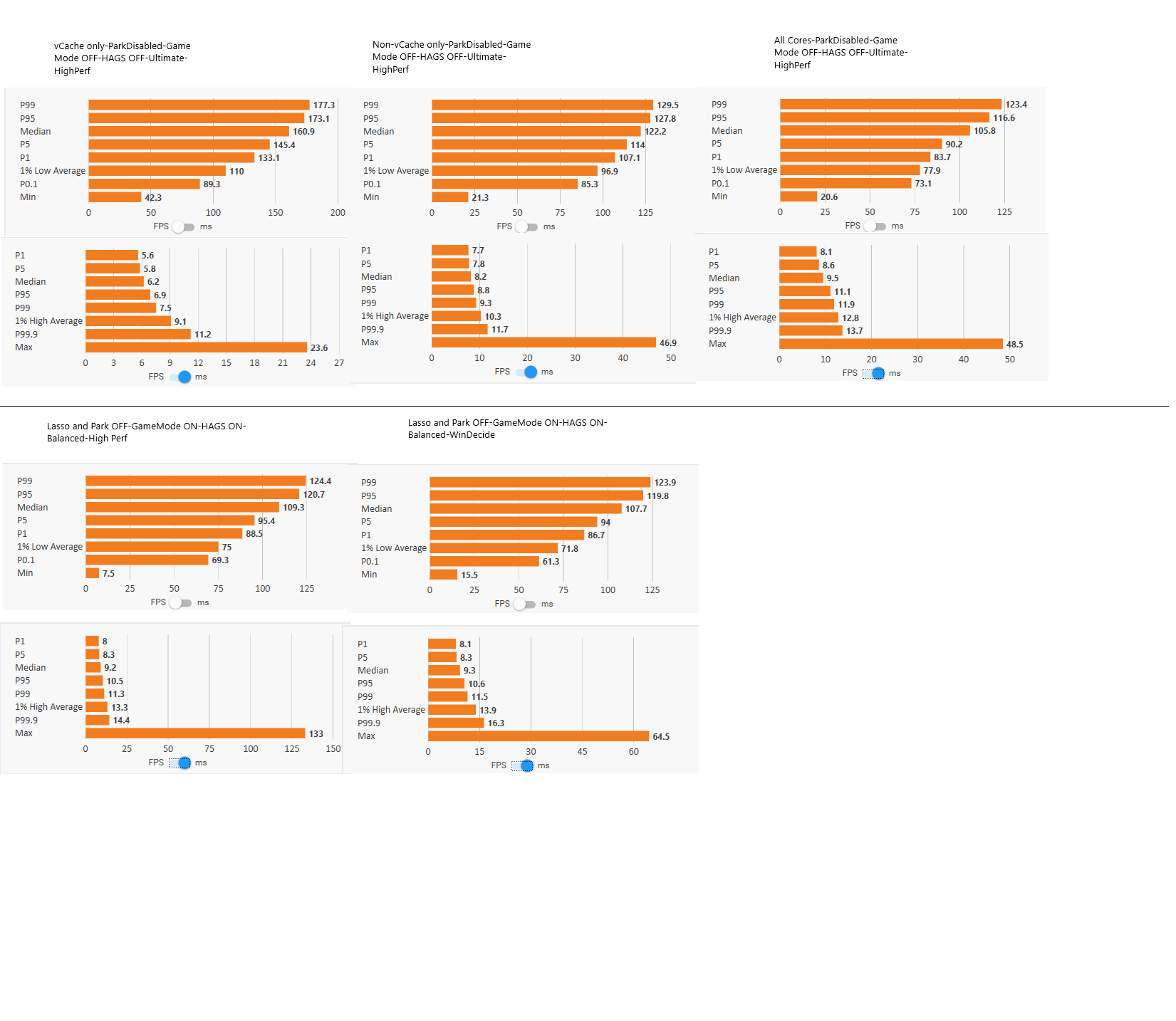
I set my resolution to 1080p for both monitors in the nVCP, and changed all my other sim graphics settings to exactly match the ‘CPU Bottlenecked’ settings in this excellent thread post by @TheOriginalBabu. Thanks for this!
I loaded the Bonanza G26 Improvement Project, and flew the same route over rural Illinois, changing some of my system setup each time. The changes are detailed in the picture.
It’s pretty clear that the X3D chiplet is being used when not GPU bottlenecked. Also, that Process Lasso is a great fit for these X3D CPU’s.
177 FPS / 5.9 ms w/o frame gen is nothing to sneeze at, even if it is only 1080p.
1% lows are impressive as well.
I agree with your conclusion: The GPU, and the resolution, are really big factors on how well this sim runs.
@MrFuzzy1337 Thanks for leading me to this test!
Just for grins, here’s the performance with what I consider to be optimized 4K settings for my system.

1 Like
Hi, I have to buy a new pc, is a i5 12400f with a rx6750xt a good build for msfs 2024? I know that it isn’t the best i could get, but will i be able to play it smoothly with good graphic settings? sorry for bad eanglish
You should be able to get decent performance @ 1440p if you are willing to make a few compromises on your graphics settings.
The RX6750XT has enough VRAM, which is very important.
iRacing is a very good realistic online race sim.
can i get around 50 fps on 1080p and good graphics (not max)?
How’s your internet connection?
i have 1Gb optic fiber, quite fast
If you can connect to a US server or a SE Asia server, and your ISP isn’t Telekom, you should be fine.
Actually, we learned definitively back during SU 15 beta and most recently with the launch of 24, that this is not the case: The executable files for PC and Xbox are compiled differently and are different for their respective platforms. The argument that the PC product gets dumbed down for the sake of Xbox is spurious and incorrect.
I’ve recently got the 9800x3d with the 4090 and a msi 870e motherboard and it runs everything on max. Only thing I’m struggling with is going from a 4k tv to a 1440p monitor and getting the settings for the hdr etc to my liking it’s either too dark or too saturated
I had ReShade dialed in with FS2020.
Today I installed it to use in FS2024.
There are profiles available on Flightsim.to, but if you’re willing to put the time in you can adjust a myriad of filters that make a huge difference in how the sim looks.
1 Like
I’ve been using nvidia filters but might try reshade