Core Components
Processor: AMD Ryzen 9 9950X3D (16-Core) 5.7 GHz Turbo (3D V-Cache) (Zen 5) (I am curious what peoples’ thoughts are on AMD Ryzen vs Intel Ultra, I have always been an intel guy, have heard AMD has good things for MSFS though. Intel is a bit cheaper.)
Motherboard: MSI MPG X870E CARBON (Wi-Fi) (AMD X870) (Up to 3x PCI-E Devices) (DDR5) (I know little about motherboards, so welcome any feedback here)
System Memory: 64GB DDR5 5200MT/s Kingston FURY RGB
Graphics Card(s): 1x GeForce RTX 5080 16GB (VR Ready) (I feel like I do not need the 5090, am i right?)
Power Supply: 1000W Digital Storm Performance Series (Semi-Modular) (80 Plus Gold)
Storage / Connectivity
Storage Set 1: 1x SSD M.2 (2TB Samsung 990 PRO) (NVM Express) (this would be the MSFS/OS drive)
Storage Set 2: 1x SSD M.2 (1TB Samsung 990 PRO) (NVM Express) (For Lightroom, photoshop, rhino, etc)
HDD Set 2: 1x SSD M.2 (1TB Digital Storm M.2 Performance Series) (NVM Express) (for storage of photos)
Internet Access: High Speed Network Port (Supports High-Speed Cable / DSL / Network Connections)
Thank you for your post! Your topic has been moved to a sub-category of the User Support Hub
The General Discussion category is meant for discussions that fall outside of our other sub-categories.
If you would like other users to help you with an issue you are experiencing in the sim, consider these User Support Hub categories for your future post:
If the PC is mainly for gaming, you really don’t need something like the Ryzen 9 9950X3D. That kind of CPU is great for both heavy workloads and gaming, similar to something like an Intel 14900K.
For pure gaming, a better and more sensible choice is the Ryzen 7 9800X3D. It’s actually considered by many to be the “king of gaming” CPUs right now. It delivers excellent performance where it matters most and one of its biggest advantages is that it runs relatively cool compared to high-end Intel chips.
Intel CPUs are cheaper, but there’s a reason … Intel lost a lot of trust in the community after past issues - I personally returned my 13900K to Intel and got a refund. After switching to Ryzen, I haven’t regretted it at all.
So unless you really need the extra cores for productivity, the 9800X3D is the smarter, cheaper and more gaming-focused option.
That’s a very good motherboard. I actually use the MSI MPG X870E Carbon myself and recommend it all the time on forums - quite a few people ended up buying it based on my suggestions and the feedback has been solid.
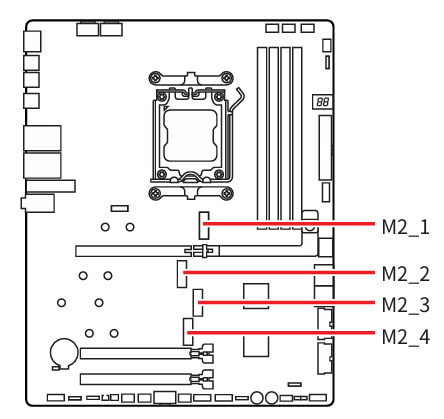
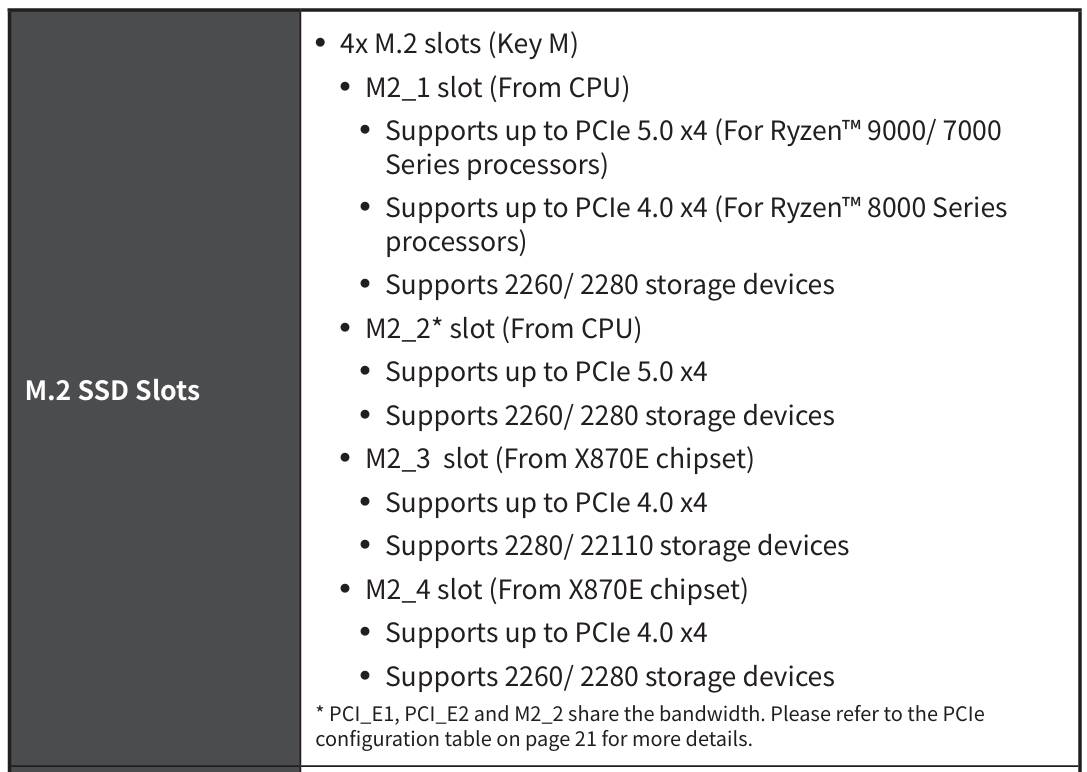
One thing you should be aware of: if you plan to run, for example, four NVMe drives, you’ll need a PCIe to NVMe adapter for one of them. That’s because the second M.2 slot shares lanes with the GPU slot, so using it can affect how your GPU runs.
That doesn’t tell us much, to be honest. All we really know is the memory runs at 5200 MT/s.
For Ryzen gaming PCs, 6000 MT/s is generally the sweet spot, so 5200 is on the lower side. We also don’t know the latency (CL), which is just as important. Since RAM isn’t exactly cheap right now, there’s a chance the store is cutting costs here - for example, using something like CL40 instead of better kits like CL26, CL28 or CL30.
Another important thing: there are two types of memory profiles - XMP (for Intel) and EXPO (for AMD). You should check with the seller which one this kit uses and ask for the exact model of the RAM.
The GPU really depends on your expectations, your monitor (2K or 4K) and VR matters too.
For example, if you’re running a 4K monitor and want to play on ultra settings without DLSS or Frame Generation, you’ll have to lower settings or accept using DLSS, because the RTX 5080 isn’t really ideal for native 4K ultra gaming. It’s a strong card, but not quite at that level without some help.
If you’re thinking about triple monitors or VR, then without DLSS you’re not going to get smooth performance either.
The ASUS ROG Astral RTX 5080 OC Edition has this feature as well. So if you do end up going with an RTX 5080 instead, it’s worth telling the seller you specifically want a model with this kind of protection - even if it means paying a bit extra.
That’s basically a generic PSU branded by the company that builds the PCs. Units like that are often just rebranded and don’t tell you much about the actual quality.
Personally, I’d avoid it. With a high-end build like this, the PSU is not the place to cut corners.
This is actually a pretty interesting feature - the PSU monitors the current on each individual pin of the 12V-2x6 connector in real time and can detect things like uneven load or bad contact before it turns into a bigger problem. https://www.msi.com/Power-Supply/MPG-Ai1600TS-PCIE5
Combining MSI’s GPU Safeguard+ with ASUS’s Power Detector+ on the GPU gives you a really solid layer of protection.
There are also PSUs that use a temperature sensor directly on the GPU power cable near the connector on the GPU side. If the temperature around that plug area rises to something like 105C or goes beyond a safe threshold, the power supply will cut power to the entire system to prevent damage. https://pg.asrock.com/Power-Supply/PG-1600G/index.asp
I personally have the PSU from the link above. I bought it before the newer MSI power supplies were available.
I’m actually considering swapping it for one of the MSI PSU. On my side, I could build a simple temperature sensor setup myself - connect it to the motherboard and place the sensor end near the GPU power connector. Then I could set it up in software to trigger a warning alert or even a full power cutoff if the temperature gets too high.
I don’t see which PC case has been chosen and it also plays a huge role when it comes to temperatures and things like ease of cleaning or replacing components. Its size matters as well - for example, if it’s not large enough, there can be issues with some GPU power cables. It’s important that the GPU cable doesn’t press against the side panel of the case.
I don’t see a link to the build, so I can’t refer to it directly.
I’m assuming some components were already manually changed, like RAM ,SSDs and possibly other parts as well.
Also, how much money do you have to spend on this PC, or what is the maximum you can spend?
In some cases, buying each part separately and having someone assemble the PC can end up being much cheaper than buying a prebuilt system.
First off - thanks for the in depth replies @TenPatrol
I should have clarified, this build will be about 85% for MSFS, and 15% for Lightroom / photoshop RAW photo files and some 3D modelling in Rhino. That is why I thought maybe having the extra cores from the 9950 was useful, but if it is only a little bit and the 9800 is probably good enough, then maybe I can use that instead.
I am going with DigitalStorm: https://www.digitalstorm.com/ which I have followed for years and heard amazing things about their customer service, build quality, upgradeability, tech service and warranty / testing protocols. I do not want to buy a big name brand pre-built PC, I have had cyberpowerpc, alienware, dell, and am always left longing for better service, cannot upgrade things, the tech help sucks, etc.
Good to know about Intel!
Thats good to know about the NVMe slots. I have been debating a lot about this - right now I have 2 x 1TB SSDs (in my laptop) and MSFS is on one of them, and I have almost no space left. I know MSFS2024 uses way less space, but I was thinking I would want at least 2TB for MSFS/OS, etc. Then another 1TB drive for LR, Photoshop, Modelling, large files, etc. The last drive purely storage - where speed is not as important, I could prob not go for an NVMe or m.2 and just do a normal SSD, no? Or I just get an external drive and forego the internal extra drive all together.
So I can definitely choose the 6000MT/s version, here is the details of the kingston rgb:
Memory Channel Configuration
Dual Channel
Dual Channel
Dual Channel
Dual Channel
Quad Channel
Eight Channel
Eight Channel
Model
Brand
Kingston
Series
FURY Beast RGB
Details
Capacity
2x32GB
Speed
DDR5 6000 (PC5 48000)
CAS Latency
36
Voltage
1.25V
Buffered/Registered
Unbuffered
Color
RGB
Recommend Use
High Performance or Gaming Memory
LED Color
RGB
For the GPU:
So for the GPU, I do not need or care about 4k. Right now I have a 2560 x 1440 monitor, I like it, but the proportions are a bit to long for me. I would likely eventually get some new monitor, maybe something like this:
I currently have 0 space on my desk for more than one 27-34” monitor, until I can be in a bigger apartment ;), so no double or triple monitors for me for now. If I go with the RTX 5080, then Digitalstorm advertises this: Digital Storm will use a top brand name graphics card from the likes of ASUS, PNY, MSI, etc… An example would be the ASUS TURBO series.
I am sure I could talk to them too, if I wanted, maybe, about switching. I truly do not really understand all the different manufactures though - if I ask for an Nvidia RTX 5080, isn’t it a card made by Nvidia? what are all these different manufactures?
So for the PSU, the only options in this build are digitalstorm branded ones, here is the info:
Designed specifically for power users and gamers, Digital Storm power supplies are a unique advantage that we offer to our customers. By working with top brands such as Corsair, EVGA, and SilverStone, we’re able to purchase entire batches of power supplies to offer our customers the most performance per dollar. By ordering Digital Storm hardware, you will receive a quality name brand that delivers outstanding reliability and performance.
ATX 3.0 Ready
Modular Cable
Fully Modular
+12V Rail
1 Rail
Efficiency
Gold Efficiency
PFC
Active
Power Good Signal
Hold Up Time
100% load >16ms
MTBF
100,000 hrs
Protection
UVP/OVP/OPP/SCP/OCP/OTP
Operation Temperature
50℃
Safety
UL/CUL, TUV (60950-1 & 62368), CE, FCC
Input
Voltage
100-240V~
Current
12-6A
Output
Total Watts
1000W
+5V
24A
+3.3V
24A
+12V1
83.3A
+12V2
+12V3
+12V4
-12V
0.3A
+5Vsb
3A
+5V / +3.3V Combined
120W
+12V Combined
1000W
Platform
Wattage Coverage
Topology
LC
ErP
2014
DC to DC Converter Design
Yes
For the case, it is a digitalstorm designed custom case, called Corsa, here are the details:
That kind of drive will definitely be fine. I personally have two SSDs like that and overall I’ve got 8 drives: 4x NVMe, 2x SSD and 2x HDD.
If you’re not aiming for hardcore 4K gaming, the RTX 5080 is a good choice.
About Nvidia GPUs - Nvidia designs and produces the GPU chip and also makes the reference cards (Founders Edition).
Other manufacturers like ASUS, MSI, and Gigabyte use Nvidia’s chip and build their own custom GPUs. They usually differ in cooling performance, noise levels, factory overclocking and often perform better than the reference Nvidia version.
Ask them to confirm whether that PSU has a native 12VHPWR / 12V-2x6 connector and cable.
It might turn out they’re using an older power delivery standard that was mainly intended for RTX 30XX cards rather than the newer 50XX series. The newer GPUs use a different power connector.
If they are including an older PSU model, then the GPU will most likely be powered through an adapter - which is not really recommended for newer GPUs.
Thanks for all the advice. I will inquire about the PSU. I think they would not be using an adapter given what they say on the website about their builds, but I can inquire.
Re the GPU, also good to know. I am not aiming for hardcore 4k.
What is the difference in the m.2 and nvme? speed?
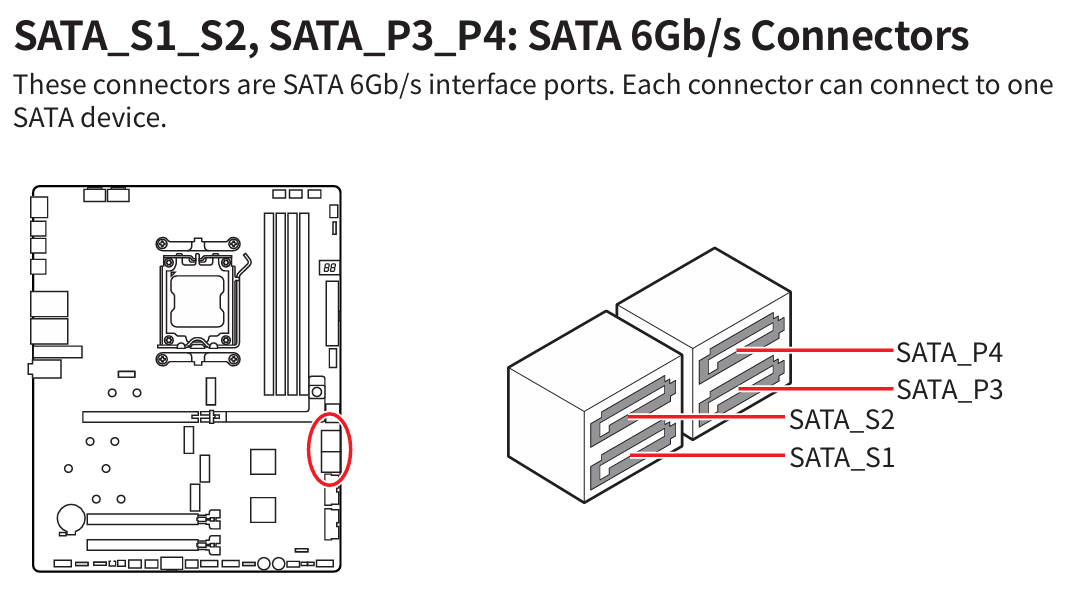
The X870E Carbon WIFI motherboard has M.2 and SATA storage slots. You can connect drives as follows:
in the M.2 slots, you install PCIe NVMe M.2 drives
and in the SATA ports, you connect SATA SSDs and SATA HDDs
The faster storage slot is M.2, which is used for PCIe NVMe drives in different generations: PCIe 3.0, PCIe 4.0 and PCIe 5.0. The fastest and most expensive are PCIe 5.0 NVMe M.2 drives, while today the most popular are PCIe 4.0 NVMe M.2 drives.
The X870E Carbon WiFi motherboard has two M.2 PCIe 5.0x4 slot and two M.2 PCIe 4.0x4 slots.
They are using the newest power delivery standards, connectors, and cables.
I did the same build specs as this rig on pcpart picker and the price was honestly not much different, +/- 250 before tax/shipping. For that, this seems well worth it to me.
If that’s what they told you, it sounds more like marketing talk than something precise. They’re offering an ATX 3.0 PSU while calling it the “newest standard” which isn’t really accurate. The newer standards are ATX 3.1 and PCIe 5.1, so it’s not exactly what they claim.
Just ask them what cable will be used to power the GPU and ask for a photo of the back of the PSU with all the connectors clearly visible.