Hello Community, Hello Support , Hello everybody else
After almost 25 years of spending (mostly a great and joyful) time with the MSFS I face a problem I am not able to resolve by myself. So with all due modesty I give all my hope to you for help.
Description of the issue:
Since March 2025 from more or less one use of FS to the next use I lost the mouse on FS2024. I waited for the SU2 it may hopefully solve this problem. Unfortunately it did not, so I am here now and I hope someone has a good idea.
The Problem is quite simply: When I start the FS2024 I get a mouse pointer on the startscreen, but I cant do a mouseclick on the “Start” button. Infact, no button on this page I can click. There is even no Hover reaction on the buttons when I move over with the mouse. Using the Controller instead to go further just shows not even a mouse pointer anymore on the next screens (Start screen) or anywhere in the sim. This is same now anytime I start the FS.
A little remark: After I got SU2 installed, I shortly had a mouse one time (first start after update). I was able to came to the “change Airplane” screen (free flight) but in there I lost the mouse again (one click to the next) and it was/is the same as described above. Maybe this may help someone to get an idea.
Some additional infos:
The mouse works properly on FS2020 and Edge on my Xbox. There was never a problem.
Hardware connected to the XBox:
Standard Controller as bought with the XBox
Thrustmaster Boeing Edition
RedThunder K20 Keyboard-Mouse Set with one USB-Adapter.
Well, depending to the software installed on the Xbox…everything else works fine.
Well, that´s all I can tell…what can you tell?
Thanks for reading! Good Day!
Thank you for this report. We’ve moved your topic into the User Support Hub.
The Bug Reporting Hub is for posting suspected or confirmed bugs that other users are able to reproduce without duplicating an existing bug report. Using the template or providing all the relevant information about your bug and sim setup is required in order to provide valuable information, feedback, and replication steps to our test team.
If you are not sure if your issue is a bug or need further input from the community, please use the User Support Hub category. If the community can replicate your issue, first search the Bug category to see if there’s an existing topic. If it already exists, contribute to that report. Duplicate bug reports will be closed.
If you believe it is a new report and no duplicate exists, then create a new bug topic using the provided topic template.
All issues caused by or involving third-party addons/mods should be reported to the third-party developer. Assure that no addons/mods are used when reporting issues in Bug Reports.
Hi - I am able to replicate this bug. I have been able to use MSFS 24 on my Xbox and mouse since launch, however, around a month ago the mouse just stopped working. Tested the mouse and it works perfectly well and the mouse pointer is stuck in the top left corner of the sim. This is definitely a bug as I’ve spent hours doing testing. Can somebody please look into this?
You may want to get Zendesk support for this, as the forums are peer to peer support.
To do so, use the “Submit a Request” link in the “Sim Support” tab at the top of every forum page.
That goes direct to MSFS.
So up until last update I didn’t have an issue. Now only works up till the point I load into airport!! Works on Home Screen and career screen but load into a airport and poof only can click digital screens and planes or anything that has push button screens but anything that has dials or knobs will not work will not pan either! And is happening on both my accounts so it’s not just one account it’s on both series X’s it’s happening! Not just 1
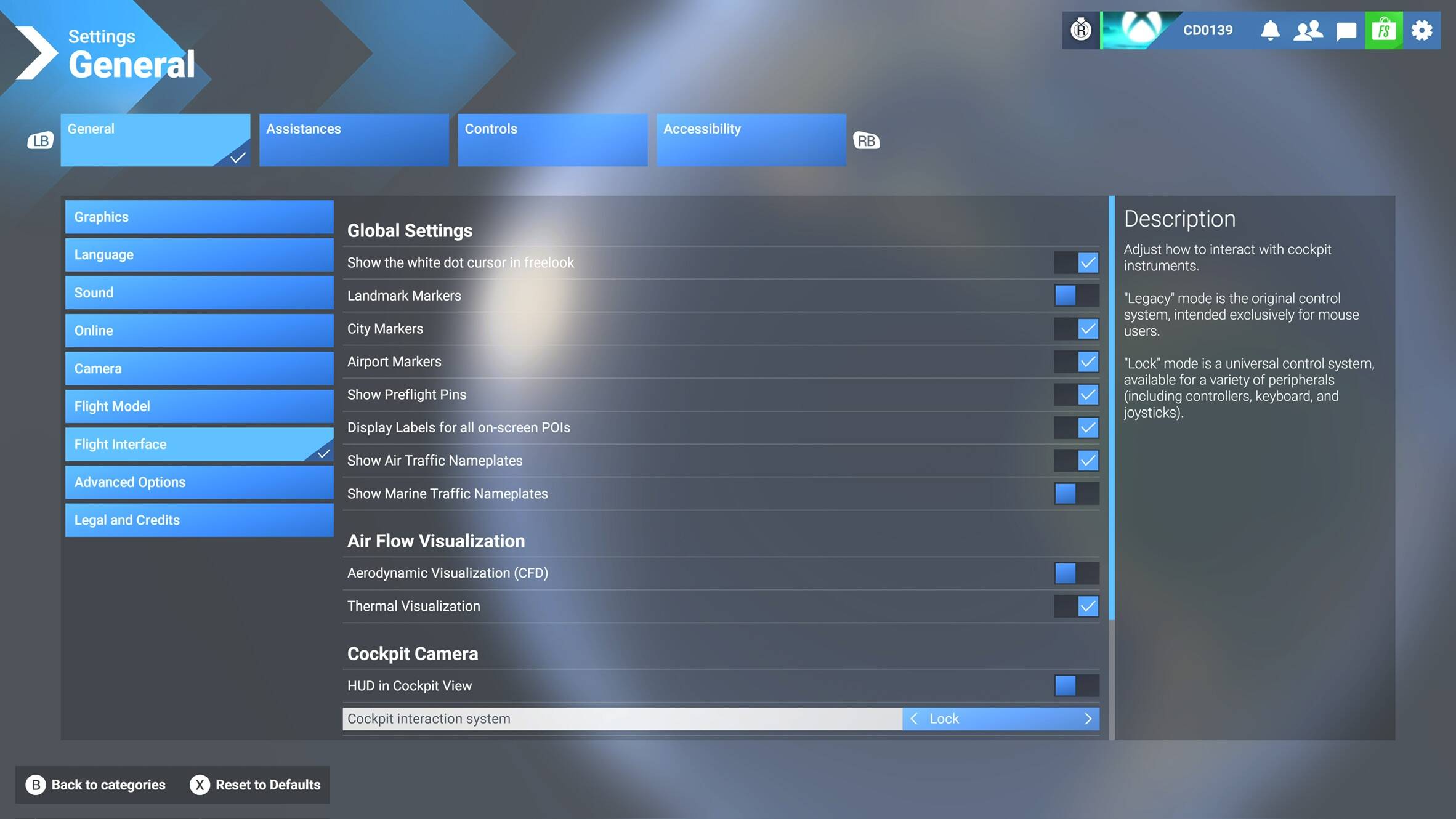
Update so I think I have narrowed it down! In the settings under Flight interface the cockpit interaction system is stuck on LOCK! Pls fix. Makes the simulator unplayable.