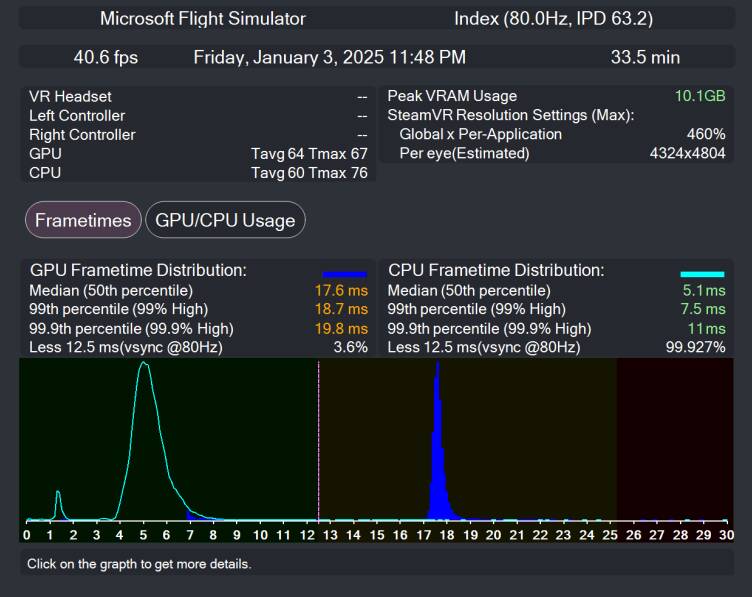
Did a partial PC upgrade yesterday – previously had a i7-9700k + 3080, kept the 3080 but replaced mobo+cpu+RAM and now have an i7-14700k.
CPU utilitzation went from pushing 100 (and occasionally spiking to 100 and stuttering) to more like 25-50%. Can have cars and air traffic on without a big hit – having some overhead with MSFS is really important.
Of course for most people all of this is obvious, but I just wanted to throw it out there for anyone on the fence about an upgrade, especially since it’s highly plausible that PC components across the board will get much more expensive in the US next year.
Incidentally, this also keeps flying on Xbox viable. For 600 GBP I have a setup (which I can also play games on) made up of Xbox, HOTAS and Controller which gets me the vanilla experience along with whatever makes it to the Xbox marketplace.
I have a i7-9700k, a 3090 Ti, 64 GB DDR4 and my CPU goes to the roof with FS2024. 100% almost all the time. I wonder if there’s something to do about it, knowing I can’t replace CPU+mobo right away.
What resolution are you running and what is the refresh rate your monitor is set at? Have you tried reducing either one?
I have 3 screens 2560 x 1140 @60 Hz. I can set refresh rate to 75 Hz but I don’t think it will change anything.
By the way, I have just noticed that FS2020 has my CPU always stay between 90 and 100% too, but it doesn’t seem to be much of a problem in terms of sim performance, whereas 2024 is severely impacted by it.
I don’t have enough money to upgrade to what I’d like, but I’m wondering if just replacing my i7-9700K by a i9-9900KS (the fastest I can put on my mobo) wouldn’t help a little.
I’ve mentioned in several threads that I’m convinced that FS2024 is much more dependent on GPU and internet connection than it is on CPU.
I was able to get 177 FPS (Bonanza airborne over Illinois at 5,000 AGL) when I set my system up @ 1080p using CPU bottleneck graphics settings, all with the CPU barely reaching 40% utilization.
I fly @ 4K with mostly Ultra/High graphics setting, and CPU utilization has hardly changed, regardless of my location. My GPU is working a lot harder, though.
That’s why my advice for those who are looking to upgrade, to focus first on budgeting for the best GPU they can afford. My 3090 Ti 24GB is doing ffine, but I definitely want to upgrade it some day in the future.
A refresh rate of 60Hz would be best. While I’ve never played with multiple monitors, have you tried capping your fps to 30-50fps?
I’m shootting in the dark as I don’t know your gpu, your sim settings or your vram usage. Posting the fps window would also be helpful.
It’s even better in 2020 with the right hardware.
Only problem with all that process coming off the CPU is that some of its gone onto the GPU. Which is fine, unless you’re running a triple monitor setup…then its hurts!
There is a balance, for sure. Every system has it’s peak point, it’s just a question of math. Being GPU bound is the way to go because these new GPU’s can be very demanding of the CPU, but if you slow the GPU down just enough, the CPU can breathe.
This was one of the most counterintuitive things I experienced with my old i7-9700k/3080 build - increasing render scaling to over 100 markedly reduced stuttering.
I have a 9700k@5ghz and do not see CPU at 100% except when it was spiking due to some latency issues in windows 11 24h2, which I have now been able to resolve.
My CPU usage is around 48-56% consistantly in msfs24 now. I do not feel a need to upgrade my components any time soon and am satisfied with the performance I am getting. I have all traffic on ultra and am using two monitors.
Granted things were very different in msfs2020, as I was definitely CPU limited. I am so grateful for msfs24 and it’s multi threading performance.
I’ve just upgraded from an i7-9700K to a Ryzen 9 9950X. I kept my 3090 Ti of course and I have three screens 1440p @75Hz. I’d like to check 2020 with that config but it seems impossible for now as the loading has been stuck on the “Checking for updates” screen for a couple days. The only thing I saw is that 2024 loads much faster and the CPU doesn’t peak to 100% anymore and remains in 15-25% range.
For now I’ve optimized settings automatically with the NVIDIA app, but If you have any recommendations for the settings, I’m all ears.
The 9950X3D, with its dual-chiplet design (only one having X3D cache) is a prime candidate for Process Lasso. My 7950X3D was a disappointing upgrade from the 5800X3D until I spent some time learning how to optimize it with Lasso. Now it’s a beast, and I’m clearly bottlenecked by my 3090 Ti.
I’m happy with the FPS and the balanced frametimes running 4K (actually DLSS 4 Quality, so 2K → 4K upscaling) with mostly Ultra/High settings.
This was the most helpful YouTube video I found for setting up Lasso.