glad to hear it worked! another update, I did a complete window reinstall/wipe out all data, etc. Installed the new driver fresh, and also MSFS2024 on vanilla. Issue is still there. So it is probably a combination of the drivers, and something from the sim.
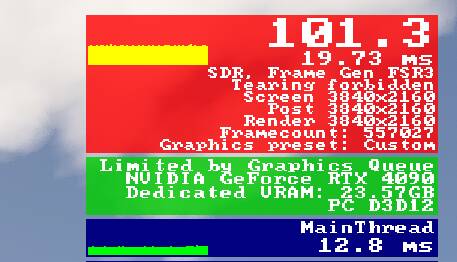
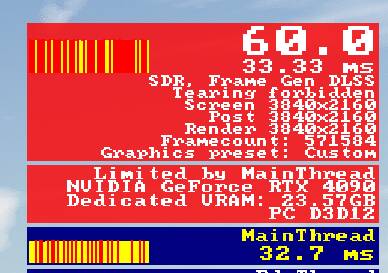

I can’t believe there’s such a big difference… Since I have an RTX 5080, I just assumed DLSS Frame Gen would be better and never even thought about trying FSR 3. I need to go test it out right now.
test:
After some testing, I’ve concluded that FSR 3 FG performs better. There is a noticeable difference in main thread latency; specifically, Nvidia’s FG shows higher latency, whereas FSR FG is significantly lower. Even if you own an Nvidia card like I do, I highly recommend using FSR 3 FG if you’re looking to enable frame generation.
Ryzen 7 9800X3D, RTX 4090, 4K High/Ultra, FG NVIDIA DLSS x2 - on.
NVIDIA driver 591.74 without NVIDIA app.

Main thread 33ms 
I just remembered one of the settings in developer mode that affects both Frame Generation NVIDIA DLSS and the main thread.
Here’s a little trick.
Turn on Smart Docking System via Options tab.


HI @TenPatrol,
First of all, thank you very much for your help.
I have installed Nvidia driver 577 as suggested, however when I am ingame, the game feels stuttery when moving the camera. Have I done anything wrong? I am having issues with Mainthread as mentioned on this post: Sim turns into a slide show on long haul flights - #19 by CaptainllDaxll
I think this is all related.
Also, I have DLSS swapper which I haven´t touched at all since installing Nvidia 577. Do I need also to change anything in Nvidia app?
Thank you in advance
I have to leave home now, but I’ll check your thread once I’m back.
Please add a new post in your thread and tag me there so I can take a closer look.
No problem at all! I have tagged you on the post 
Have a good afternoon!
what an insanely random setting. i’ve also seen posts stating that disabling it improves performance. shrug
https://www.avsim.com/forums/topic/658385-bad-performance-in-dev-mode-disable-smart-docking-system/
I have Smart Docking checked, and i think it shows your actual fps without Fg, and that’s why the mainthread looks low. Mine is showing 44fps, which is my “true” fps. I usually have to exit the dev mode and leave the debug counter on, to show the fps with fg, and that’s when it will show the mainthread being saturated.
Hi @apeduke1806 , did you see the 591.86 driver got released?
brave enough to try it? 
That’s why I left it open to comment.
Im terrified to try it.
I all seriousness, I just want to fly. Im staying on 577.
Couple of thoughts I had.
-
I wonder what would happen to a brand new system that only got flashed to 591.59. I think it would be OK
-
I will see if NVIDIA get back to me.
Serious point about the new driver though. I don’t think they recognise this as an issue yet, so it probably won’t fix the issue. It may fix it accidentally though if they’ve made a change elsewhere that coincidentally fixes what we are seeing.
I have also reverted back to 577, however, what´s your max FPS? I am getting around 70/80 max in EGLL.
Hi mate. I saw your earlier post.
Im on FGx2
I was wondering if you were on 3x or?
Do you use v sync also?
I was getting my real issue mixed up before with changing other settings. For instance, no frame generation would look stuttery, but I think thats because I was generating 45 native frames on a 60hz tv
I have a 4090 so the maximum FG I can get is 2x. I have Gsync ON and V.Sync OFF. (240Hz monitor).
My issue was that I had a massive bottleneck because of the mainhread during descent and also before descent. 8h of flying without issues/super smooth and bam mainthread was a slideshow… I have had this issue since SU3…
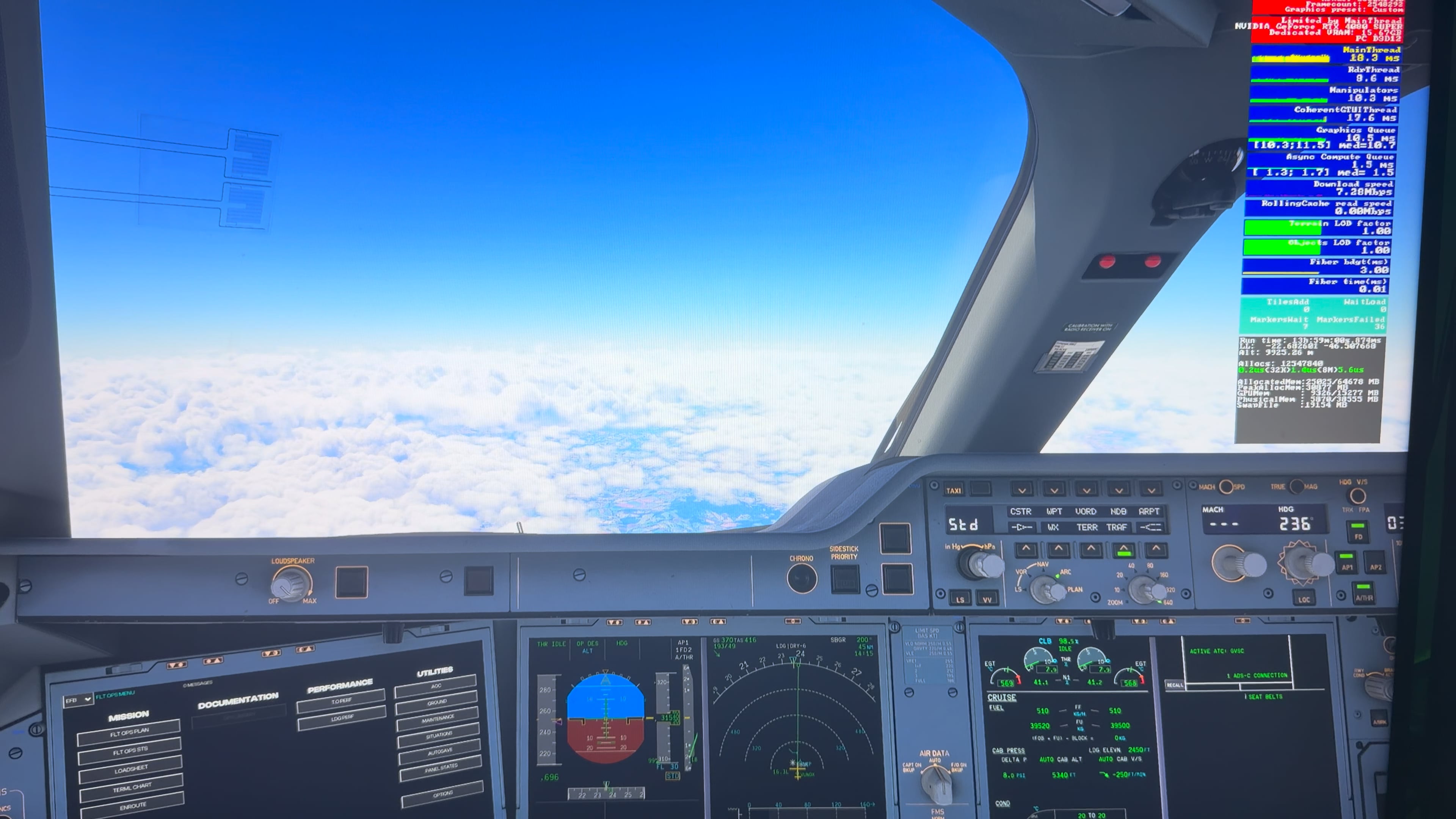
I hope Nvidia sees the issue because many people are affected by this issue
I think that does look different to what the topic author and i are seeing.
Your mainthread is yellow, with a red spike each time you get the jump.
In our case, we have it from immediately loading in, and the mainthread is pegged with constant red spikes in it.
@apeduke1806 Try
Download NVIDIA driver 591.86
- Uninstall NVIDIA driver via DDU in Windows Safe mode.
If you need help for using DDU, check this GUIDE - Restart PC.
- Install NVIDIA driver 591.86 - install only the driver and PhysX.
- Restart PC.
- Launch MSFS 2024

YSSY

i just tried it with the steps above. First time playing it was ok, but the second time it went back to the high mainthread issue. Can you try again with a restart?
Yep - stay tuned.
I see that this happens with newer drivers, so I have the impression that Nvidia still insists on collecting data via telemetry… because they don’t know what to improve specifically. This ends up undermining performance. But I know there’s a way to remove telemetry from a driver with specific software.