NVdia driver from 580.88 causes mainthread to saturate (50ms) when using framegen

Using the template below will greatly help the team reproduce the issue and ease the process of fixing it. Before posting, search for an existing report. If you are not sure it’s a bug, please first report in User Support Hub.

3 tags are required - add them in the tag section next to the title above:

Feel free to delete this quote section after adding your appropriate tags.

ISSUE DESCRIPTION

Description of the issue:

Since the last DLSS4.5 driver update, the framegen (x2 and x3) has been causing the mainthread to saturate to 50ms all the time. I had to roll back to 577 driver for it to work normal again (see pic below. 577 with framegen x3 shows a normal ~17ms, while all the drivers from 58x and above cause the mainthread to jump to 50ms). This happenned just recently with the DLSS 4.5 release, so i was wondering if Nvidia did something retroactively with the framegen that affected all the 58x.xx drivers and up?

FREQUENCY OF ISSUE

How often does this occur for you (Example: Just once, every time on sim load, intermittently)?

All the time with Nvidia driver 58x.xx and up

REPRODUCTION STEPS

Please list clear steps you took in order to help our test team reproduce the same issue:

  1. Update to latest nvidia drivers (or any 58x.xx drivers)

  2. Turn on framegen override (x3) from Nvidia

  3. go to game and turn on dev mode, Display fps , then exit dev mode so the fps shows the frame gen fps

  4. Mainthread will saturate at 50ms and cause stutter

YOUR SETTINGS

If the issue still occurs with no mods and add-ons, please continue to report your issue. If not, please move this post to the User Support Hub.

What peripherals are you using:

[PC Only] Are you using Developer Mode or have you made any changes to it?

[PC, MSFS 2020 Only] Are you using DX11 or DX12?

[PC Only] What GPU (Graphics Card) do you use?

[PC Only] What other relevant PC specs can you share?

MEDIA

Please add a screenshot or video of the issue occurring.

577.00 Driver - Normal ms (~17ms) with frame gen x3 forced on from Nvidia app
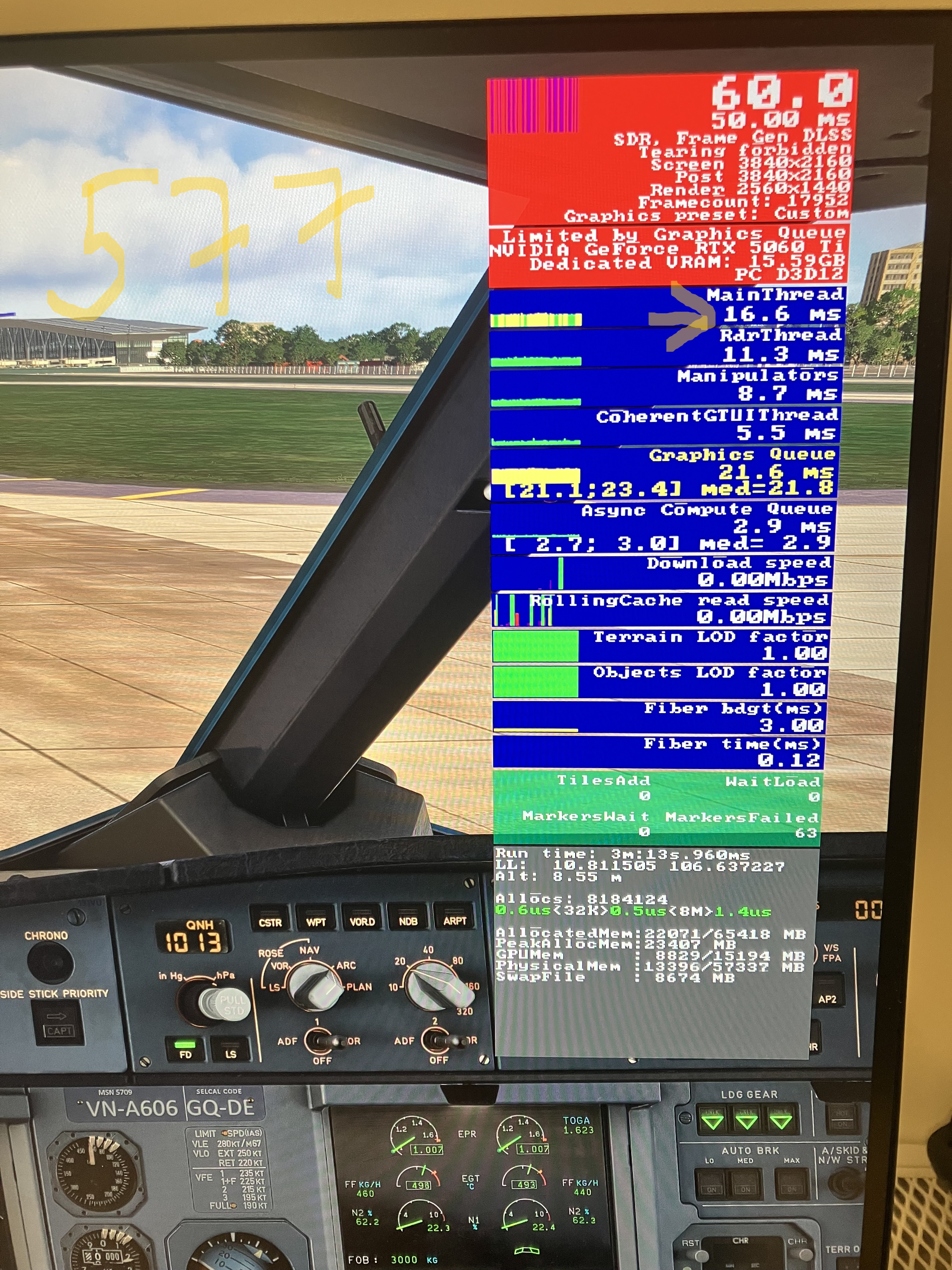
58x.xx up to the latest DLSS4.5 driver. Mainthread is saturated at 50ms with frame gen x3 forced from nvidia app. This just happened recently since DLSS 4.5 update. I was on the 581.57 driver before and it did not happen until the DLSS 4.5 release. Seems like Nvidia has retroactively applied some changes to the framegen to all the 58x.xx drivers as well.

I’ve read that the Windows 11 Security Update yesterday interfered with the latest Nvidia driver, causing a drop in performance. Noticed today’s flight was a bit stuttery, maybe due to it.

Have you tried latest driver 591.74 ? Seems to work ok with DLSS4.5 driver

Windows 10, 11 and Insider preview all to latest update as of 17 Jan 26

Official GeForce Drivers | NVIDIA

Yes I did try the 591.74. That was the first one I tried, and encoutered the 50ms issue. Then i tried rolling back to earlier driver, still the same until i tried 577.00.

Did the 577.00 smooth it out?

Paco572

yes. After several times switching back and forth to test, including flashing bios, ddu, etc. I will be back to 577. Fg x3 is smooth and with DLSS Quality Preset K. The funny thing is, everything was working fine on 581.80 driver, but when DLSS4.5 was released, it started having issue above. So i had to revert to 577.

Another post about this same issue: Frustrating issue with Nvidia (591.74) Update(s)? - Please help!

Linking it here. Exactly what i have been experiencing

Have you tried injecting the latest 4.5.dll file directly into MSFS. I rolled back video drivers one version and MSFS installed an older .dll file. When I reverted back to the latest driver, the .dll file in MSFS did not update and broke 4.5 even though I reinstall the NVidia app and did a clean install of the drivers. It was only when I grabbed the latest dlss 4.5 >bin file and renamed it to the .dll file, replaced it in MSFS did the new DLSS 4.5 function. I was just curious.

PACO572

what is the name of the dlss bin file?

C:\ProgramData\NVIDIA\NGX\models\dlss\versions
Locate the folder with the highest number. Inside you will find the bin file. SAVE a copy in temp folder. Re name it to: nvngx_dlss.dll

Located the same file in MSFS and replace it. This will install dlss 4.5 into MSFS. Be sure make a back up of original .dll file in MSFS.

Cheers
PACO572

oh thanks!

did this fix your issue of high mainthread when using framegen?

NO it did not, I wish. For me it got the broken 4.5 DLSS back working after it failed to load the DLSS into MSFS after video driver swap old/new.

I was just wondering if you could use the old v577 drivers with a injected 4.5 DLSS and see if that works to smooth it out..

Cheers
PACO572

ya my dlss 4.5 works fine on 577. Using preset M right now with fg x3 and it is smooth as usual (mainthread areound 14ms).

What do you mean driver on 577 and DLSS 4.5? you rollback to 577 and than use DLSS Swap ? or do you inject the dlss file directly? Thanks

Looks like we have discovered something. LOL… Hopefully more do try this in this thread.
The caveats here is 577.00 is 12 updates back and there are monitor fixes for mine in those updates. So am reluctant to try.

It would be a good idea to add this information to the bug report at the top of this thread so when it gets reviewed, perhaps this will shed light on the issue and give the team, (this is how it should look and most importantly is repeatable, ie 577 and DLSS 4.5) can’t help but give MSFS a good place to start when trying to solve this issue with the newer video drivers. They will have something to compare.

Cheers
PACO572

Nothing was really “discovered” here. The OP did not have any issues with driver 577 - the problem starts with the 58x.xx driver series. Rolling back to 577 just avoids the issue, it doesn’t explain or identify it.

Additionally, OP mentioned issues with Frame Generation on drivers from the 58x.xx series, but the officially released and stable DLSS 4.5 only arrived with driver 591.74, so that timeline doesn’t really add up.

The issue with fg started when i updated to 591.74, and even when rolling back it did not work.

@apeduke1806 I have a massive thank you for you. Thank you so much, my sim is working fine again.

I now have a permanent (well interim) fix, and really enjoyed a long flight in the Fenix last night!!

577.00 !!!

I did actually try this before, but I can only think I didn’t use DDU that time, because on a few occasions I used the NVIDIA launcher without clean install…….

I don’t think this should be marked as solved though, as the issue is still captured in the below statement, and I will raise with NVIDIA in my ticket.

When updating to 591.74, ALL post 577.00 graphics drivers are affected no matter which one you chose.

The issue itself is, regardless of super resolution setting, TAA / DLSS / DLAA, using frame generation x2 and up causes the mainthread to be saturated.

Rolling back to 577.00 removes whatever issue that was / is.

Steps to fix for others that wish to try.

  1. ddu driver

  2. Clean direct x shader cache

  3. Delete MSFS rolling cache file

  4. install 577.0

  5. restart

  6. check

  7. relaunch

  8. check

Thanks so much all for your help diagnosing this. Not that we have a proper conclusion yet, but it all helped ruling out things that were perhaps not impacting the issue.

I will inform NVIDIA of this, and let you know the feedback………

What? Are you serious?
I already mentioned 4 days ago in your own help thread that the drivers should be uninstalled using DDU to ensure a clean installation.
https://forums.flightsimulator.com/t/frustrating-issue-with-nvidia-591-74-update-s-please-help/755179/12?u=tenpatrol

If you want help, you need to follow the instructions you’re given, not do things your own way. As you can see, that approach didn’t work out very well.
Next time, please follow exactly what’s suggested step by step
Also, you already have your own help thread, so don’t post in 10 different threads - it only causes confusion and makes it impossible to provide proper assistance. Stick to your own thread, please :slight_smile: