14 flights in SU3 on 581.42 have been fine for me running DLSS 310.4.0, preset k, set to Quality.
I have the same problem… rtx4090 with last pilote, I have a lot of ctd but with 577 , no problem !
2 Likes
Here 5080, yesterday 2 hours on a flight (Fenix A320), today another 2 hours (IniB A350) and no issues. I’m not in Beta4, I’m using version 3.
It is HIGHLY unlikely that it is caused by a graphics driver.
I read in PC World magazine that with the 5090 many pc’s are experiencing freezes because their psu cables are burning at the connection points. Check if yours are ok.
Mines are fine thanks !
This is definitely a driver issue. I ran a test again yesterday with newest driver no CTD after fresh DDU uninstall and install of newest drivers. Then this morning on ground while preparing Freeze again.
This does not happend with 577. Therefore, I believe this is definitely a driver issue. I hope Asobo teams knows the issue.
2 Likes
Disable “Fast startup” in Windows guys, it is causing so many issues, not only gpu but for other devices/drivers also. Recently our local member was having artifacting and freezing issues on 5090 (Other games). Disabling “Fast Startup” fixed it instantly. Just google how to disable “Fast Startup” in windows. (“Fast Startup” is not bios related fyi) . And 580 branch is really more sensitive to overclocks and underclocks.
2 Likes
To disable Fast Startup, hibernation must be enabled. If hibernation is disabled beforehand, the option to turn off Fast Startup will disappear. So the correct order is:
1 Disable Fast Startup in Windows
2 Then you can disable hibernation if you want.
How To Disable Fast Startup in Windows
1 Open Control Panel
2 Power Options
3 Click - Choose what the power buttons do
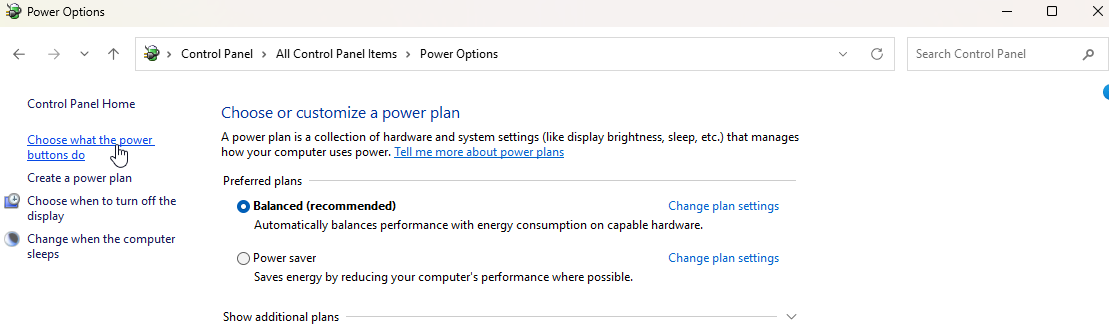
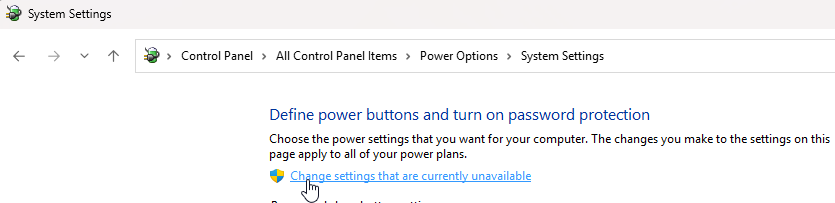
4 Click - Change settings that are currently unavailable
5 Uncheck “Turn on Fast Startup”
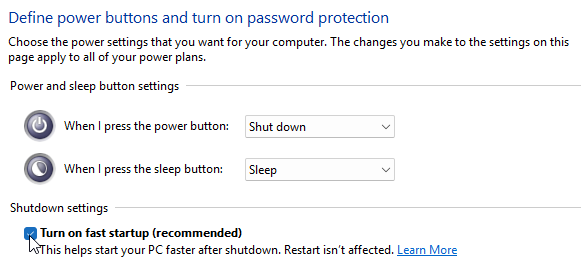
6 Save changes and restart PC.
7 Then you can disable hibernation if you want.
Intel-based PC: Here it’s different. In the BIOS you disable Fast Boot and in Windows you disable Fast Startup.
2 Likes
Thanks a lot TenPatrol! With win11 24H2 25H2 we saw so many issues with Fast Startup, it is crazy. Have a great day! Here is a BSOD example. More examples here and here
Highly unlikely or not, that is what happens in my case.
I was thinking the same, did several test using DDU before installing each driver and… that is what happens to me 
Could this be related to the freezes I’m getting in the SU4 Beta? Also on the latest Nvidia driver using a 4070,
I’m not getting freezing in SU3 though, so that’s why I’m not sure.
I have fast startup enabled and never had any issue with this or any other game. Just saying.
Yeah, apart from many interweb things about this, I have NEVER seen this cause an issue in a repeatable manner.
Fast startup essentially caches the windows kernel with some element of drivers pre-built in in order to make re-loading a bit quicker than having to load the kernel from scratch and set up the drivers from scratch.
If you do a Restart (not a shutdown and power back up), it does the full kernel and driver load anyway.
If you think you have a driver problem related to fast startup, just restart the machine.
1 Like