Game Ready for STAR WARS Zero Company™
This new Game Ready Driver provides the best gaming experience for the latest new games supporting DLSS and RTX technologies including STAR WARS Zero Company™, Resonance: A Plague Tale Legacy, and Hell Let Loose: Vietnam.
Fixed Gaming Bugs
DOOM: The Dark Ages & Indiana Jones and the Great Circle: Frame rate may exceed V-SYNC when DLSS Frame Generation 3x or higher is used [6061475]
Outer Worlds: Texture flicker may be observed while playing after updating to R595 and R610 drivers [6238668]
Fixed General Bugs
ASUS Armory Crate: GameVisual color profiles are not getting applied when using R590 drivers [5860581]
Chief Architect: 610.47 driver crash on Geforce RTX 4000 series cards [6226227]
Claude Desktop: Driver incorrectly detects application as a 3D app [6468260]
Resolves issue that some instances can cause a driver crash with 32-bit DirectX 12 apps [5725350]
Tycho Tracker: Unable to create individual OpenCL buffers greater than 2GB [6538978]
Open Issues
“Prefer Maximum Performance” Power Management Mode may not be applied correctly [6007998]
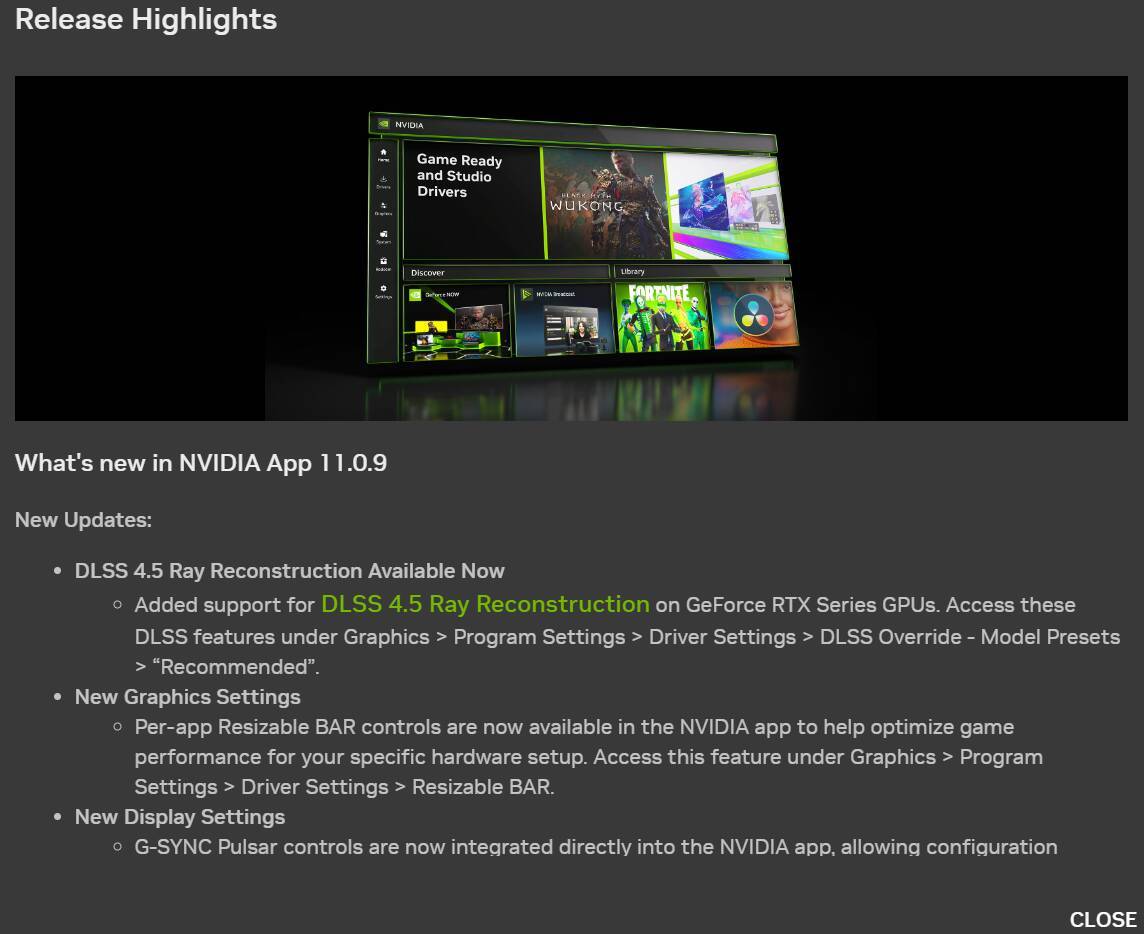
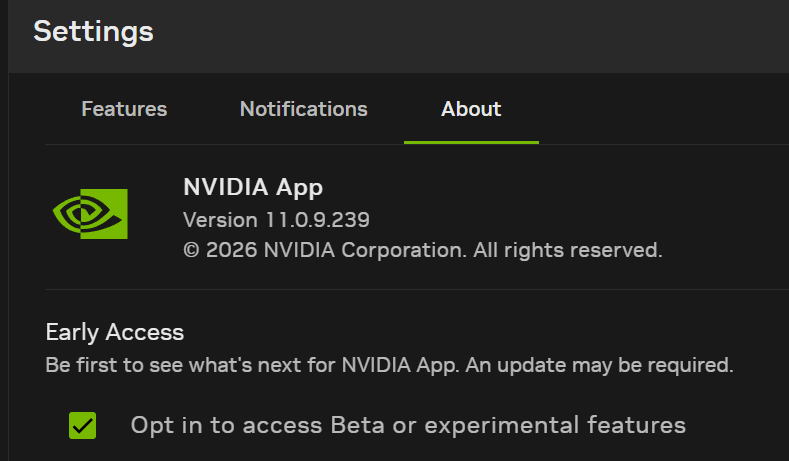
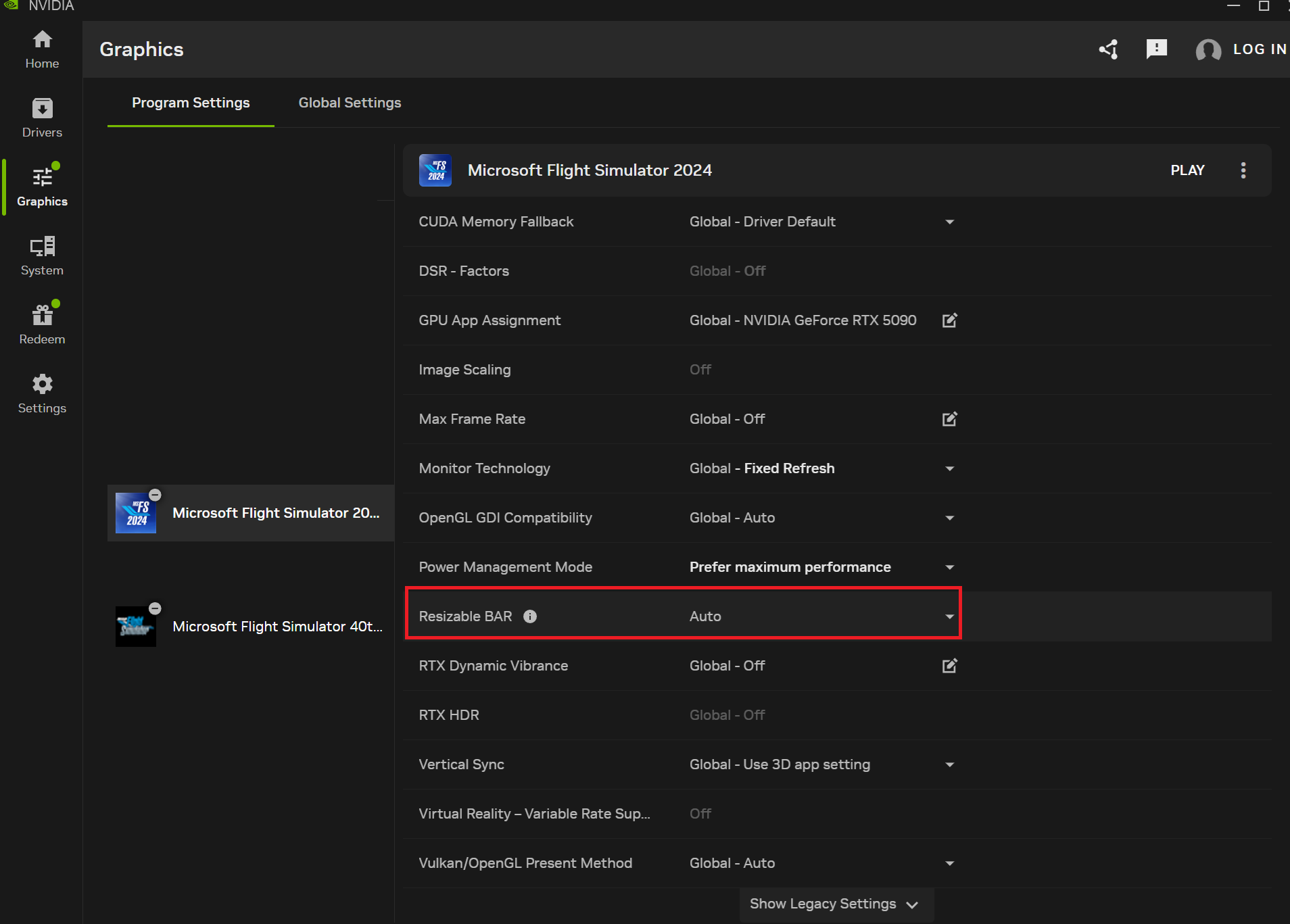
With the beta version of the NVIDIA app, a new setting has been added: you can now enable or disable Resizable BAR directly from the NVIDIA app for each individual game.
TenPatrol, if it is set in the auto position (where mine is currently) do you know how that determines whether it should be on or off? Is it just a case of there being some kind of preset depending on what game you are playing at the time. Do you know how to tell if it is on or off when in the auto position and playing MSFS or any other game?
Your thoughts would be appreciated thanks.
edit: This is a pain. Before I only had a choice of two and now I have a choice of three.
Really interesting. It’s too bad that the company at the center of AI can’t use some AI to help users figure out the impact of ReBar on their particular system, or particular game title, etc, since it is such a complex functionality in a complex pipeline. But at least this makes it easier to toggle back and forth if you want to test.
I think it will prove useful because as you say it makes it easier to toggle it on or off. From what I’ve observed it’s not just the game title it is also what you are doing (flying) at the time. If I have rebar on and I’m in the ini A350 it has a hissy fit about running out of resources. However if it’s on with the new ini A220 I seem to get a much smoother experience. This is in VR. RTX5080.
If this auto setting somehow monitors available VRAM and can dynamically flip it on or off then it would be a game changer. I have considerably more VRAM resources in the A220 than in the A350.
I’m not going to explain the Enabled and Disabled options because I’m too lazy Instead, I’ll explain AUTO.
AUTO basically means the driver decides whether Resizable BAR should be disabled or enabled for a particular game. There are games that are optimized to work with Resizable BAR and MSFS 2024 is one of them. So in this case, AUTO means ENABLED.
So it’s not very clever after all. It’s now just a convenient way to flip it according to how much spare VRAM I expect to have for a particular scenario. Better than nothing I suppose. Thanks
AUTO doesn’t monitor VRAM. That’s not what it’s doing. The problem is with MSFS 2024 optimization …
If you’re low on VRAM, just choose Resizable BAR Disabled instead of AUTO or Enabled, or adjust your graphics settings so you stay within your available VRAM.
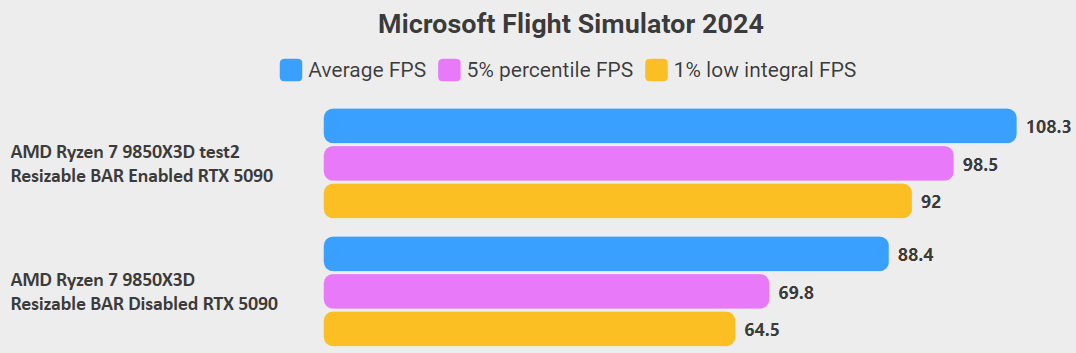
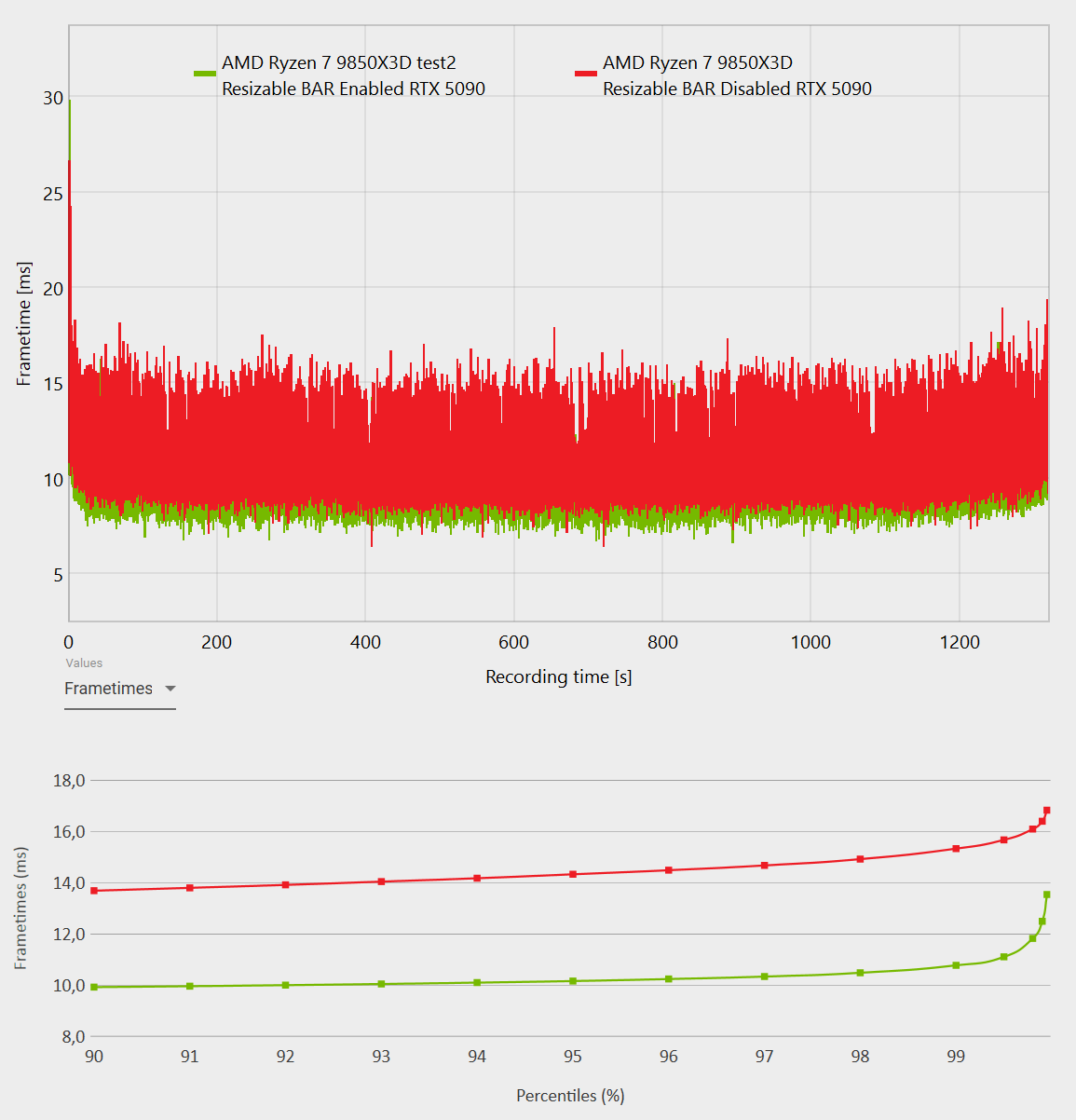
For GPUs where VRAM capacity isn’t a limiting factor, as we can see, Resizable BAR Enabled gives us, among other things, +22.5% more FPS and lower frametimes, so it’s all benefits.
2 normal flights on this driver, no issues for me. Installed after using DDU.
(9800X3D / 5090 / 3 screens / TAA / Max Frames 30 / FSR FG x2 / High Preset)
I’ve seen the same in testing my 5090 across triple 4K monitors - A substantial improvement in FPS and, more importantly improved 1% lows when ReBar is enabled.
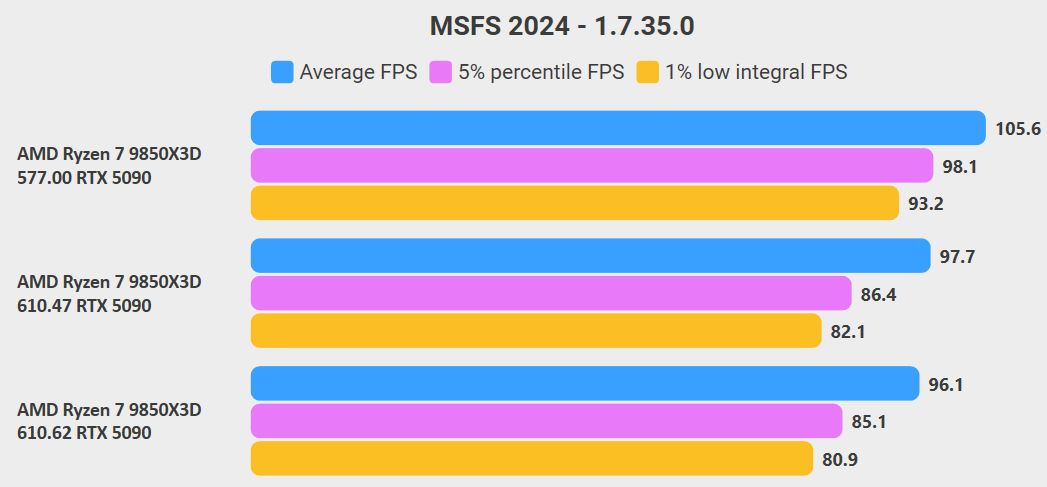
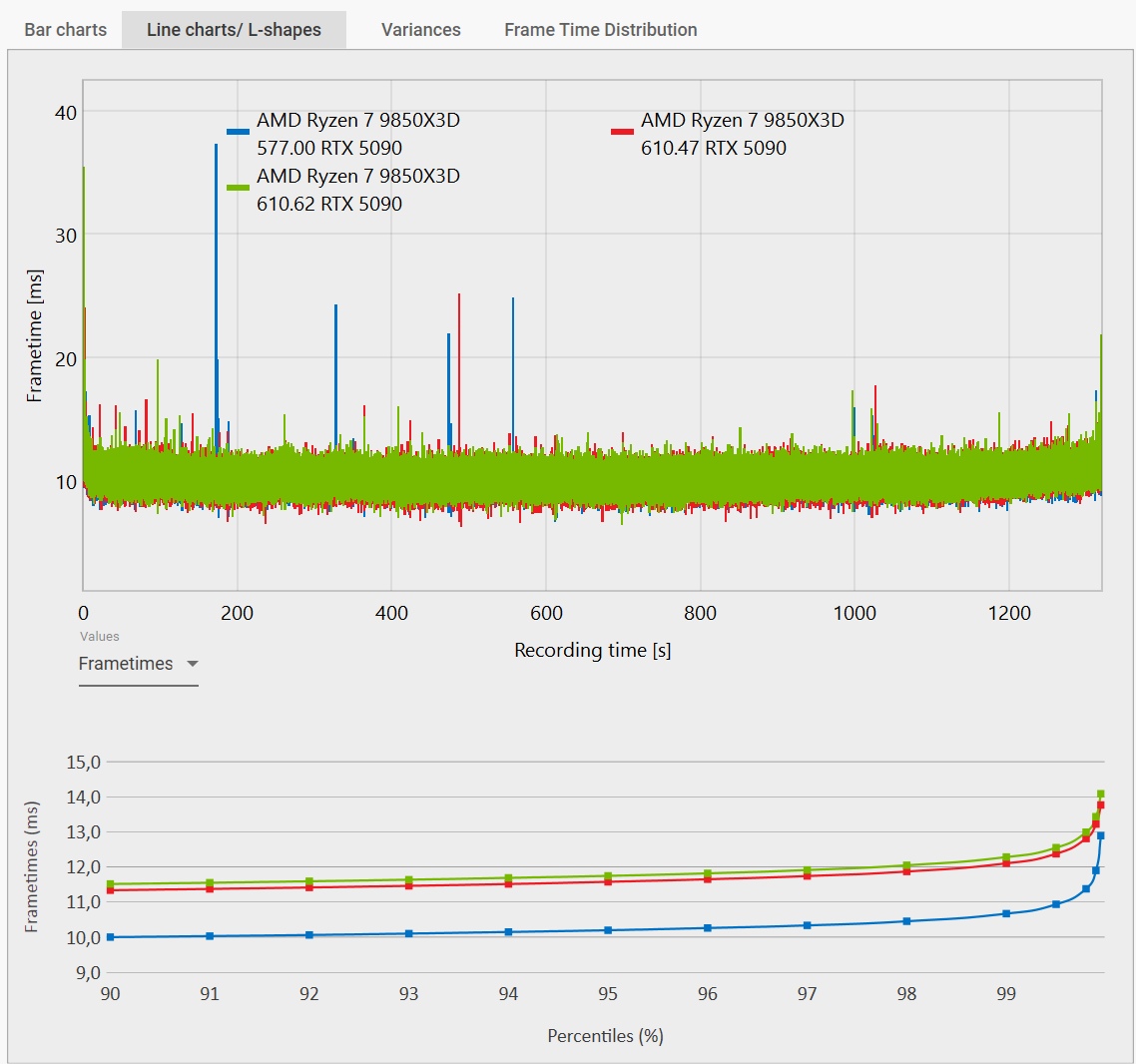
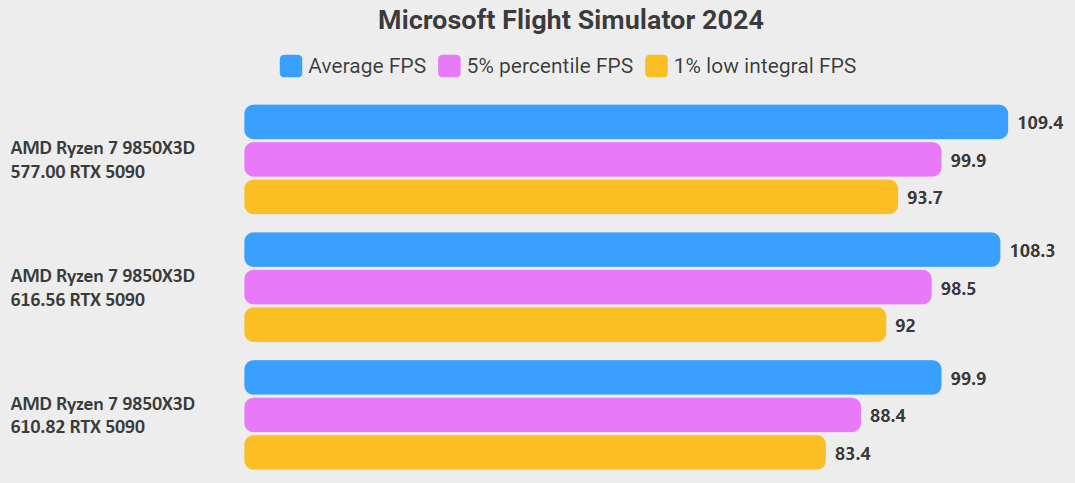
Guys, if you’ve been following the NVIDIA driver discussions, you may remember that I’ve been testing new drivers and comparing them against what I consider to be the best driver for NVIDIA 50XX series GPUs - 577.00.
Below is one of those tests from July 7.
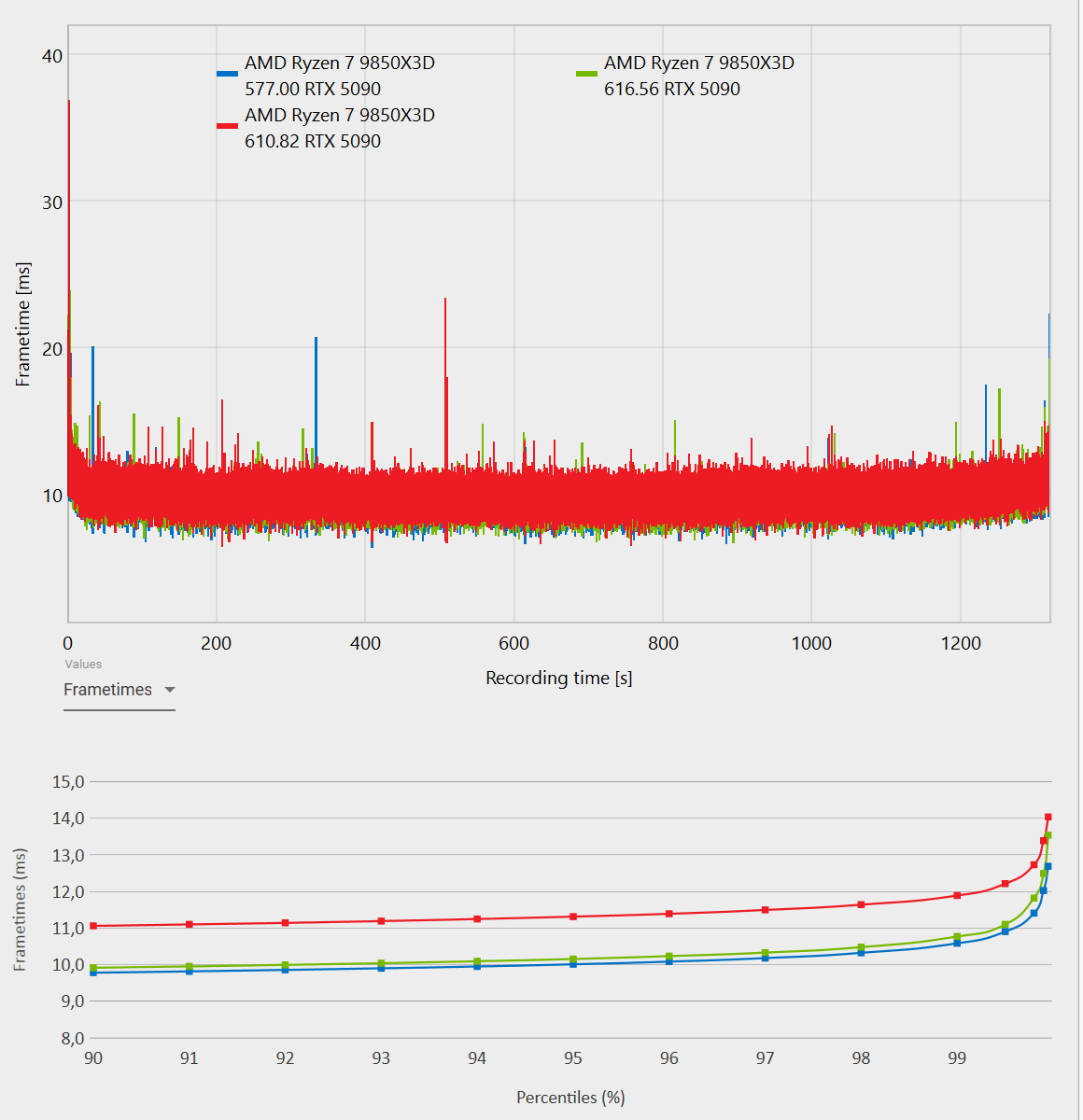
Since then, some time has passed, with new Windows updates and a new version of MSFS 2024 being released. So I decided to run another comparison, this time testing 577.00 against the previous Hotfix driver 610.82 and the latest NVIDIA driver 616.56
MSFS 2024 FENIX A321, a 20-minute test flight from YMHB to YMLT.
4K TAA.
As we can see, the latest driver performs very similarly to 577.00. I’d even go as far as to say that the difference is within the margin of measurement error.
So, if I had to choose between 577.00 and 615.56 right now, I would go with 615.56 - the latest driver. Not only because the performance is comparable, not only because it’s newer and includes new settings and features, but also because newer drivers include updated security fixes.
The new driver 616.56 is playing Havick with my quest 3. Anyone one else that fly’s exclusively VR and using a Q3 having any issues. 2D seems fine but VR locks up and just freezes. 2024 is fine and continues without issues.
I did DDU before installing the new driver but unfortunately had to go back to 610.88. Haven’t run into this issue in quite a while.
Windows 11 up to date, I use a 5090 no overclocking or under volting.
Hhmmm, I have the latest 11.09.239 beta App version plus driver 616.56 but Rebar does not show up under the driver settings. I have Rebar off in the BIOS so I am wondering/suspecting if it has to be on in BIOS to allow you to switch it on and off in the NVIDIA app. Not a big deal for me so I will probably try it later.

 Instead, I’ll explain AUTO.