@SmotheryVase665 I concur in my experience the significant pop in issue in the original post from op is not happening to me either. However the mainthread and renderthread spiking (although improved, still exists with higher settings when initially panning outside the cockpit. It does settle some but initially spikes. This can cause a bit of a stutter if not using frame generation (for me). Of course it’s mostly all settings dependent. Frame gen solves it too. Thus my thought process on adjusting vram use for the ultra precache setting only. No harm no foul, I’ll bow out as gracefully as I can here. (inibuilds A320 v2, TLOD 330, Ultra buildings, Trees, AI live traffic, DD KEWR, stock JFK) And I’ll add. no other performance issue for me whatsoever.
For what it’s worth, these are my current settings on my 9070 XT. I’m still tweaking here & there to see how the changes impact performance, but these settings have given smooth framerates between 80-100 FPS under most of the conditions that I fly in.
This, for example, is the 707 at KSFO:
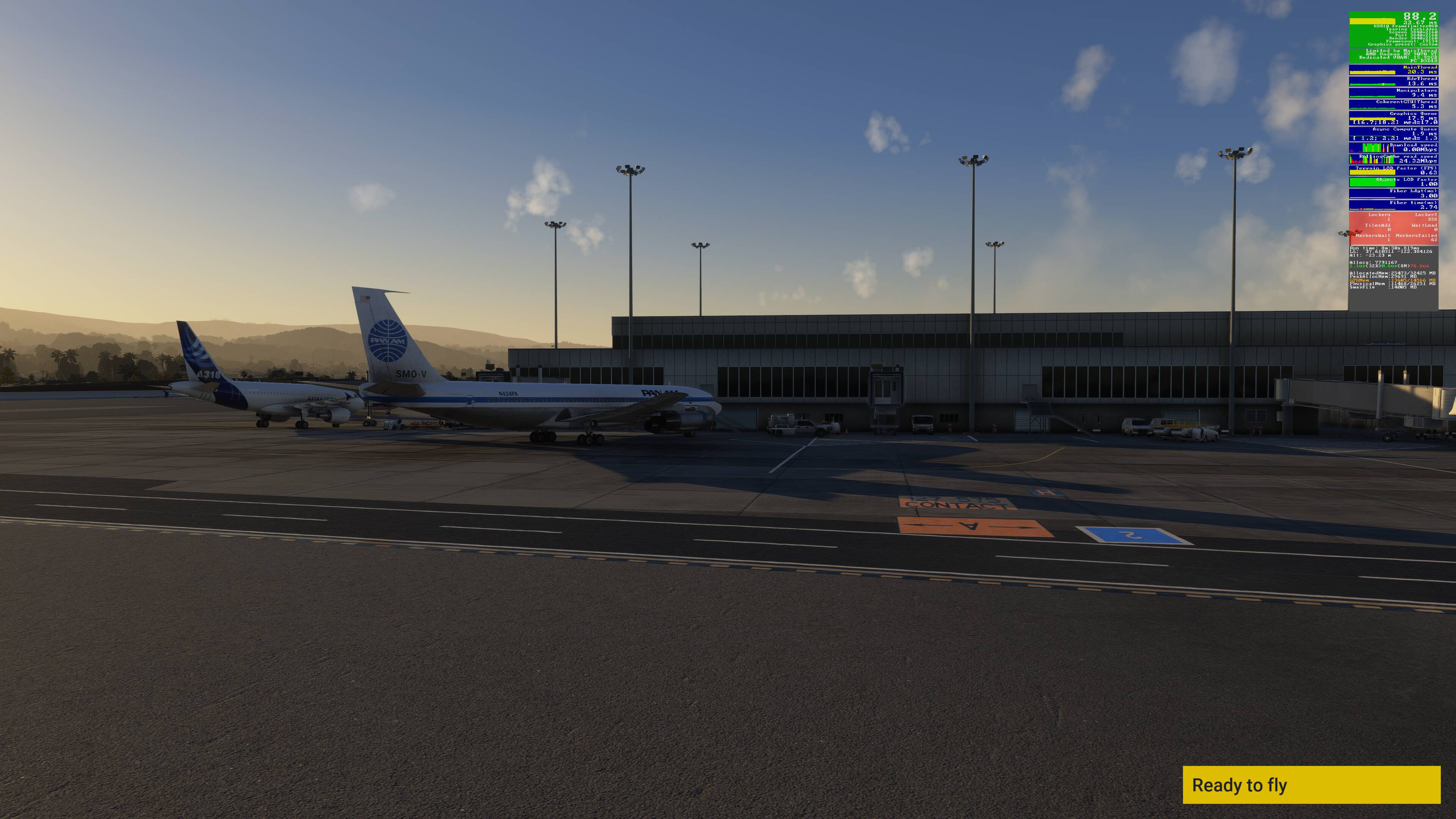
Expand to see my graphics settings
| Item | Setting |
|---|---|
| Display Mode | Full Screen |
| HDR10 | On |
| Exposure Compensation EV | -1 |
| Full Screen Res | 3840 x 2160 |
| Anti-Aliasing | TAA |
| Render scaling | 100 |
| AMD FidelityFX Sharpening | 200 |
| Max Frame Rate | On |
| Max Frame Rate Value | 60 |
| Frame Generation | AMD FSR 3 |
| Framerate Multiplier | 2x (N/A) |
| VSync | Off (N/A) |
| VSync Interval | Half refresh rate (N/A) |
| Dynamic Settings | On |
| Frame Rate Target | 40 |
| - | - |
| Global Rendering Quality | Custom |
| Terrain LOD | 400 |
| Off Screen Terrain Pre-Cache | Ultra |
| Displacement Mapping | On |
| Buildings | High |
| Trees | Medium |
| Plants | High |
| Rocks | High |
| Grass | High |
| Object LOD | 200 |
| Volumetric Clouds | Ultra |
| Texture Resolution | High |
| Anisotropic Filtering | 16x |
| Water Waves | High |
| Raytraced Shadows | Off |
| Shadow Maps | 2048 |
| Terrain Shadows | 512 |
| Contact Shadows | High |
| Windshield Effects | High |
| Ambient Occulsion | High |
| Cubemap Reflections | 256 |
| Raymarched Reflections | High |
| Light Shafts | Ultra |
| Depth of Field | Ultra |
| Motion Blur | Off |
| Glass Cockpit Refresh Rate | High |
| Characters Quantity | Low |
| Characters Variety | Medium |
| Characters Quality | Medium |
| Airport Services Quantity | Low |
| Airport Service Variety | Ultra |
| Parked Aircraft Quantity | Low |
| Parked Aircraft Variety | Ultra |
| Aircraft Traffic Quantity | Low |
| Aircraft Traffic Variety | Ultra |
| Road Traffic | Medium |
| Sea Traffic | Medium |
| Fauna | Ultra |
| Seatbelt Visibility | On |
@SmotheryVase665 Concur. Our settings are similar, except my TLOD is 330 not 400, but I do not use Dynamic Settings. Your performance numbers are similar to mine. But I was speaking to the issue of going external and (I use my joystick “hat” to rotate around the aircraft) say at a 45 degree high angle. The initial circle of the aircraft will spike mainthread enough (without framegen) to cause stuttering. After that initial turn, it does not happen. This is not a real concern for me, since I now use frame gen (new 5070ti) but with my previous 3080 and all the other folks that have this issue, I just wanted to throw out an idea to change the dynamics of the ultra pre cache setting. Unfortunately, I posted in this thread and not one of the other dedicated threads for stuttering while panning.
I just tested 1.6.30.0 build. The issue still exists. I don’t have any major problems with the sim right now apart from this and the sudden FPS drops when panning the camera. A fix would make this sim a 10/10.
This is still not resolved in 1.6.31.0!
True i was excited when i saw this “On PC and Xbox, changed the way the mip evictions are handled to improve texture management and reduce stutters” 
Still the case in the latest beta.
So to my understanding this wont be fixed with the SU4 release? We just accept that they broke it in SU4 beta and just let it be a regression?
Since around 95% of the users benefit from the better overall performance and only a few suffer from this problem, I can understand, that it is not fixed in this release.
Does anyone know where the caching is taking place? Is it Rolling Cache, or some other hidden cache that we have no control over?
If the former, what size is that cache for the users having this problem?
Also, where is it located? Fastest NVMe drive?
Or is VRAM used for that cache? Does anyone actually know?
Yes, of course in the VRAM, as it was described already several times during this thread. And we have definitely no control over it.
I read through this thread and others related to this topic, and I’ve seen speculation that the cache is located in VRAM.
Nowhere have I seen a definitive answer. It’s certainly possible I’ve missed it. Perhaps you could quote one?
Then you haven’t read my posts with the content of the FPS Windows in the MSFS 2024. You can easily prove it yourself: Place your plane at a gate on an airport and activate the FPS window, and pan around 360 degrees several times. You will see no stutters during the last turns. Now stop and wait for a minute or 90 seconds. Keep an eye on the VRAM usage, and you will see: It will decrease by 2 - 3 GB over time. Now pan around again: The first 360-degree turn stutters, the following not. AND: The VRAM usage increases by the same 2-3 GB as it decreased before.
How is the cache supposed to work if not in the VRAM? This is the only way the graphic card has direct access to the objects. Even caching objects in RAM causes < 20 FPS (as it can be seen using REBAR, see the discussions over there), and caching on a mass storage device like an SSD will cause < 1 FPS.
And exactly that is the reason, why this new approach of the Off-screen terrain caching gains so much overall performance: The VRAM is not wasted for invisible objects, but available for rendering the screen you see.
I could argue that there is a relationship between CPU and GPU usage, particularly in relation to ReBAR and LOD settings. Those are reflected in both VRAM usage and Main Thread performance.
But I won’t. I’ll simply say that correlation is not causation, and until I see a Microsobo developer say, “The Pre-Screen Cache is located %HERE%”, I’ll remain skeptical of any pseudo-definitive observations.
Happy Flying.
See the VRAM usage:

BTW: One of the Work-Arounds during SU2 and SU3 for VRAM overflow was to reduce the Off-Screen Terrain Pre-Cache. qed.
OK. Correlate that graph over time with CPU core usage and Main Thread spikes.
Look, I’m not saying you’re wrong. I’m just more aware of confirmation bias based on limited variable observations than most.
Maybe the pre-cache is indeed in VRAM only. I’m looking for a definitive answer from the developers. I know that’s awfully hard to come by. And I appreciate your input.
The main thread spikes are only during the rising edge at point 4, when a lot of content has to be loaded into VRAM.
BTW, I can see main thread spike, but this does not lead to visible stutters. The system is configured in a way the FPS during this edge is mostly higher than my FPS limit, and even the lowest FPS during these spike is within the G-Sync Range of my Monitor. This makes the stuttering almost invisible. There is just the remaining change in the frame times, but no frame loss.
So you’re basically saying that the pre-cache is in VRAM, but VRAM is not being used to pre-load graphics data back to the Main Thread. I suppose I can buy into that. I’ll continue waiting for a developer to confirm the cache location, but in the absence of that I’ll exit this thread.
Just did a test flight at EDDL, blurry runways, popping textures and stutters on final… what a bloody mess.. and they want to release it like this?
Im lucky that my Thesis is coming up and I dont have much time to fly SU4 for the coming weeks…
Cant wait for SU5 beta to start…
And what does this have to do with off-screen pre-caching? That would only make the problems described worse.