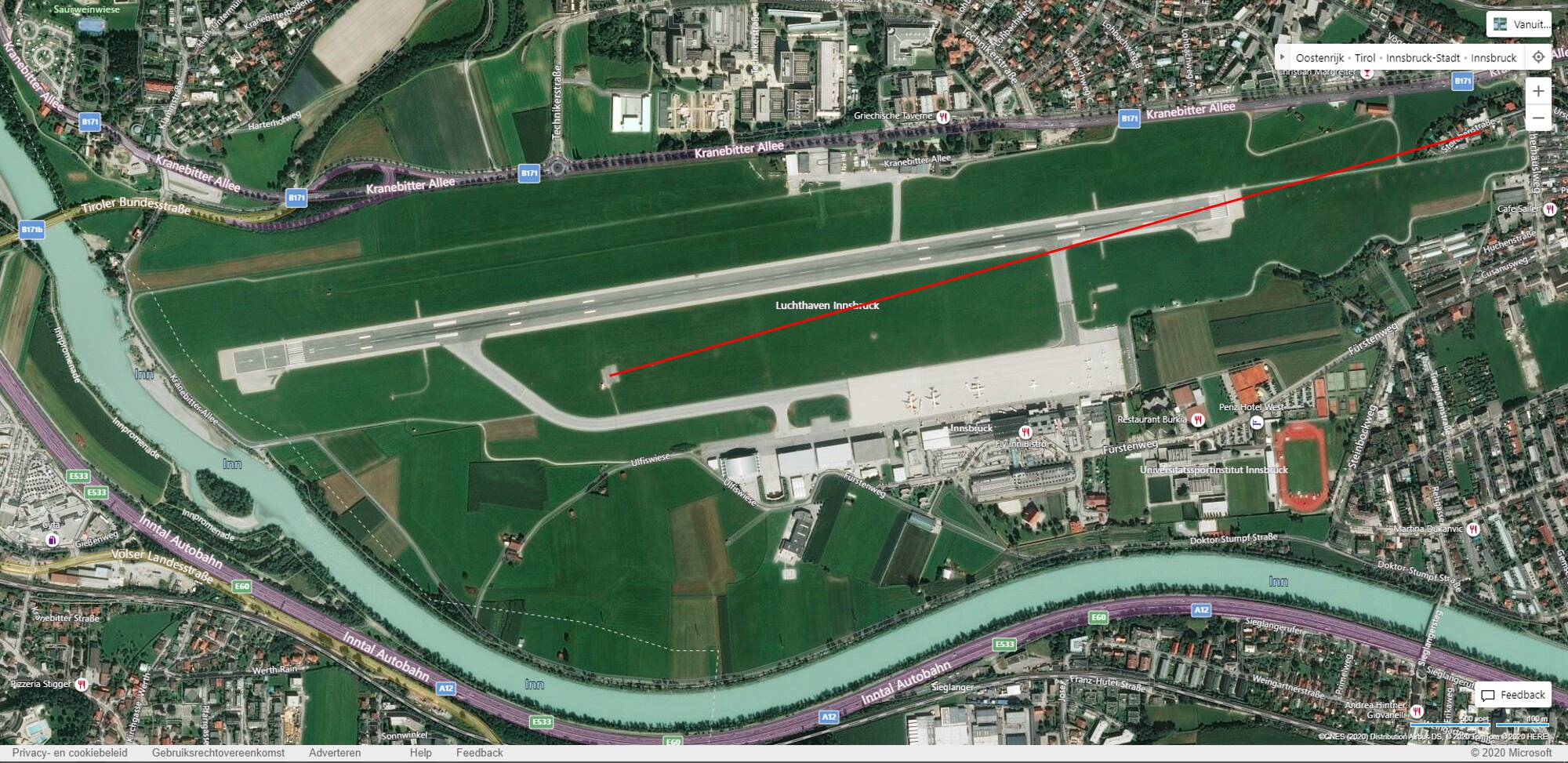
Didn’t we have this discussion before? It is because the Asobo navdata has the wrong coordinates for the localizer antenna:
What @HalberQuacky is talking about is that the navdata includes (or did include) the correct real world final approach course (including localizers which are offset in the real world), but all localizers being are aligned with the runway heading anyway. So FS2020 is ignoring the real world final approach course and sets all localizers to runway heading.
Not if the localizer antenna is put at the wrong location. If the localizer is not placed on the extended centerline behind the runway but, for example, 100 m to the left in the grass. Then that’s exactly where you will end up, flying parallel to the runway (on the correct course) into the grass.
The important question is what nav data source is being used? If an airport has an offset localizer, landing next to the runway should not be an issue if Navigraph nav data is used (post-SU4), but it definitely continues to be an issue if the default nav data is used.
The problems at airports in China is a different issue. Those localizers by and large are not offset. The problem there is that the default nav data either has the runway locations set incorrectly, or the position of the ILS antennas set incorrectly.
One problem with China is that the country does not use the worldwide standard WGS84 coordinate reference system for aeronautical navigation data. They have their own reference standard, and there can be data conversion errors going from one system to the other.
I have not flown into Chinese airports in MSFS, but my understanding is that ILS approaches there do work correctly when Navigraph is installed.
I interpreted it as ‘they ignore the actual position and always place it in the right spot’ (which actually wouldn’t be too stupid to do, as a quick fix - at least for problem 2).
Take Innsbruck for example, the antenna is at the right location, but in this case the course is wrongly set to the runway heading. The course should be offset as below:
Its the exact opposite from the problem you are describing but resulting in the same condition, in your case the course is correct but the position is wrong. Here the position is correct but the course is wrong. In both cases you’ll end up flying parallel to the runway into the grass…
But this revival actually started discussing the ‘why’. Is the NavBlue data wrong or is MSFS interpreting the data wrong? My point was: if Navigraph has it right, and suppose NavBlue has it right too, what’s Asobo doing to it that it ends up wrong? And if it’s MSFS mangling the NavBlue data, why then is not every airport wrong?
NavBlue is being used IRL, hence I doubt that their data are wrong.
Since there are thousands of ILS approaches it’s highly probable that the LOC antenna placement is an automatic feature and the runway heading is automatically used as LOC course, which is correct for ~99% of the ILS approaches.
Any difference from this standard needs to be manually adjusted.
As Navigraph mentioned some ILS localizers are incorrectly placed in MSFS, (particularly in China), but most are correct. In the case of the offset localizer for runway 22R at KJFK, and the offset ILS-Y 04L and ILS-Y 22R at KDTW, I have looked at the lat/lon coordinates in the default data and Navigraph, using a BGL analyzer, and compared them to the official FAA data, and all match.
Even with Navigraph installed, these offset approaches did not work correctly prior to SU4, but do work correctly post-SU4 (with Navigraph), but do not work (still) with default nav data because of the incorrect localizer course data in the default.
Even Navigraph occasionally has problems with localizer placement due to errors in the original Jeppesen source data. That happened at my home airport KELM, where there was a disparity between the Jeppesen data and the FAA data for the location of the ILS 06 localizer antenna. I alerted Richard at Navigraph, who in turn alerted Jeppesen. Jepp confirmed that the error was indeed at their end, and it was promptly fixed in the very next nav data release.
But yes, there are definitely some default (non offset) MSFS airports where the localizer antenna positions are wrong. I don’t know if this is due to errors by NavBlue, or errors in the original government source data that they use.
Little Nav Map is a good way to see if there is a misplaced localizer at a given airport, if you set up LNM to display only default MSFS nav data and ignore Navigraph.
Airports where the localizers actually ARE aligned with the runway heading (the great majority) would work correctly no matter what.
Where localizers are offset in the real world, NavBlue likely has the original data correct, but it is being modified before being imported into BGL format for use in the sim. I don’t know if NavBlue was originally instructed to set all localizers to exact runway heading, or whether Asobo does it when processing the nav data for import into the sim.
This modification was necessary prior to SU4, when the nav receiver itself would ignore offset localizers and would “see” all localizers as having the exact runway heading. This was a deliberate design choice (insofar as the nav receiver behavior was concerned), and the localizer courses in the default data were modified to match the behavior of the nav receivers.
When thus “simplified” nav receiver behavior was fixed (removed) in SU4, the default nav data should have been fixed at the same time, (for offset localizers), but that has not yet been done. If NavBlue is still doing it, then someone at Asobo should have told them to stop once SU4 released. If Asobo is doing it, they should have stopped doing it after SU4 (It may be an automated process.) It is an oversight of some sort by Asobo.
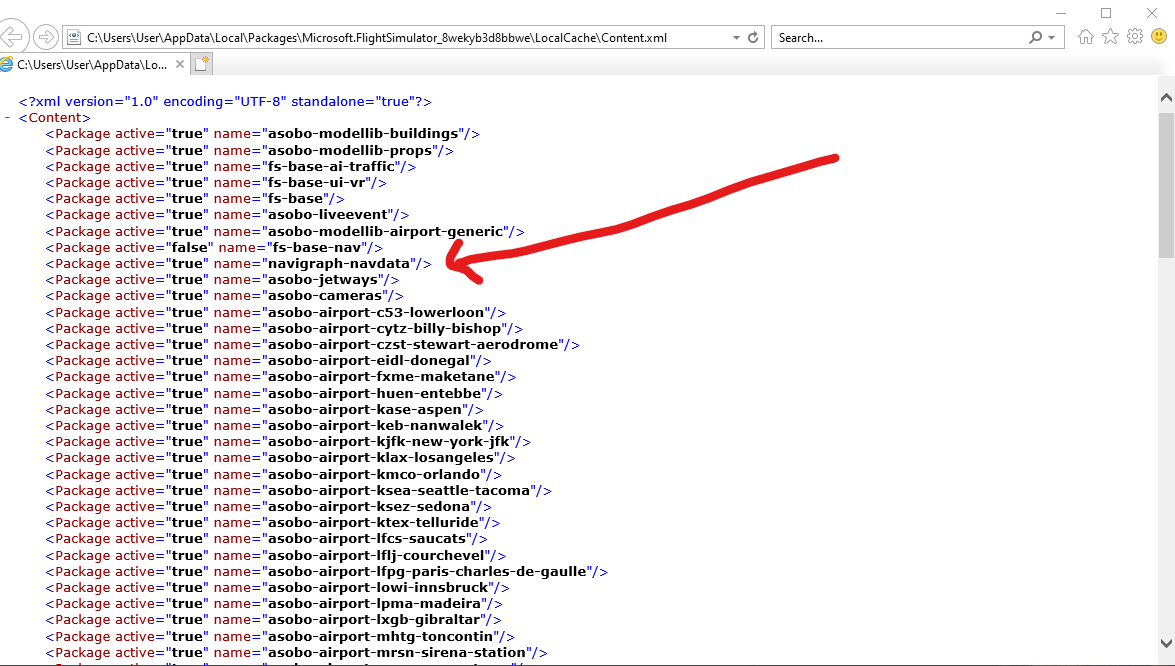
Apparently, if you move the navigraph line to the bottom of the page it will over ride all the other airports nav data with the correct Navigraph data. I just don’t know exactly how to move the line…
This should not be necessary if you use the official Navigraph installer which will automatically update content.xml to put the Navigraph data at a higher priority than default. If this gets corrupted, you can just use the Navigraph data manager to uninstall, then immediately reinstall, the Navigraph data, and it will fix the priority with no hand-editing required.
I updated the AIRAC in the Navigraph Navdata Center and this replaced the navigraph line back to where it has no effect over non default sceneries. I will now manually move the line again. The navigraph data line needs to be at the BOTTOM of the file. What do you mean by the ‘official Navigraph installer’ ?
The navdata center is what I am referring to. The Navigraph stand-alone data manager specifically for MSFS. (It also can update the MSFS version of the Aerosoft CRJ).
It should not be necessary to manually edit content.xml - the whole purpose of the navdata center is to do that automatically, to insure that Navigraph takes priority over MSFS.
If you open the data manager, it should show the current version of Navigraph installed. To be absolutely sure the installation is correct, click on the “uninstall” option. Once uninstalled, click the same button to re-install it. This should insure that Navigraph is placed correctly in content.xml
If that is not working correctly, perhaps your content.xml is corrupted. It is easy to accidentally cause issues with the internal structure of an xml file when hand-editing - especially if you use the default Windows Notepad. The free Notepad++ editor is a better option.
That doesn’t sound like a foolproof system, since MSFS recreates the XML file when you delete it.
At that point it’s MSFS that determines the order. So the Navigraph Installer might have it right once. But after that, and after installing more addons, that cannot work properly in ensuring that the line is always at the bottom. At least, I don’t see how.
I think the issue is that the Navigraph Installer puts it under the MSFS navdata (higher priority). But then when you add an airport, with its own navdata, the line in Content.xml is too high, and the airport takes over. Seems easier to manually update the file than to have to reinstall Navigraph every time you add something new.
That is how it is supposed to work. Navigraph should have higher priority than the default fs-base-nav folder, but lower priority than any custom nav data that may be included with 3rd party airports. If you put Navigraph at the very bottom of content.xml, it will override any and all custom nav data that airport developers may have included with their products. In some cases that custom nav data was specifically intended to work with a particular add-on.
Granted, there are many individuals who are quite new to airport scenery development, releasing free airport updates on flightsim.to, who may not fully understand how to correctly create custom nav data with the SDK airport editor, and as a result, ILS approaches at such airports may not work correctly. In that case, letting Navigraph override all airport scenery may be beneficial in “disguising” such developer errors.
But, professional developers like FSDT, Flightbeam etc. presumably know what they are doing when it comes to custom nav data, and if they have included such custom data in a payware airport, it is because the airport and custom nav data were designed to work together. Putting Navigraph at the very bottom of content.xml basically nullifies whatever custom data such developers may have included.