disabling nvidia reflex low latency in MSFS seems to make my experience with OFXR far better. not sure if the MSFS depth setting matters or not
I’ve found that if your nvida power setting is set to Prefer Max Performance, you do not need to enable msfs refex low latency (has no effect). MSFS depth setting doesn’t seem to have any effect in VR, so I always leave it disabled (off). Cheers.
I too can confirm an uptick in smoothness with Nvidia Reflex Low Latency disabled. Thanks for the tip 
And how do you turn off Nvidia Reflex Low Latency if you’re using DLSS frame generation? In 2d mine is grayed out and in VR settings I can’t turn it off!?
I had to disable frame generation in 2D to turn off Nvidia Reflex Low Latency in VR. I hardly ever use 2D anyway so not an issue for me.
Hey All,
I just got my Pimax Dream Air and have been trying to get it up and running. I’ve got PimaxEvo setup and have the Sboys3 Driver enabled via OpenPort. In PimaxEvo I’ve got SteamVR set as the runtime and in the settings of SteamVR I have SteamVR set as the OpenXR Runtime.
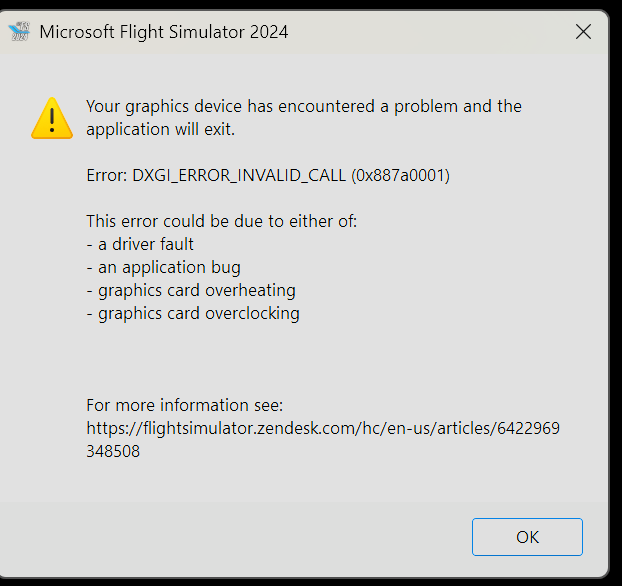
In MSFS 2024 I can switch to VR mode (although it takes much longer to switch using SteamVR than the PimaxPlay runtime) but anytime I switch to VR with OFXR Bridge running, I’m getting the below crash. Anybody got any advice? I’m using a 5090. I’ve tried a bunch of different settings within OFXR Bridge but the crash always occurs the moment I toggle VR on with OFXR Bridge running. I’m using version 3.2 (V773).
Anybody got any ideas what may be the cause?
I’ve tried using the PimaxOpenXR runtime in PimaxEVO (and thus not running SteamVR) but the crash occurs regardless of the runtime…
OK - I lowered my resolution in SteamVR and PimaxEVo to High (1.0) and its now loading up fine.
What I am noticing however is that when the application is running, my MSFS render thread goes up significantly. If I’m running the application I may see for example, 45 FPS native and around 40-45 generated, but the render thread is operating at around 20ms. If I disable the application and just run at 45 FPS (limited in MSFS) my render thread is running at around 9ms. So turning on the application is causing the render thread to double. I’m surprised by this behaviour. I see no difference in GPu timin or CPU main tread timing…
What occurs when the render thread is so high is that I get a lot more stutters as even a slight spike in render thread timing drops the frame rate from 45 down to low 40s. If however I disable the application and just run locked 45 FPS in the sim, the render thread rarly goes above 10ms meaning there are no stutters.
Interesting…might try VectorXR and see what that works like.
After lots of testing for me the best combination is djules75 OFXR with OpenXR Toolkit crop2fov version. I am using steamvr and took me time to realize that it was limiting msfs to 45 fps.
I can achieve 90fps I tried NR but the visuals look a lot grey to me 
Has anybody found a way to get OFXR Bridge to work with reshade? The game will crash if I try and activate OFXR Bridge with reshade loaded. I see a comment in github about it here but no solution..
I’m using the Dream Air, in EVO, with the PimaxOpenXR runtime, and djules75 OFXR set to 3X. So, MSFS 2024 is rendering at 30 fps, but my Pimax is running at 90 fps. The render time is around 30ms due to djules75 OFXR rendering another 2 frames on the GPU. I don’t see any stutters as I look around…it is very smooth. I haven’t try sboys3/Steam VR…but I guess I don’t see the need to do so.
Any updates from Pimax as to fixing the vram? That is what is holding me out right now. I am not going to use Steam VR/sboys3, I have tried it and its just not for me. Right now just locking the headset at half frames has been the best. Dream Air. I want to use the bridge with pimax but waiting on them to fix the vram issue.
Why in the meantime not to try this one?
Works great for many of us. I am on Dream Air and am happy.
There is a dedicated thread here at the forum as well.
Wouldnt VectorXR still be facing the same problem, or has Vector bypassed this somehow? “Pimax Play’s OpenXR runtime keeps an extra copy in VRAM of every image it is handed, so OFXR costs about 1.5 times more”
I was getting that 0x877a0001 even without OFXR.. Turning msfs motion projection from ‘Depth’ to ‘None’ seems to have fixed it. This is on 8KX/5090.
OFXR is so much smoother for me in VR. VectorXR was a stuttering mess.
And bigger altrefact
As I understood it OFXR has no impact on what happens in 2D only in VR.
Yes thanks - had my thinking backwards. Have tried too many new apps lately!
which oxfr are you using? tig3rmast3r or djules75
I had success with djules75 but I noticed that tig3rmast3r provides frequent updates.
djules75 joined with tig3rmast3r, so djules75’s branch is no longer being updated.