Exactly, this is what I learned from all of this. The EXPO and Memory timing have the biggest benefit for MSFS (because stock ram timings are usually lower generic timings, and for gaming each model has specific and usually higher capabilities … thus EXPO). The PBO and voltage is just about managing heat, and making a bit of room for those spikes, and a bit of boost clock if there is room, and if it’s stable, etc. MSFS moves a LOT of data around RAM, VRAM, Virtual Memory, so those memory and controller timings are really key.
I think MSFS will find the bottleneck of any system, so it’s important to see where the temperatures, voltages, power, current, and timings fall, at stock, and then while tuning, to find the “just right” compromise where things are stable.
Yes, I agree on the memory. Your data look like my data.
On MSFS I was hoping to get just a tad of better speed in the main thread but it is running OK. I get 72 FPS with FG. I also see the rolling cache is all over the place even with using a SSD. Another bottleneck.
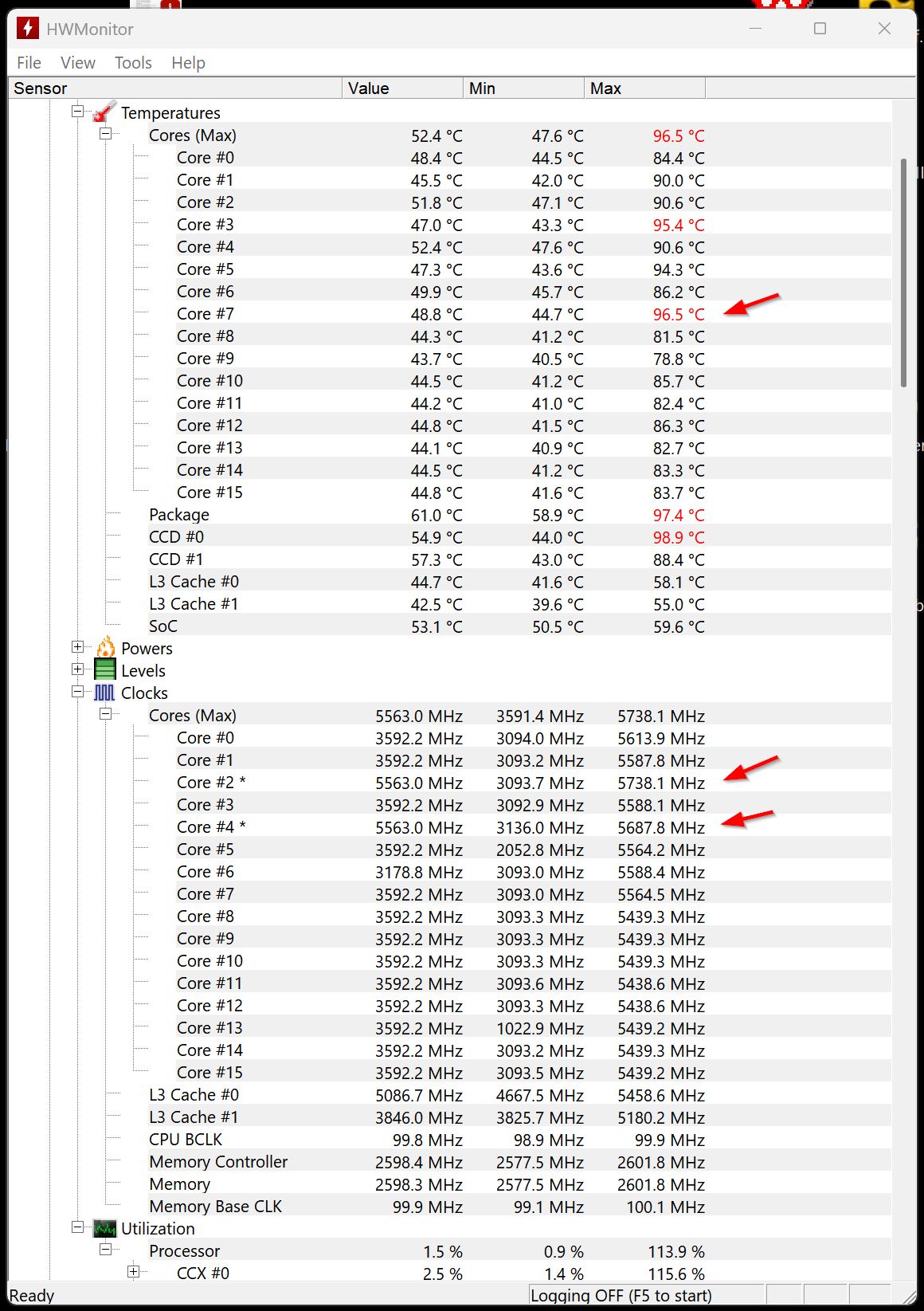
This CPU is boosting pretty well despite a few crummy cores. Not sure it is worth the price in stability to try to work around them.
Yes, as you might imagine I did a lot of research two years ago on this CPU but this was mostly in reference to astro-image processing. We have our own benchmarks and this CPU blows them away with the 16 fast cores and then the GPU CUDA Cores.
I was reassured to see the variability of the Core temps with another 95 DEG outlier.
I have to say I did my own experiment gingerly Under-volting my wayward Core #7 at -2 -5 and then -8 where again I got more experience fishing out the CMOS battery with no performance gains.
I decided that I am just a tool of the corporate structure and decided to benchmark the packaged ASUS CPU AI that is a one button choice. This dropped the DOCP choices to auto, but the good news is that the benchmark was 35955 (the best so far)… Core 7 was still hot… see below.
For the time being I have joined the corporate world and will be running the canned ASUS CPU AI and the canned ASUS CPU AI… when I run them together will report the benchmark.
Thanks to you and TenPatrol for the support. I think anyone with ASUS equipment would benefit from reading what I went through rather than replicate the experiments.
PS Note that with their AI package it let Core 7 > 95 DEG.
Many thanks for this (and other) threads, posts and assistances! I have just updated chipset drivers from the AMD site (successful) and checked the MSI site for BIOS updates for my MAG X670e WiFi: It looks to me like all non-beta versions are from last year, so probably no need to update BIOS at this time? PC was built a year ago and I am sure I update BIOS at least once (maybe twice) after the build. Thanks!
I’m not sure which BIOS version you currently have, but the newer BIOS also adds support for the Ryzen 7 9850X3D. In the meantime, memory compatibility has been improved, multiple OC solutions have been implemented and there’s a new AGESA version, so it might be worth installing the latest available BIOS for your setup. Of course, whether to update or not is entirely up to you.
If yours is this board, it looks like the last ‘stable’ (non-beta) was 2025-07-08 v7E12v1J
It is odd that the most recent is still a beta from October… In your shoes I would check the MSI forum and possibly Reddit to see what others have said, if you consider updating to a beta bios version.
What I showed in the screenshot is the Vcore undervolting for my CPU in the BIOS of my MSI X870E Carbon WIFI motherboard.
Vcore is the voltage supplied by the motherboard to the CPU
If you’re monitoring CPU temperature, you should also pay attention to Vcore - more Vcore means higher temperatures as well. That’s why it’s better to focus on Vcore rather than VID. Vcore is the actual voltage the motherboard delivers to the CPU, while VID is the voltage the CPU requests at a given moment, and it often requests more than it truly needs.
It is undervolting. For any given frequency, there is a programmed voltage (the Voltage / Frequency Curve), you are shifting the curve down, for a reduction in voltage.
Thanks. Well this thread is a learning experience. You can see from my temperature readings that I was concerned that my Core #7 by running the hottest as soon as it got to 95 DEG the system was throttled even though my good cores (2&4) still had thermal headroom. But when I tried to address this in CO it failed.
GimbalAxis gave me a good reference to a video with essentially exactly my 7950X system and it showed again those outlying cores.
When I failed with the CO I went back to the canned ASUS OC and got the best numbers I have seen on the CineBench. Parenthetically it allows the Core 7 to go to 96 DEG.
I think I am splitting hairs here but learning a lot. I really need faster memory to make this system go faster overall but 64GB of fast memory now seems to be > $1000 which is a lot for a now older computer.
For anyone learning about tuning an AMD CPU, I highly recommend learning about what AMD’s Precision Boost Overdrive (PBO) actually is, and the concepts and tools it provides. I found Skatterbencher’s website and videos to be informative. He does competitive overclocking (which I would never attempt) but he also does a good job of explaining to mere mortals what the tools do.
My in sim time is pretty short these days but this weekend I decided to spend some time optimizing the “optimizations” I had set when I built this system back in Nov ‘25.
I had been running PBO Adv, Motherboard Limits, -30 and +200mhz, Expo enabled. Stress testing seemed fine after building, so I left it. Whilst it seemed stable, I could tell in 2020 and 2024 that it was a bit much.
DIaled back to -20 CO and dropped the +200 boost.
I did update to the newest chipset driver from AMD and also noticed I had changed the Windows Power Plan to High Performance over Balanced. I must have changed the power plan thinking back to my days with the 14900K. These changes made, system just feels that little bit more stable if I can even say that.
Did some flying in SU5 Beta and yeah, felt smoother and I didn’t even turn any telemetry on to verify!
Disclaimer, I am running this motherboard on a Bios from June or July ‘25 I believe (never updated at time of build or since, will look after I post this and edit to list version). I also don’t chase frame rates, preferring fluidity. My RTX 5090 is the Gigabyte Gaming OC and I have performed an 895mv Undervolt.
I plan on updating to the latest Bios, 7E59v2AA0, at some point in the next week or so.
You’re still mixing up the concepts a bit without really separating what does what. The simplest way to describe PBO is that it’s a collection of different boosting and tuning features - it can involve overclocking behavior and also voltage tuning through Curve Optimizer, but it’s not the same thing as traditional undervolting.
To undervolt a CPU, PBO does not need to be enabled at all. It can be off / completely disabled.
Traditional undervolting, without involving PBO, is done through Vcore override or Vcore offset in the BIOS. That directly controls the voltage the motherboard supplies to the CPU, independent of PBO logic.
Yes, I left my Windows Power Plan at Balanced (default) so that the cores could idle when they want to. As the pros explain, this actually allows single threads to boost more when other cores are idle. The only thing I did with Windows power plan stuff was turn off sleep, and disable “hibernation” so it would stop writing RAM to disk.
I also found that a modest undervolt (in my case per core -13 to -21) is really just to keep away from the limits during spikes, and save about 5-10% power/heat. Any more and I was over-doing it, and although benchmarks were great, MSFS was best with just a modest undervolt. The most significant performance gains really come from tuning memory clocks, in my case.
If I wanted to scare you a bit, I’d say I’ve seen a few posts on the MSI forum where someone mentioned WIFi and USB port issues after installing that BIOS version.
But instead of going down that road, I’d just say this:
if we start looking for information about problems with motherboards on manufacturer forums, Reddit or on Discord, Facebook and other social media, it might seem like we’ll never buy any motherboard at all - I hope you know what I mean
In various threads, I mention that it’s worth checking the MSI forums and Reddit first. If there aren’t any serious issues reported, you can download and install the BIOS, keeping in mind that everyone has different hardware and, importantly, different BIOS and Windows settings. So if someone reports a problem after waking their PC from sleep mode, there’s a high chance they also have Windows Fast Startup enabled - and that setting alone can hugely affect drivers, system behavior, and even how games run.