ISSUE DESCRIPTION
After a cold and dark start of Carenado Piper PA-28 in MSFS 2024, tuning ADF to a known and working ADF - needle doesn’t move at all after takeoff.
Try same ADF from a runway start with engine already started - needle moves.
FREQUENCY OF ISSUE
How often does this occur for you (Example: Just once, every time on sim load, intermittently)?
Every time I try a cold and dark start…. regardless of airport.
REPRODUCTION STEPS
Please list clear steps you took in order to help our test team reproduce the same issue:
-
Cold and dark from EGFI performing a full checklist, ensuring avionics are on, GPS on and radios all on.
-
Set ADF to 352 for NT east of Newcastle EGNT in the north - ensure it’s the active ADF frequency with ADF selected not ANT.
-
ADF needle remains static all the time.
Repeat the same from a runway start, set ADF frequency; take off and very shortly into the flight - ADF needle rotates to point at NT.
I do have the Just Flight Piper Warrior II also, it’s ADF is working from cold and dark.
Have tried from other airports but same issue.
YOUR SETTINGS
Windows 11 PC and XBOX cloud Standard version.
Have tried without any addons in my community folder, same result.
Do you have the same issue if you follow the OP’s steps to reproduce it?
• No
Provide extra information to complete the original description of the issue:
•
If relevant, provide additional screenshots/video:
•
Similar behavior for an airborne start. PA-28-236 cannot hear ADF nor get bearing needle reaction to NDB stations.
What NDBs have you tried?
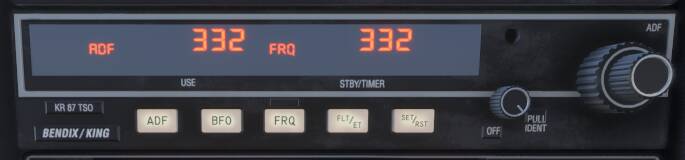
OK, testing has shown an interesting bug. There’s some error with the manual knob frequency input. If I use the EFB “SET” function which magically shoves the frequency into the avionics it works but manual knob turning can result in the exact same frequency as displayed on the instrument face which does not.
Example IC (Piche) NDB, 332.00 kHz
Weird thing #1: With “500” on the display adjusting the small knob clockwise results in the sequence:
500-410-420-430-440-450-460-470-480-490-500 (repeating). Basically the value added is being added 1-10 instead of 0-9. It’s an off-by-one-error in programming.
Weird thing #2: The large knob operates backwards and includes digits which are not possible in the real unit “1” and “18”. Real unit is capable of 200-1799 kHz inclusive (step 1 kHz) while the sim display shows 101-1800 possible on the display.
In the real unit the small knob is pulled out or pushed in, not “tap pulled” to change between 1’s and 10’s digit. The large knob should select between 02-17 (x100 kHz) increasing while clockwise (not decreasing), the small knob should select between 0-9 (x10 kHz) when pushed in, and 0-9 (x1 kHz) when pulled out. The digits rollover/rollunder only that digit, e.g. increasing 10s’ digit above 9 with 1190 will result in 1100, not 1200. Similarly 1100 decreased by one in the ten’s digit results in 1190.
This radio has had the left frequency applied using the EFB “SET” function. The right frequency has been tuned using the knobs on the panel. The left frequency results in normal ADF navigation function. Pressing the FRQ button to swap the two frequencies results in no ADF navigation function.
I can’t get mine to work at all. Cold and dark, starting on the runway… nothing. Same with the C152.
Can replicate in SU5 beta with a couple of aircraft starting at EGFI but not sure if it is a bug.
1st party PA-28:
1st party C-172:
And the 3rd party Just Flight PA-28 Arrow III:
Terrain is not really flat when starting at EGFI so it could explain why ADF is received once airborne.
In SU5 works fine for me. In SU4 did not work - the same ADF near PABI airport (freq - 347).
1st party PA-28-236 standard
Mostly fixed. The Dakota ADF could tune things, the digits/display was messaged up. The real minimum freq of 200 kHz is still not modeled right as you can dial in 100-99 kHz which you shouldn’t be able to do. The maximum freq of 1799 is correct.
The ADF needle points to the station in botht he ANT and ADF modes which I’m not sure if that’s correct. The purpose of the ANT/ADF button is to switch between non-directional or directional reception of the signal. It’s a minor thing though. In real life in “ANT” (antenna) mode the needle is non-functional and parks at the 90 degree position. In “ADF” mode it’s possible to hear a semi-cancelled signal because of how the two loopings of the antenna work.
Also some buttons on the KR 87 panel should stay pushed in when selected and pushing again they should stay out. E.g. “ADF” button when pushed in will stay semi-depressed when in the ADF function and by being pushed again will extend further out from the panel in ANT mode. I.e. they aren’t just simple buttons but like the button-switches on the Airbus overhead panel.