Yep, my Honeycomb Bravo bindings are all messed up. Was able to fix the Parking Brake bindings, and now the control axis are all over the place.
Since SU3 parking brake on PC-12 does not work with mouse. Hovering mouse over the brake handle does not show that it can be interacted with. Mapping parking brake to a joystick button does work though.
1 Like
I had this problem too with SU3. Don’t know what they changed but you must unbind the default parking brake on/off switch on the Bravo Thottle Quadrant. Then your parking brake toggle assignment should work again. At least that worked for me. It’s the second rocker switch in from the right.
1 Like
Or use the rocker switch
We’ve been waiting years to have buttons working ! 
I hope this patch will reach 2020 before it’s dead…
Yes, I am using the rocker switch now. PC-12 wont even highlight the brake so cant use it any other way.
Happening for me now with the A2A Comanche. Right in the middle of my checklist.
Jeeeez, Asobo, can you not do just ONE SU which doesn’t break new things….?
1 Like
I have TOGGLE PARKING BRAKES assigned and it works in the Comanche. It’s worth noting that if you’re using the realistic parking brake option you need to depress the pedals then set the parking brake for it to work. To release them you don’t need to this.
Sure, I know how to use the realistic brakes. No combination of my previously fine stick button bind or keyboard bind would work.
Brand new PC, new install of MSFS 2024 SU3, messing around in the cockpit of the default Cessna 172 G1000…
I’ve loaded in to the cockpit a handful of times to figure out control mappings, and finally was ready to start flying. Loaded cold and dark at parking spot, followed checklist, started up, and when it came time to release the brakes to taxi… nothing.
I have a keyboard, mouse, and Xbox controller, using default control bindings to start with…
I exited, closed MSFS, rebooted, and tried again. This time, the mouse pointer was not visible. Ugh. So again, exit, reboot, 3rd time seemed to work.
Definitely inconsistent recognition of standard controls going on.
1 Like
I was able to release parking break but the plane would not move and I was getting a message that the parking break was still on.
It turned out to be an issue with the brake axes on my Honeycomb Charlie Pedals.
I had to change the input curve as shown in the screen capture. This solved the problem. Full credit to another user who figured this out.
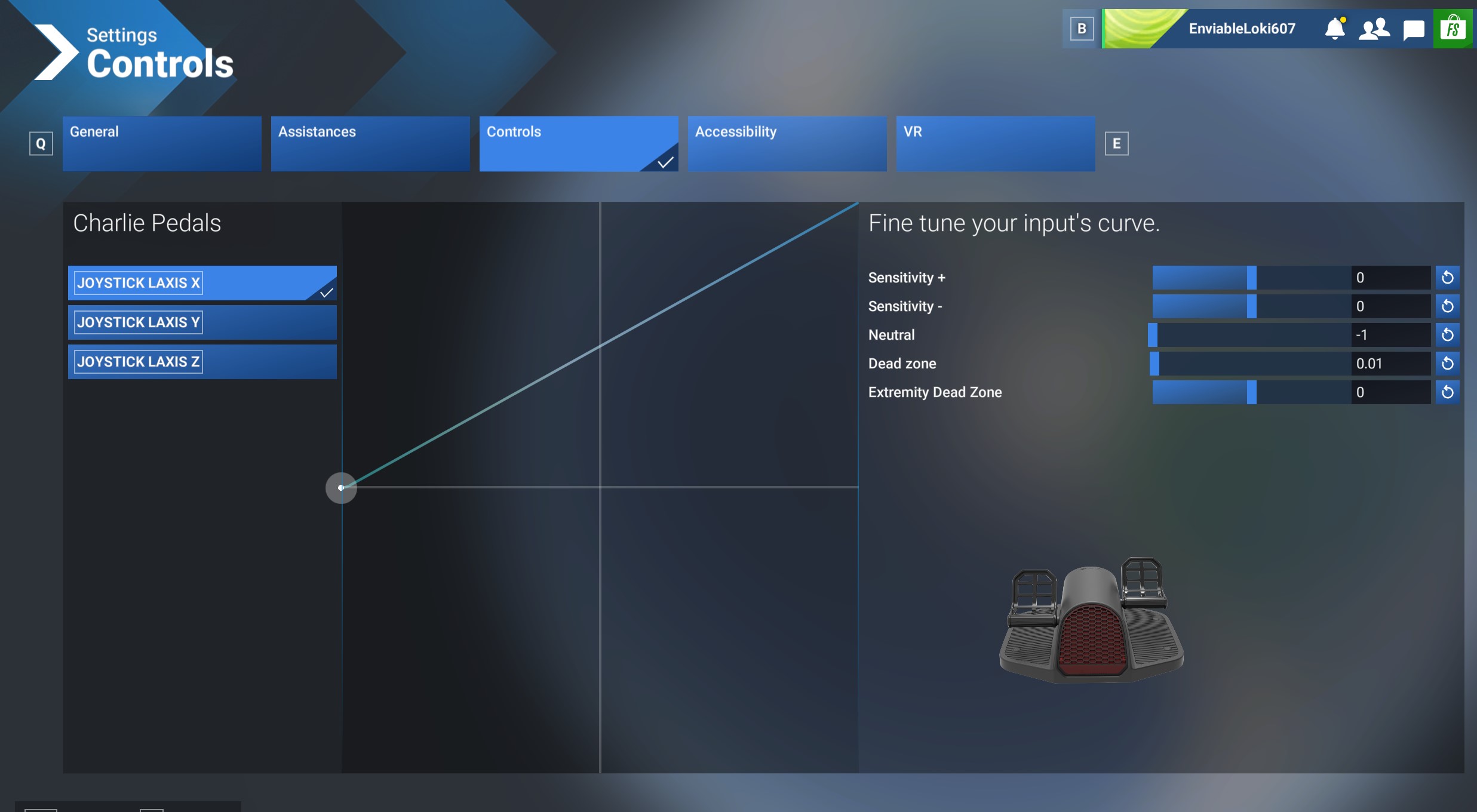
Thank you!!! I keep forgetting this 
1 Like
I, too, have a new PC (built for flight simming), with default C-172. Parking brake appears to release, but the brakes themselves do not. Aircraft won’t move. Have you found any consistent fix for this?
have you removed the Wheel Chocks?
A quick way to remove all the external covers and wheel chocks is ALT Q
Or, step outside, and go look / click on the chocks if they are there.
Yes; thank you. I saw that idea in the forum, but no; no chocks involved. I’m invariably at the end of the runway, about to begin my take-off roll. Thx, tho.
Cannot replicate using the mouse or the keyboard (CTRL+space) bing or the joystick (extreme 3D) binding:
@Pilotfirst9999 : are you still experiencing the issue since you last post in august ?
Seems this issue is/was specific to Honeycomb Bravo isn’t it ?
It’s ok now thanks.
1 Like
Moved to User Support Hub since issue confirmed as fixed.