Here is my configuration, I only play in VR and would like to spend the money in the right direction …
I5 12600KF
32G DDR5
RTX3090FE
QUEST 2
Shall I upgrade first :
1/ CPU to I9 13900K for 450-500 EUR (resale value of 12600K is 250-300 EUR) + Reverb G2 for 300 EUR (just for Fsim because I need to keep Quest2) = 800 EUR
2/ GPU to 4090 for 1200-1250 EUR (resale value of 3090 is 750-800 EUR)
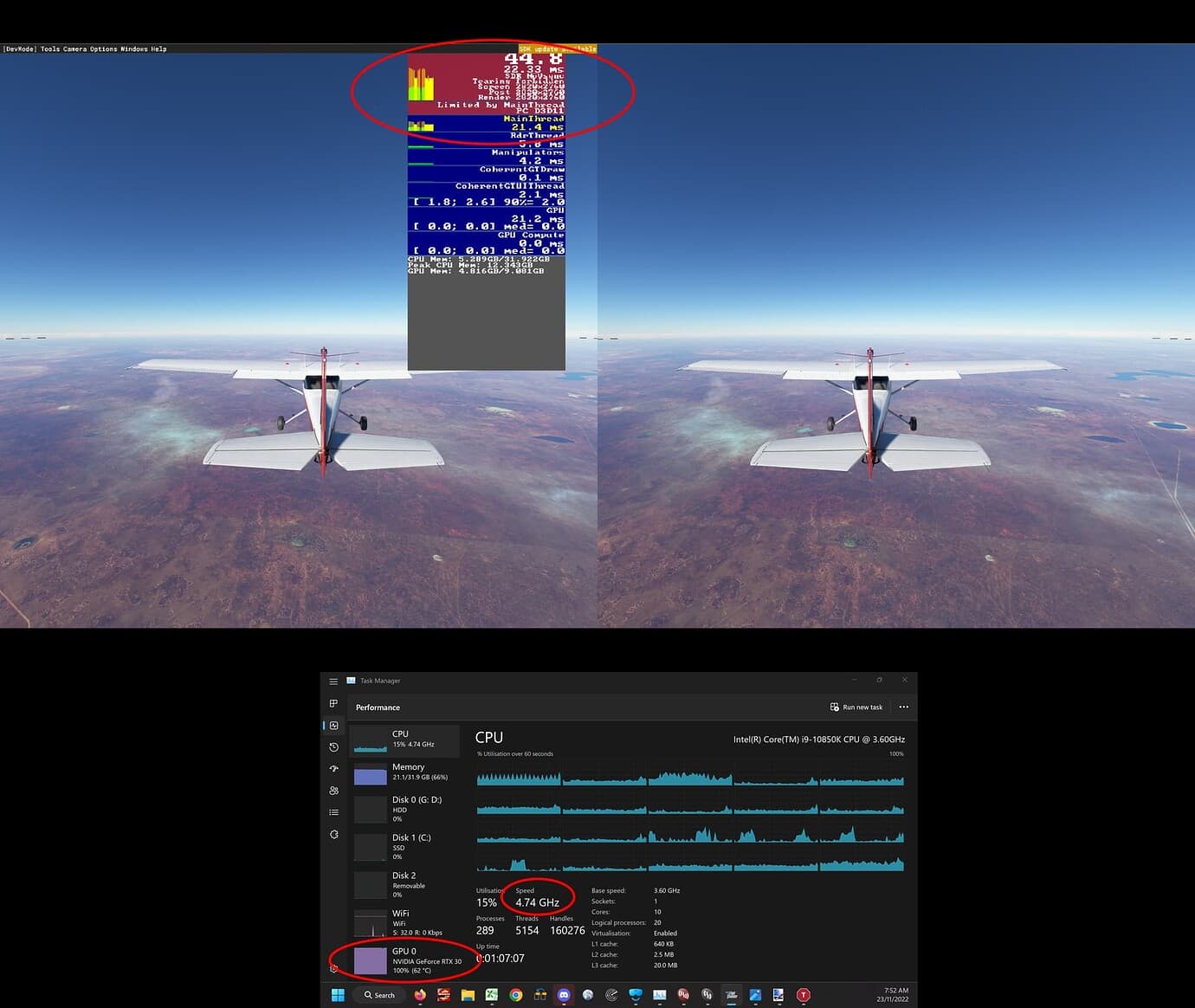
Is your system currently CPU or GPU bound? The best way to tell used to be Developer Mode FPS view, however since SU11 it now seems to inaccurately indicate you are mainthread (CPU) limited when you are in fact GPU limited.
An example of the porkies MSFS now tells is shown below where I am clearly GPU bound, as implied by the scenario of being in the middle of nowhere in a simple aircraft with no traffic and as indicated by the GPU load, yet MSFS says I am mainthread limited.
As such, I supplement whatever I am seeing in dev mode with another utility that shows GPU load. If GPU load is showing > 97% most of the time then it is your GPU holding your system back.
If you only play in VR, I would go for the 13900K and Reverb G2 first. The G2 is going to make a notable visual difference in MSFS. The 13900K isn’t going to give a huge boost vs the 12600K, but every bit helps because MSFS is so poorly optimized from a multicore standpoint.
The 4090’s biggests boosts come from frame interpolation — which currently doesn’t work in VR — and DX12. But DX12 is more CPU-bound, so going DX11 to DX12 on your old CPU would be a step backwards. So it’s likely to have less impact compared to the CPU/G2 upgrade.
Going one generation with CPU/GPU isn’t usually a huge boost, and you’ll see the biggest boost in perf when you combine the two. But the visual difference between a Quest 2 and the G2 isn’t huge in VR-specific apps, but in sims (MSFS/IL-2/DCS) the extra clarity is really nice.
Thank you very much, advise really appreciated.
Any other feedback or comment are welcome.
Developer mod shows CPU limited but it onlt work in 2D not in VR
Developer Mode does work in VR, you just may have to look at the 2D reproduction on your monitor to see it. Also beware of what I said above about it being misleading at times telling you that you are CPU limited when you are actually GPU limited.
You know buddy, my honest opinion is don’t move now anything don’t as right now at this stage I think and as seen a cross all YouTube channels and advises is hold off till next Intel gen cpu and Nvidia /amd gpus as this is we’re we will see the real performance increase! Right now you will throw money in the wind! Don’t chase right now be smart play smart! Your sim right now runs relatively well ? You have great sim experience? Then hold off save some extra and when big change time comes then do that as tech moves faster than you can think and what is today relevant tomorrow might not be the case! I just myself bought 3090 WTF3 ultra V2 black and paired with my i9 11900k binned to 5.3 all cores it’s solid system and I have great performance in my sim even using FSLTL on ultra settings and 4K. I get 42-55fps no matter we’re and what and flying in mostly addon airports major cities London, Portugal, France, US New York, Washington DC, Los Angeles (LA) and NZ and Canada, so I won’t change anything now as my system is solid and performance is nice! Only thing I’m updating now is my memory to faster timings and 4500mhz DDR4 from CL18 to CL16 so I will have prox. 4-5fps plus!
So here is my advise can hold off now hold and see what is happening right now and do upgrade when is actually time and that will be next year now 2023 when we see new Intel line up cpus and boards and gpu’s!
Best regards,
Stan
Be smart play smart! And even if then you upgrade to 13900k and 4090 you will see lower prices and would be much affordable and easier to step up! By that time Sim would be much better in performance!
Hello and thanks. Yes I think it’s the best thing to do … maybe I trade my Q2 for a second hand G2 and that’s it until we know more. Maybe CPU overclock as well…
Upgrading CPU doesn’t really make sense, I’d rather wait next GEN and upgrade MB and MEM as well.
Upgrading GPU now means a lot of money and I’m not sure it is really worth it
Hi mate! Glad that you making right move! Now regarding OC what cooling you got ? I can drop some settings and some config and test plans and assist on that as I have OCed purity much all my life mainly CPU’s occasionally my GPU’s but only for score record and then drop them down to stock, while CPU always my working horse in OC and experiments, if you need help let me know!
I mean, definitely get the G2, no matter what you do. You’ll not regret it. It’ll be a bigger difference than either a CPU or GPU upgrade, since you’re already state-of-the-art early 2022 on those.
Yes, but I wasn’t actually CPU bound. I proved it in that scenario by disabling turbo on my CPU, dropping CPU speed by 25%, and there was no change to FPS. Yet, if I power limited my GPU, the FPS went down accordingly.
In any case, that scenario was run over a week ago before I reinstalled Windows and MSFS and now I am getting GPU limited indications in similar scenarios, like I should and like I used to. Something must have screwed up with my old Windows/MSFS install for MSFS to indicate I was always CPU limited, even when I was clearly not, but that is all fixed now.
TL;DR - ignore where I said that DevMode was broken and use it to tell whether you are GPU or CPU bound.