I don’t know why, but for some reason i cannot look around with my mouse when walking around my aircraft, how ever it will let me look around when i switch to 3rd person view. I can look around with my headtracker but still i can only look in the one direction. I have looked at all the key bindings, there are soooooo many and the profile layout is irritating as hell theres all these options and it becomes really overwelming. Thank you.
You should try selecting the following mouse profiles:

To enable “look around” with your mouse in 3rd person view, right-click while in 3rd person view. This will let you freely move the camera around.
1 Like
@TenPatrol That’s a good idea!
Or you can just right click. It’s what I’ve done until now. It’s not perfect though, at least in VR. If you look sideways, you’ll start walking sideways. The presets above may be a better idea.
2 Likes
Thank you so much
1 Like
You’re welcome.
Sorry but this has not fixed any thing, iv tried other things also. Ill just redescribe what i mean because i don’t make much sense some times.
When i’m walking around outside my aircraft specfiicly, i can not use my mouse to look around or change the direction im facing, so this means my character is facing only one way all the time and so i can only look around in that one direction with my headtracker. BUT when i go in to 3rd person mode for some reason i can use my mouse to look around, and also i can use it to look around in the cockpit, its just in first persion view while walking it does not work.
Thanks!!!
To enable mouse look (character rotation), click the right mouse button once right after spawning on the airfield - this activates the mode.
When you want to rotate the character with the mouse, you have to hold the right mouse button while moving the mouse.
To switch from first person to third person, for me it’s a key End on the keyboard.
I know this is what you do to look around as i said it works fine inside cockpit and in 3rd person view just not first person view.
No matter what i do nothing works to look rotate character in first person even if i look right or left manually with out mouse.
I can look around with my mouse in cockpit, and while walking around outside aircraft but only in 3rd person view, i used to be able to look around in 1st person view while walking around but no matter what i do i just cant get my character to rotate any more so i am alwayys looking in one direction. I set mouse controls to the 2024 transversal and all that stuff.
With Mouse - 2024 Transversal
- Mouse controls for 1st Person view under Player Character
Description states while First Person is active, look left, right, up, down.
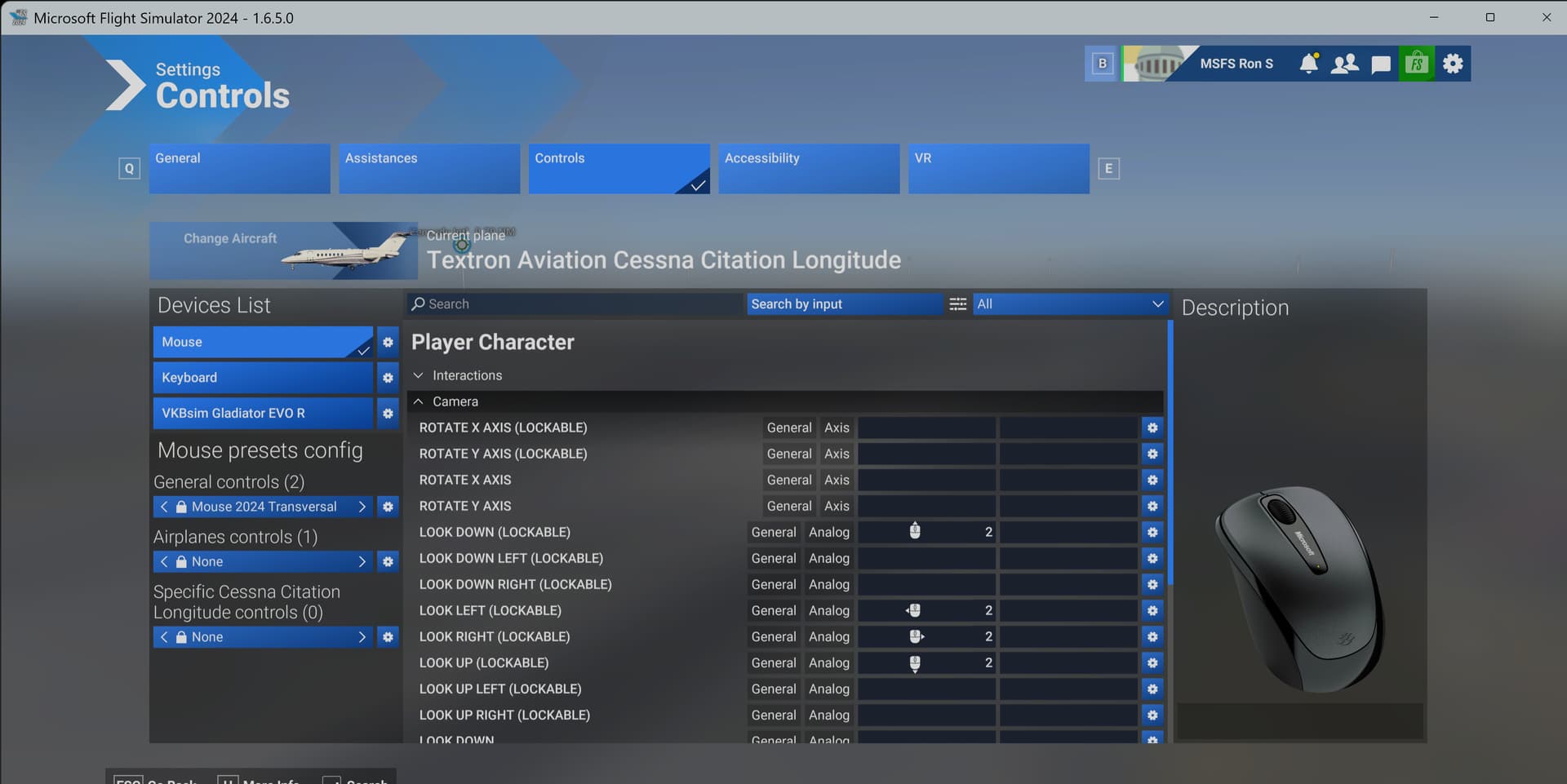
-
“Character First Person Cursor Lock Toggle” control is mapped to the middle mouse button.
With lock = on, above controls work.
With Lock = off, right mouse button must be held.
-
Works the same for 3rd Person view
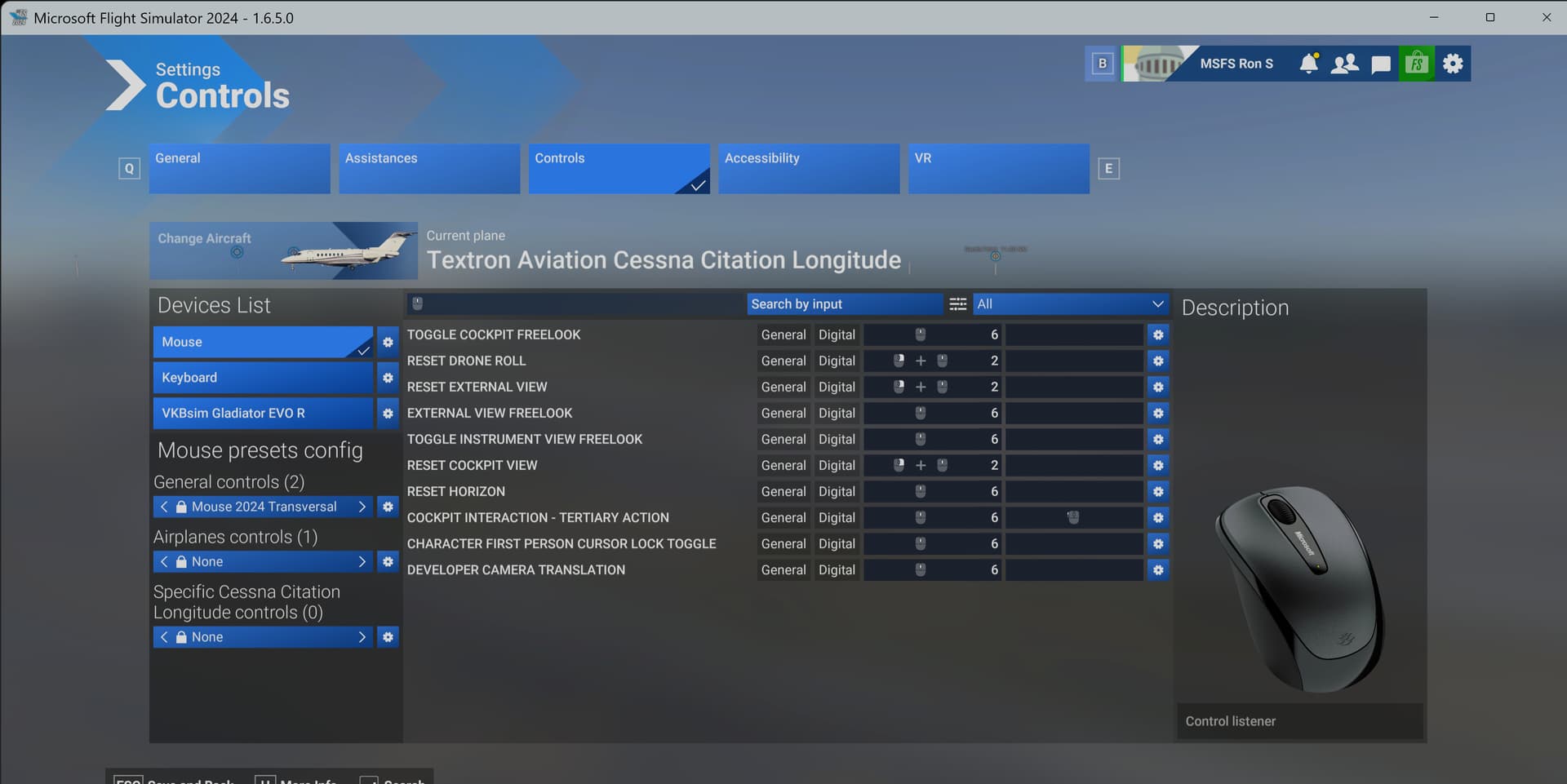
1 Like

This is not working, i took a video to show you my settings and what is happening maybe it will help.
Thanks for helping. Dont ask why the heli spawned like that lol i have no idea.
I don’t have the Hughes 500 helicopter.
So, I can’t help you.
It’s the same with any helicopter or aircraft.
Your video is totally confusing.
Okay but what do you need help with.
Don’t say outside aircraft.
External?
Player Character?
Drone?
- Can you press the right mouse button and slide the mouse right & left or up & down?
- Can you press the center mouse button to turn on (lock) the mouse movements in 1?
Start on a runway in the C172.
1 Like
How else can i explain it with out explaining that this is happening outside of the aircraft, not while i am inside of it. if i dont mention that you wont understand that the cameras dont work the same inside and outside.
I am talking about 1st person view while standing/walking outside aircraft. If you dont understand that then dont worry about it.
I see a bug with this helicopter - “camera” rotation works for you in character mode, and that’s how it’s supposed to be. It doesn’t work if you select the cockpit tab, but how is it supposed to work if it’s clear you’re not actually inside the cockpit …
I understand that and I wont worry about it.
1 Like
It’s working again now, thanks for all the help, also sorry RON for being irritated :D. I don’t even know what i did exactly to get it working . You can delete this thread if you want.
1 Like
Hi, we generally leave them visible incase anyone else has the same propblem in the future. However, if you want us to close and unlist it we can (let me know) 
1 Like
It’s fine keep it up if you want. Thank you!!!
1 Like