Thank you for this report. We’ve moved your topic into the User Support Hub.
The Bug Reporting Hub is for posting suspected or confirmed bugs that other users are able to reproduce without duplicating an existing bug report. Using the template or providing all the relevant information about your bug and sim setup is required in order to provide valuable information, feedback, and replication steps to our test team.
If you are not sure if your issue is a bug or need further input from the community, please use the User Support Hub category. If the community can replicate your issue, first search the Bug category to see if there’s an existing topic. If it already exists, contribute to that report. Duplicate bug reports will be closed.
If you believe it is a new report and no duplicate exists, then create a new bug topic using the provided topic template.
All issues caused by or involving third-party addons/mods should be reported to the third-party developer. Assure that no addons/mods are used when reporting issues in Bug Reports.
Your reproduction steps are pretty useless if you don’t even state which livery you use and where you got that from. Also which version of the 738 do you use?
How do you expect anyone to help you without providing relevant information?
It was all variants and all liveries. How I solved this was that I deleted the downloaded 738 from MSFS 2024. I then tried to download the 738 again. Though it would download to MSFS 2024, it would not install after numerous attempts.
I then elected to stream the 738 to MSFS. After doing this, the plane loaded properly but I had no acccess to OC3 liveries. Though I would install the liveries through OC3, they would not show up in MSFS 2024.
Since I wanted liveries, I then bought 3 PMDG livery packs from Market Place for about $17 USD.
The 738 is now streamed, loads properly and the purchased liveries work.
I did try buying a PMDG livery pack before deleting the downloaded 738. They would not install until after the downloaded 738 was deleted and then streamed.
I suspect that the last PMDG 738 update prevents users that bought their 738 from Market Place from accessing the free liveries that were available on OC3 if you downloaded the 738 to MSFS 2024.
When I wrote “Also, please check directly in MSFS 2024 which 738 version you have installed - the exact version matters”, I meant the aircraft version number, not the variant or livery.
You can check the installed PMDG 737-800 version in two ways. The first one is on disk. Go to Official2024\OneStore if the aircraft is downloaded and installed, open the PMDG 737-800 folder and look for the manifest.json file. Inside it you will find an entry like “package_version”: “4.0.7” - in this example 4.0.7 is the installed version.
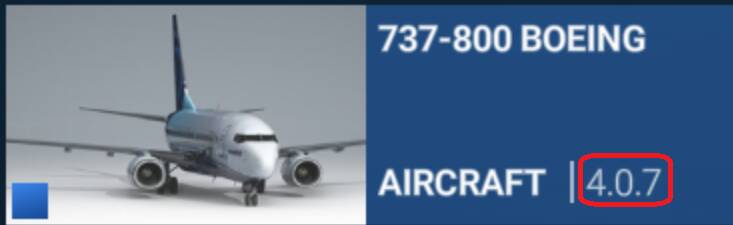
The second way is directly in MSFS 2024. Open My Library, type PMDG in the search field and you will see the aircraft listed there. The installed version number is shown next to Aircraft.
Hi there. Thanks for all your effort on this. Current streamed version is 4.07. I am not sure what the downloaded version was, as it is now deleted. I got it the day it was available in Market Place. The One Store folder with pmdg 737-800 is basically empty. Some folders and a pc.pck file.
There is currently an issue with downloading and installing from the Marketplace. Close MSFS 2024, then go to the Official2024 → OneStore folder and look for a temp folder next to the PMDG folder name. If it’s there, delete it. There might also be an empty PMDG folder - delete that too. After that, launch MSFS 2024 again and try installing the PMDG 738.
I don’t see any temp folders. In One Store are the following folders: .fscontent, Asobo-passiveaircraft-b777family, pmdg-aircraft-77w and pmdg-aircraft 738.
In the pmdg-arcraft 738 folder is simobjects. In simobjects is airplanes. In airplanes is pmdg 737-800. In pmdg 737-800 is common. In common is sound. In sound is pmdg_738.pc.pck