The ‘Fix’ button allows to you input a navigation fix and then draw various distance rings, radials, abeam points etc. it’s a great feature of Boeing FMC’s.
The Fire Axe (not hammer) looks entirely correct, and because it’s extremely sharp what you’re seeing there is the plastic cover protecting any unsuspecting person that walks into it.
When you say performance menu, do you mean in the PMDG Settings?
If so I think that’s just options on the software and has no impact on the actual aircraft. The way it’s setup out of the box is correct.
I’d always taken that submenu to mean the actual performance of the software in the sim. You can downgrade the visual quality to improve performance if needs be.
It’s in the FMC. Gives you the approach speeds for various flaps, of which you can copy and paste the one you want into the blank field just below.
I wasn’t sure what the FMC did with that figure after that.
That simply sets your Vref speed based on the auto generated or manually entered weight at LSK 1L which you’ll then see repeated on your PFD speed tape.
Yes, as in without a performance tool (like the one that shipped with the Fenix) it’s all kinda guesswork.
No, as in the real world pilots either manually perform, or have a system that automatically performs, performance calculations. After inputting weights etc from the loadsheet the calculations are input into the FMC. In reality this is a critically important procedure and a when it’s being done generally pilots will be pretty much ignore anything and anybody…the consequences of getting it wrong are not good, particularly on wide-bodies. The flap setting that goes into the Take-Off Ref page comes from those calculations but on the 737 95% of the time it will be Flap 5.
I have to say, it’s pretty poor that the 737 didn’t come with a performance tool. I know it’s coming but still…
I need to delve more into this side of things. All interesting info thank you. Yes hopefully performance calc makes it into the forthcoming EFB. For me at least there’s still plenty to get my teeth into with the 737 ahead of EFB release.
I’m guessing perf calcs are why I’ve seen some video streamers use external subscription based web apps for that purpose.
I can confirm this since I had to put almost twice the fuel compared to simbrief’s OFP with default 737-800 profile to get rid of INSUFFICIENT FUEL warning in FMC.
Well that´s kinda strange… because I think the same about my car every day. But these 480kg of burned virtual kerosene yesternight only while standing with the Fenix on the runway and programming some nice flight into the FMC was not bad either!
How much is the 737 burning; it´s the same CFM-56 turbines an A320 has it should be exactly the same amount of fuel consumption.
Is it burning a whole tonne of fuel while idling on the runway for one or two hours?
edit: Why is there no carpet even in the 737 MAX cockpit? This floor is dirty and not very cozy looking. A pilot should feel comfortable and at home inside the cockpit.
With all due respect, one shouldn’t have to go through all of that to get a relatively basic question like that answered for a $70 sim. Aerosoft’s CRJ, despite it’s other failings, contained a full, step by step training flight from cold and dark start up to shut down. The question the OP asked about was described in full. I get that PMDG can’t legally provide some data but they certainly can and should improve the documentation that currently comes with the sim (unless that’s been done with the -800 already).
This specific question that I replied to is addressed by the documentation included with the plane. But some people would rather obsess about perceived deficiencies in screw modeling in a corner underneath a dashboard of a virtual cockpit than take an hour and work through the included Tutorial flight document.shrug
I get that, but there are countless user tutorial videos on Youtube detailing almost every aspect of the 737, including 45 minute videos detailing the 737 electrical system. PMDG has been releasing planes well before MSFS, and many of the older tutorials for P3D and FSX are still relevant today.
Perhaps I don’t speak for everyone, but people tend to prefer tutorial videos over reading a printed tutorial flight.
Sure. As you say, there are literally hundreds (if not thousand) of tutorials available to learn from in addition to the included Introduction and Tutorial PDFs.
And again, honestly, if someone demands reference materials, just go to Google/DuckDuckGo/Bing/(search engine of choice) and search for “Boeing 737NG FCOM” and “Boeing 737NG QRH.” This is not that difficult.
So when I enter the waypoints I want to fly on the World Map screen and I start a flight with the 800, the waypoints don’t seem to be entered into the FMC? It seems like I have to enter the waypoints that I entered on the World Map, separately into the FMC?
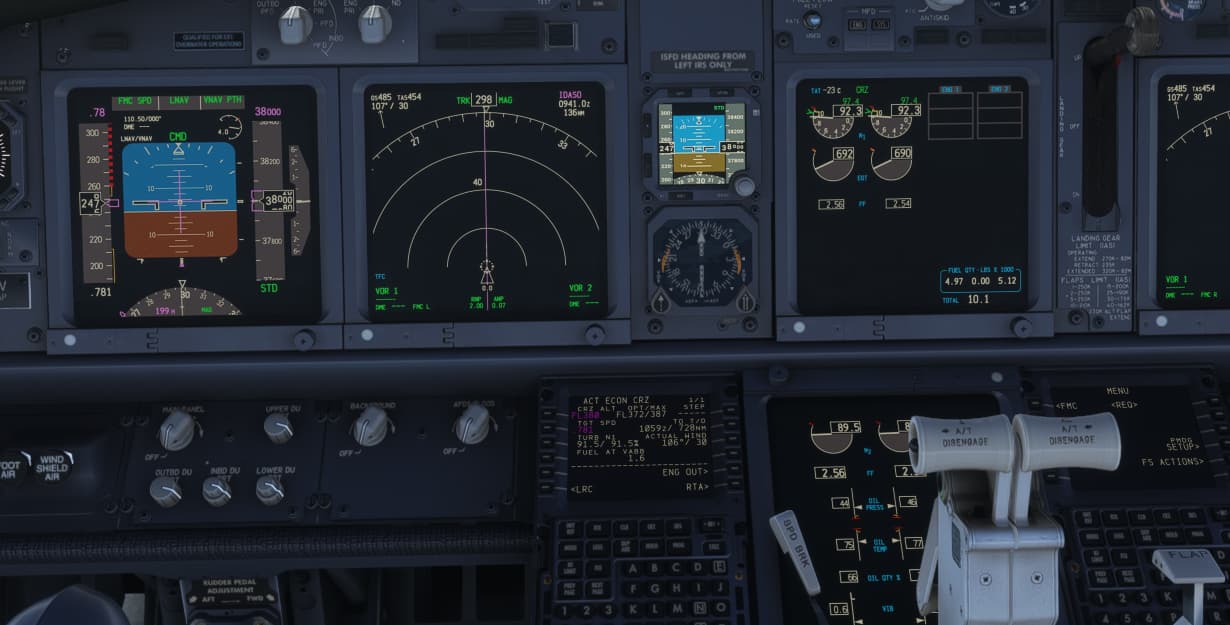

 But these 480kg of burned virtual kerosene yesternight only while standing with the Fenix on the runway and programming some nice flight into the FMC was not bad either!
