There’s a bunch of assistance options in the MSFS settings. Just get rid of all of them. But I can confirm that when it works correctly it does require rudder (So time ago I used it before my RSTs)
Hi guys, how do I assign the activation of the reversers to something more convenient than F2? I’ve flipped through the manuals but couldn’t find it. Kind of strange, it’s the only plane I have flown where the reverser toggle action doesn’t work for it.
Normally I would not complain, but there is a lot going on during the landing and pressing (and holding) some random key that is far away from my other controls during the phase seems awkward.
I have reversers assigned to my Warthog throttles and they work fine, although it’s only full reversers or none.
I only have full reverse or none as well (HC Bravo). Does anyone have hardware and/or software that allows for control of thrust in reverse?
Apparently it can be done with some third party middleware like Axes & Ohs, Spad.next or whatever. But for the stock sim, F2 or the equivalent of binding that same command to a controller is the only thing that works.
It would be VERY nice if PMDG simply used “Toggle Reverse Thrust” (or however it’s phrased) so we could easily use idle reverse if desired without needing some annoying and obtuse paid middleware.
I use the Thrustmaster TCA Yoke and Quadrant. To assign reverses in the PMDG, you only have to assign a button (in my case the reverse lever, which is not an axis) to “Hold Reverse Throttle Thrust”. By holding that button down, you can use your throttle normally, but the power will be in reverse until you release that button or lever. So you easily can control the thrust of your reverses with your throtle axis.
Thanks, I’ll give that a try.
EDIT: That did work, thanks. Too bad MSFS doesn’t have a “Hold Throttle Reverse Thrust” for each engine (selecting either causes both to engage) but at least now I can control the amount of reverse thrust on each… just have to remember to move the throttles forward after raising the reverse levers 
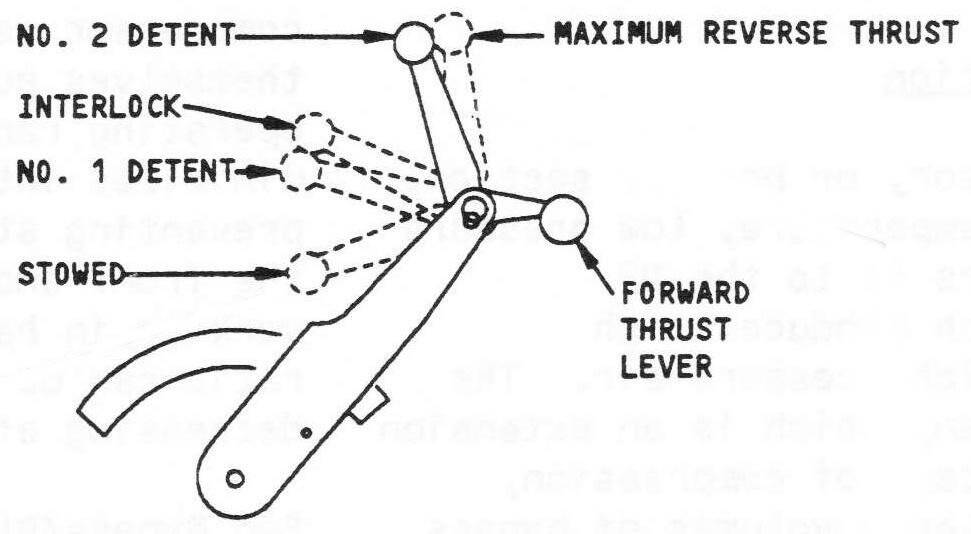
Keep in mind that reversers are only used in 2 positions. We don’t use intermediate positions and we don’t modulate them. We either use idle reverse or second detent reverse. Nothing inbetween.
70-80% of the times we use idle reverse. This is the first detent of the thrust reverse levers. Reversers will open but engines will not spool up. In my airline it is mandatory to use at least idle reverse on all landings unless directed by MEL or QHR (first detent will also deploy the auto speedbrakes in the unlikely event that the crew forgot to arm them)
If necessary we’ll use second detent reverse. The engines will spool up to about 75% N1. We’ll use this on hot days or on short runways or in places where there’s minimum runway occupancy procedures in place. If the brake cooling required is longer than our planned turnaround then we’ll use this. Of course we’ll use this too if the runway is not dry but first we’ll try to see if the landing can be done without them (higher flap setting).
Third detent reverser is also available. This is the level most simmers use because they just go “full” without knowing that the real airplane has detents. I’ve never had to use third detent reversers in the real airplane. The reversers will open and the engines will spool up to more than 85%. This is more than the level of reverser accounted for in any enroute landing calculation. It’s there in case the crew need it on heavily contaminated runways with poorer braking action than expected or in extremely hot days on short runways approaching brake cooling limits.
So if you find a way to assign a SINGLE CLICK of F2 to your controllers you’d be able to simulate the majority of the 737 landing operation.
Really appreciate that information. Will be SOP for me going forward. Thank you.
I get a sim freeze when using tcas. Happens 1 out of 3 flights. I understand this has been documented and acknowledged by PMDG. Anyone aware if a fix has been implemented for this already or when it may be expected?
I assume any fix will be incorporated into an aircraft update, all of which are accessible through the PMDG Operations Center app.
Reverser use, like so many other things, is going to be operator specific in terms of what is standard.
For instance, as a counterpoint, we use reverse detent two as standard on every landing. I have definitely used detent three before, on wet nights in Burbank or Orange County, contaminated runways in Sitka, Wrangell etc. Works good, no reason not to use the plane’s capabilities. Conversely, we’d never use idle reverse.
You’re going to find differences like this across every airline, so like in a lot of other cases, the “right” way in the sim is whatever you prefer, unless you’re attempting to model one specific airline.
I wonder if there is a Spad.next snippet that models the reverser detents. I’ll hunt for one tonight.
Yep the infamous cockpit freeze, like Charles said its documented on the PMDG forums but its so random that the PMDG team cannot reproduce it
Some blame the EFB , others ai traffic , TCAS in TA/RA mode ……all debunked theories.
Bottom line is no one knows what the problem is, so if they cannot produce it they cannot fix it.
It sucks big time, I have had this like many others on landing , setting up at gate , anytime really and the only way is to exit the sim, although if you are on finals strangely enough the throttles and control inputs on yoke work but thats about it so you can at least land if your airport is in sight.
You cannot click on flaps, spoilers, reverse thrust but you can brake , but you cant turn off the lights , engines etc
Not just on the PMDG forum, just google it, lots of people having this issue.
Really frustrating !!!
Having read PMDG’s take on this issue, it seemed to me they were fairly satisfied this was being caused by some fault in the tcas logic. But as you suggest, it may well be they are still unclear of the exact cause. In my case, I’ve had over 20 flights in the 737 since completely turning off tcas with no other changes and have not experienced a sim freeze since. Only happened with the 737-600, and only with tcas on.
EDIT: The exact quote from their Feb 24 update:
*It was clear to us that something was causing our TCAS handling logic to get overwhelmed with large volumes of potential targets being communicated to the airplane- and this was causing TCAS to fall over."
Well they initially said only use TA NOT TA/RA
I havent tried turning off tcas completely but if that is the fix then why dont they bring out a patch for it
To be honest, they don’t know and lots of people have tried lots of things
But i personally havent tried that so i will test that tomorrow.
I agree about the 737 getting overwhelmed but this happens in all variants not just the 800
Its like it crashes mybe the WASM element stops functioning, but the sim keeps going and it still flies along
Thanks i will try that tomorrow
Good luck, but really don’t want to get your hopes up. It may be something specific in setups, other addons conflicting, etc. When it happened to me the sim completely froze. No mouse clicks, no keyboard strokes, and the aircraft was frozen in time and space. Only forcing a ctrl-alt-del shutdown would get me out. Don’t envy PMDG in attempting to get to the bottom of this. All I know is no other aircraft I’ve ever flown in the sim caused the entire sim to go belly up due to faulty tcas implementation.
Thanks, there is a you tube video of Emmanuel, boeing 737-800 real life pilot doing one of his streams and it happened to him mid flight on vatsim, he was in clouds and expertly diverted to another airport with the aid of a vatsim ATC its great to watch , he was completely locked up
Except for his throttles and yoke so he could at least steer the aicraft and land it safely on a strip somwhere.
I would put it on here but i dont know how to upload you tube videos
He was ■■■■ off initially at the time but turned it into an emergency, well worth watching for his skill as he is a real world pilot.
I believe he is now working for another airline training on A330’s
Always a pleasure watching his videos
The putative fix for the cockpit freeze issue is incoming (PC OpsCenter users tomorrow, Marketplace customers next week).
I say putative because I experienced it on the ground several times while still loading the aircraft, with the transponder set to Standby having not touched it at all yet. I fixed my freezes with a complete uninstall/reinstall cycle including the leftover folders buried in %APPDATA% and then using a freshly downloaded installer.
Precisely the info I was after when I posted earlier, thanks Doc.