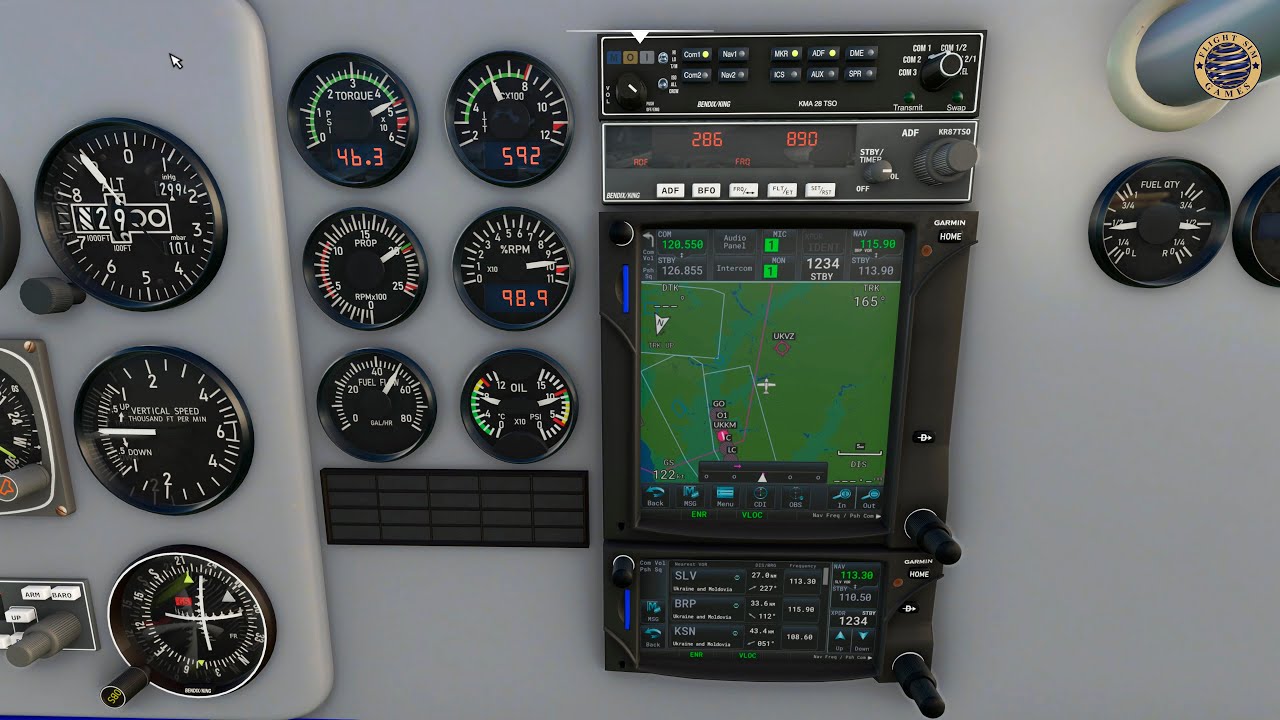
First images of a 750/650 combo in action.
A big thank you to Alex for his great airplane we could use for development of the GTN650 and for its 750/650 betzels.
First images of a 750/650 combo in action.
A big thank you to Alex for his great airplane we could use for development of the GTN650 and for its 750/650 betzels.
Just wanted to say a big thanks to @ScorpionFilm422 for making the GTN750 SU5 compatible and the inclusion of the 650 for future aircraft mods. It’s mods like this and the WT G1000NXI that continues to renew my enthusiasm for the simulator.
Just wondering will it be possible to give future 3rd party aircraft devs the option to include the GTN650 as a stand alone GPS unit without the 750 in the future? A few GA aircraft that I’ve flown had this and was more than enough to get around IFR. Cheers!
Thanks for your post.
650 and 750 are independent each other even if they share the same code. So an aircraft dev can integrate just one of them or both or 2 X 650 or 2 X 750.
Awesome! Second question- are the units remaining freeware beta products for the time being, or will they be moving towards a payware upgrade anytime soon?
Edit- just saw on your website that there is indeed a paid premium version available now. Up untill SU5 I think I was running the beta freeware version of this. Is this a recent change?
In terms of the premium subscription, the pricing seems fine for someone subscribing to Navigraph and needing Metar etc but if you do not need those features the temptations is currently to stay with the basic free version.
There may be some value in offering a lower tier subscription/lifetime purchase at maybe 50-60% less expensive that adds features like importing and exporting plans but lacks the navigraph option.
The In-Game Panel is missing a Direct To button. Other than that this add-on is the best thing that happenned to MSFS. Thank you!!!
Thankyou for that, much appreciated
Just read the doc and/or the image a few posts above. There is a directTo button. 
The beta has ended May 31.
The in-game panel was an unexpected and very pleasant surprise… Never saw it coming!
I have to say – this is probably the most trouble-free mod out of the many I’ve installed on MSFS. From very early on, it did exactly what it said it would do, and did it well. If anyone is on the fence about trying it – just do it. The base version is absolutely free, so you’ve got nothing to lose. The paid premium version (which I use) is mainly of interest for (a) people with Navigraph subscriptions, and (b) people who need the flight plan import/storage features, but the terrain/WX/traffic screens are nice additions as well, and it’s the most “complete” version if you’re a stickler for such things. (And don’t forget about the 530 mod, which is also a pretty solid upgrade from the base Asobo version, and also free.)
I have the same issue, in 2d and vr.
Of all the developers, @ScorpionFilm422 , is the most active, and even prepared before the Sim Update 5. The after-sales support is unmatched. The free-versions including GNS 530 is well-supported too with new versions after the sim update.
My premium payment is worth it! Thank you!
Still waiting for other developers to fix or update their paid planes, hahaha 
Since SU5 I have 2 problems with the Caravan. First with the OBS the right knob changes the radio frequencies instead of the OBS angle. Second the Map +/- is not wotking. In both cases using the popout panel they work. The problem seems to be in the PMS C208 aircraft file as it doesn’t happen in other aircraft I have tried.
I have the latest PMS/Working title G1000/PMS C208 aircraft pack.
You have updated the GTN750 to the latest version (2.0.0)
To be sure verify it in System / Info menu of the GTN750.
Yes confirm 2.0.0 + WT g1000 ver 0.4.0 + c208 file from the link in the documentation.
All is working correctly here.
OBS angle works only when you are in the map and in OBS mode, otherwise, the knob changes the frequency.
Thanks for your prompt replies. I decided to be methodical and deleted all possible problem Mods and reactivated one by one. It is now working perfectly with exactly the same Mods I started with so heaven knows what was causing the problem.
Once again thank you for trying to help and thank you for the best mod in MSFS 2020.
I just found it. Thanks.
For some reason, even with the latest version 2.0.0 of the GTN750- it just comes up as a blank panel for me in both the Carenado Seneca and JF Arrow III. No other versions of the GTN750 are in the community folder- any ideas what I am doing wrong?
Im having this exact same issue too.
