It would be good to have some sort of official statement of the problem, for sure. At present it’s all chatter and a badly behaving sim.
6 Likes
Good morning folks,
I’m currently out sick, but have read through all of your comments this morning and wanted to quickly acknowledge that we do hear your frustrations surrounding the release of SU7 earlier this week.
While I don’t have a status update for the aircraft drag issue, and can’t provide an ETA for a fix right now, the fact that this has been identified and the team at Asobo have been working to resolve it already, is a good sign that a fix can hopefully be implemented at the earliest opportunity.
We’ll be sure to keep you all in the loop the moment we’re provided with more information to share.
Cheers,
The MSFS Community Team
24 Likes
Please also take note of the general frustration/anger around the state and direction of the sim and level of communication from the devs. This release is the straw that broke the camel’s back. Enough is enough.
Get well soon.
14 Likes
I’ve been saying those exact same words with ever growing frustration and resentment with each passing month of deafening silence from Asobo since SU16 of 2020 well over a year ago now. Trust me.. we hear you, they don’t. They might fix this specific issue eventually, but they don’t really hear the broader comments as to lack of community feedback acknowledgement, engagement or quality control of the development output that I have seen increasing exponentially over the past year since I joined the forum.
The Camel doesn’t have any non broken bones left at this point.
12 Likes
Thx. And get well soon. We know you hear our frustration, and that is much appreciated, but it is still very frustrating that MS/Asobo themselves remain quiet while pushing such a release with a known critical issue.
8 Likes
JMB Aircraft VL-3
The propeller’s shadow on the fuselage or wings, when the sun angle allows it, is now slow moving and visible as if the rpm is 10 or 20. There is no motion blur, you can clearly see the shadow of a very slow moving and low fps propeller on the fuselage or wings.
1 Like
Why did I not even notice that MSFS 2024 had been updated to 1.9.18.0? I launched the simulator, and apart from it taking ever so slightly longer to load, I did not see any messages regarding “update in progress”. Is that normal?
When you launch the game, the first screen detects there is an update and then downloads it and starts automatically (optional checkbox on screen). If you’re not paying attention and have a fast internet, you don’t even notice it.
I believe this update was around 4GB, it was less than 10m on my 100Mpbs connection.
My connection is 500Mbps, and I have the Steam version. I guess that “slightly longer loading time” was the download and installation of the SU7 update.
2 Likes
Pros. The shadows of trees and other objects have finally returned, after having been removed in SU4. The shadows cast by generated buildings and trees are sharper and visible from greater distances and altitudes.
Cons. Drag doesn’t exist. Yesterday, I was landing a Kodiak with the engine at idle. the flaps had no effect. It’s madness  It behaved just like a glider. On top of that, small gusts of wind tossed the aircraft around like crazy.
9 Likes
It’s that time of year - hope you feel better soon, Chewwy.
My only feedback is that it is increasingly disappointing that issues and regressions reported by those beta testing are not fixed each cycle, or even acknowledged in the release notes - even the ones annointed as “bug-logged”. And when they are not fixed during the beta cycle, those bugs get lost in the pile of past reports, with fading hope of a fix.
11 Likes
i try to keep an open mind when it comes to these updates, but this is a bad one, really,
too many things are worse than they were before
15 Likes
To be honest, I always approach updates with the mindset, that there will be regressions and new bugs. It has always been that way and to a certain extend I can live with that.
However, there are two types that need to be distinguished when it comes to that: Annoying bugs and breaking bugs/showstoppers.
It is one thing, if there are i.e. graphical artifacts, a few more or less FPS, a single aircraft that might not work as expected, questionable night or POI lightning, etc… simply stuff that is “not nice to see” but does not prevent you using the sim as intended. For that I can also live with the fact that it might be necessary to wait until a future update to get things fixed (and introduce new bugs  )
And than there are the breaking bugs…and to be honest, the sole purpose of a flight sim is to simulate flying. If the physics of the sim are now broken (drag and performance) and the core purpose of the software cannot be fulfilled anymore, than this is a whole different story, because it means ALL customers have now a software at home that simply does not meet any basic criteria and requirements of a flight sim.
And exactly than the management and Dev leads have to step into the ring, not only communication-wise, but to push every single button and pull every lever they can to get this back onto track ASAP.
It’s not about solving it in 5 minutes. It’s about letting people know: Yes, we have seen it, yes we acknowledge there is an issue. Yes, we have already a team working on it and we will try to fix until xx.yy.zz and plan B is…whatsoever. It is NOT sufficient to keep it as a “bug logged” item in the Dev Forums.
I was quiet happy with SU6, no crashes in months, more or less reliable performance and a solid state of the Sim. Why do we as customers always have to be afraid of the next update?
16 Likes
It appears that it’s yet to release in UK unless I’ve missed something. I fired up the sim an hour ago and it went straight to the sim itself rather than the “your game needs an update “ screen. Any ideas when it’s live here?
It was released yesterday. Got mine in the UK immediately (Steam).
Also, your game doesn’t need an update. It is streamed so will stream the latest version. You might need to update some components in-game sometimes but the core game files are streamed.
It has asked for every over sim update. Strange. 
Mine installed via the windows store…I didn’t get the traditional pop-up when starting the sim. To check, in Windows, open Start > Apps > Installed Apps. Then sort it by Date Installed…
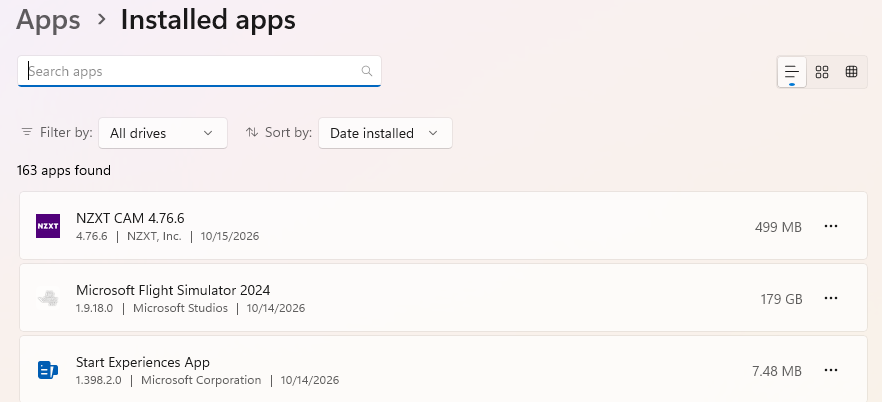
I do apologise I just rechecked and it has updated I’m sorry I questioned you.