MSFS204 Douglas DC-3 GNS530/430 loading flight plans fix within liveries.
I have had a terrible time with flight plans in DC3 GNS 530 they have never loaded properly at all. Solution within created liveries for Asobo Douglas DC-3 in msfs 2024 (most found on flightsim.to).
Discovered a possible solution to flight plans not loading into the Douglas DC-3 GNS530 and GNS430 from msfs 2024 EFB including user created flight plans. Solution is only for MSFS 2024. Discovered the fix in a flightsim.to post from ‘bbrockmann’ so credit it theirs.
Solution and fix is livery based within DC-3 liveries for msfs 2024 only. Fix requires changes to panel.cfg file in msfs 2024. I tested it out and it worked right a way with a user created navpoint heavy flight and a manual waypoint heavy flight plan. Recommend you back up or copy the original panel.cfb before editing. Use at your own risk. Read your panel.cfg carefully. Solution may not work after msfs 2024 updates.
Panel.cfg location in liveries: [DC3 livery name] > Simobjects > Airplanes > [DC3 livery name] > panel.cfg [A folder labelled Panel may also be present such as ‘panel [livery name] advanced’ etc].
Make sure your only changing MSFS 2024 DC3 retrofit, advanced, or gps enabled. Livery creators use different terms. Old panel.cfg lines that should be replaced.
htmlgauge00=NavSystems/GPS/AS430/AS430.html
htmlgauge00=NavSystems/GPS/AS530/AS530.html
2024 has updated to V2 of the WTT 530/430 and the new paths are:
htmlgauge00=NavSystems/WTGNSv2/WT430/WT430.html
htmlgauge00=NavSystems/WTGNSv2/WT530/WT530.html
When building aircraft for Microsoft Flight Simulator 2024, we strongly recommend using the updated V2 packages of each of these instruments for the best user experience.
MSFS 2024 includes the following avionics packages that can be used by developers in their aircraft:
Garmin GNS 430/530
    Legacy/V1 Package Name: workingtitle-instruments-garmin-gns

    MSFS 2024 Package Name: workingtitle-instruments-garmin-gns-v2

        GNS430 VFS instrument location: NavSystems/WTGNSv2/WT430/WT430.html

        GNS530 VFS instrument location: NavSystems/WTGNSv2/WT530/WT530.html
Sources:
bbrockmann post on flighsim.to here (livery I tested solution on): DC3 liveries fix.
MSFS2024 SDK Documentation: See The MSFS Avionics Framework.
Steps:
- Use only liveries dedicated for msfs 2024 Asobo DC3.
- Find and copy panel.cfg and rename to secure original.
- Replace lines in appropriate place and save.
- 430: htmlgauge00=NavSystems/WTGNSv2/WT430/WT430.html
- 530: htmlgauge00=NavSystems/WTGNSv2/WT530/WT530.htm
- Load up msfs 2024 and test solution in DC3 at ‘ready to taxi’ state.
- Make sure GNS530/430 is fully on and gps location acquired.
- Load a flight plan into fs24 EFB then transfer to avionics.
- Flight plan should load up into gns530 and gns430.
- Flight plan should also load up into pms50 GTN750 if active.
Example of msfs 2024 DC3 panel config with old lines for GNS530/430.
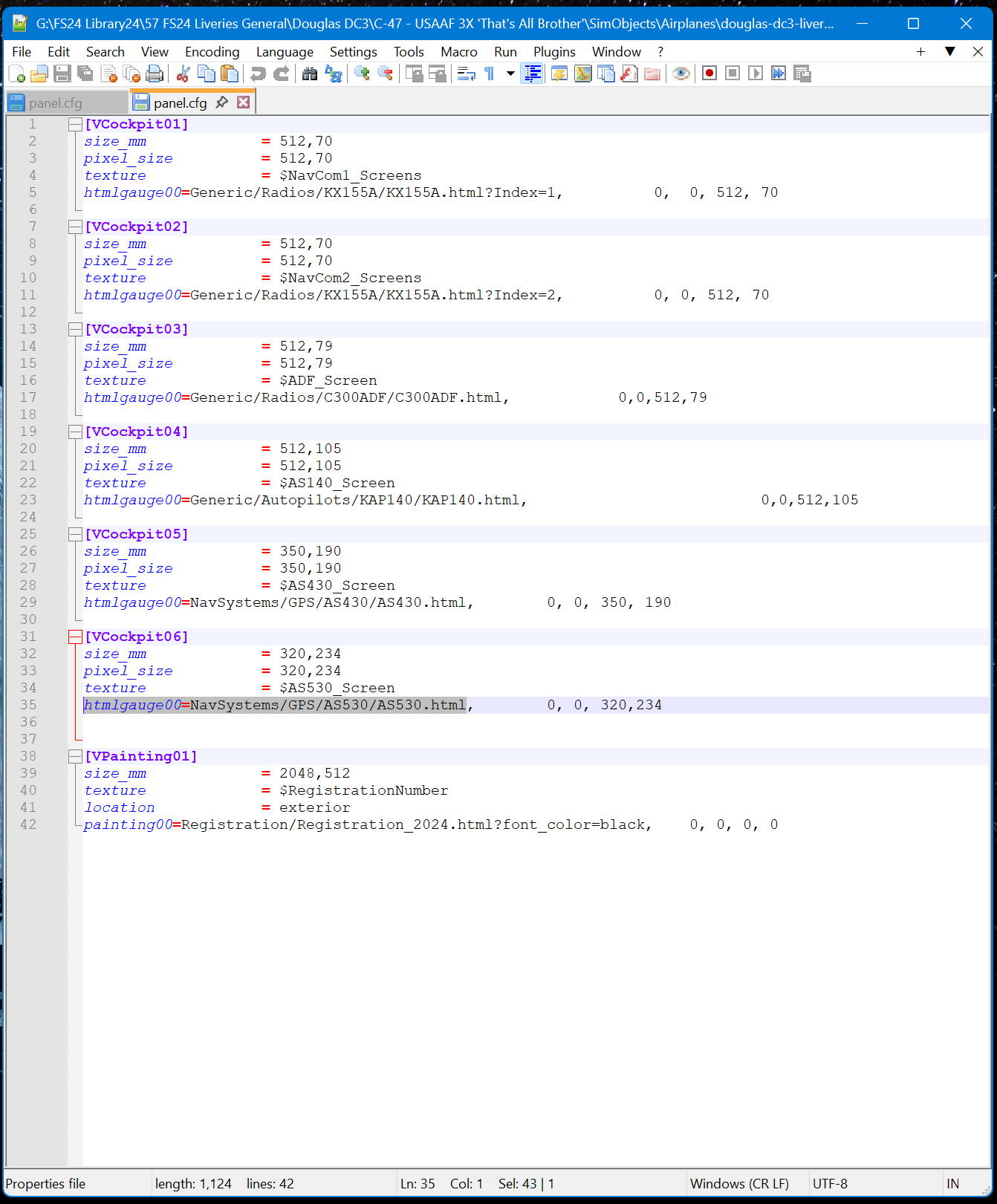
Example of msfs 2024 DC3 panel config with new llines for GNS530/430.

Good luck. Please note solution may not work with all liveries for DC3 as livery creators follow a wide variety of formats and msfs 2024 updates may affect solution.
If solution works for you pass it on to your favourite msfs 2024 livery creator. This solution may work with other msfs2024 aircraft using GNS530/430 but I have not looked into that.
Again credit to ‘bbrockmann’ for solution.
Nighthawk1867.
