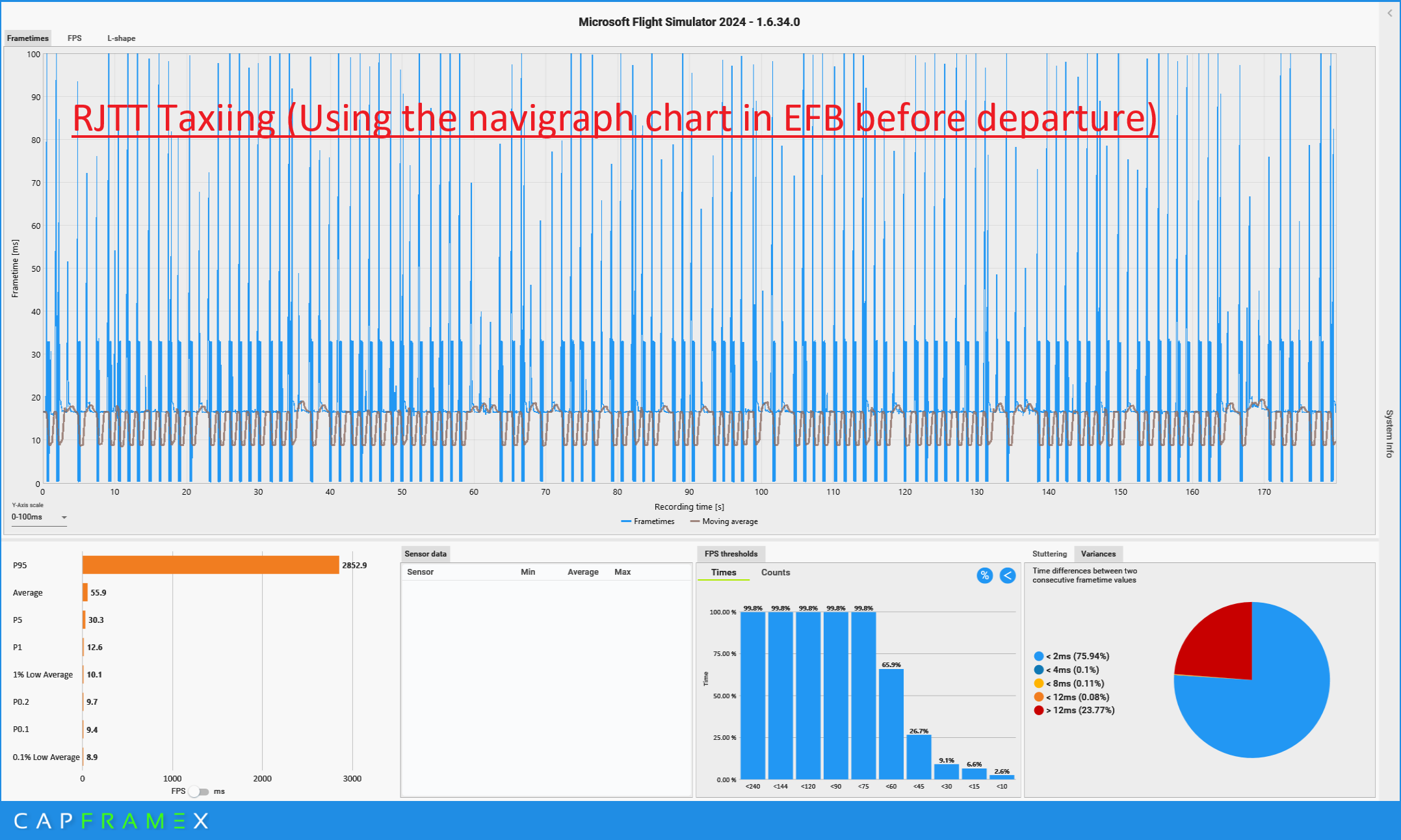
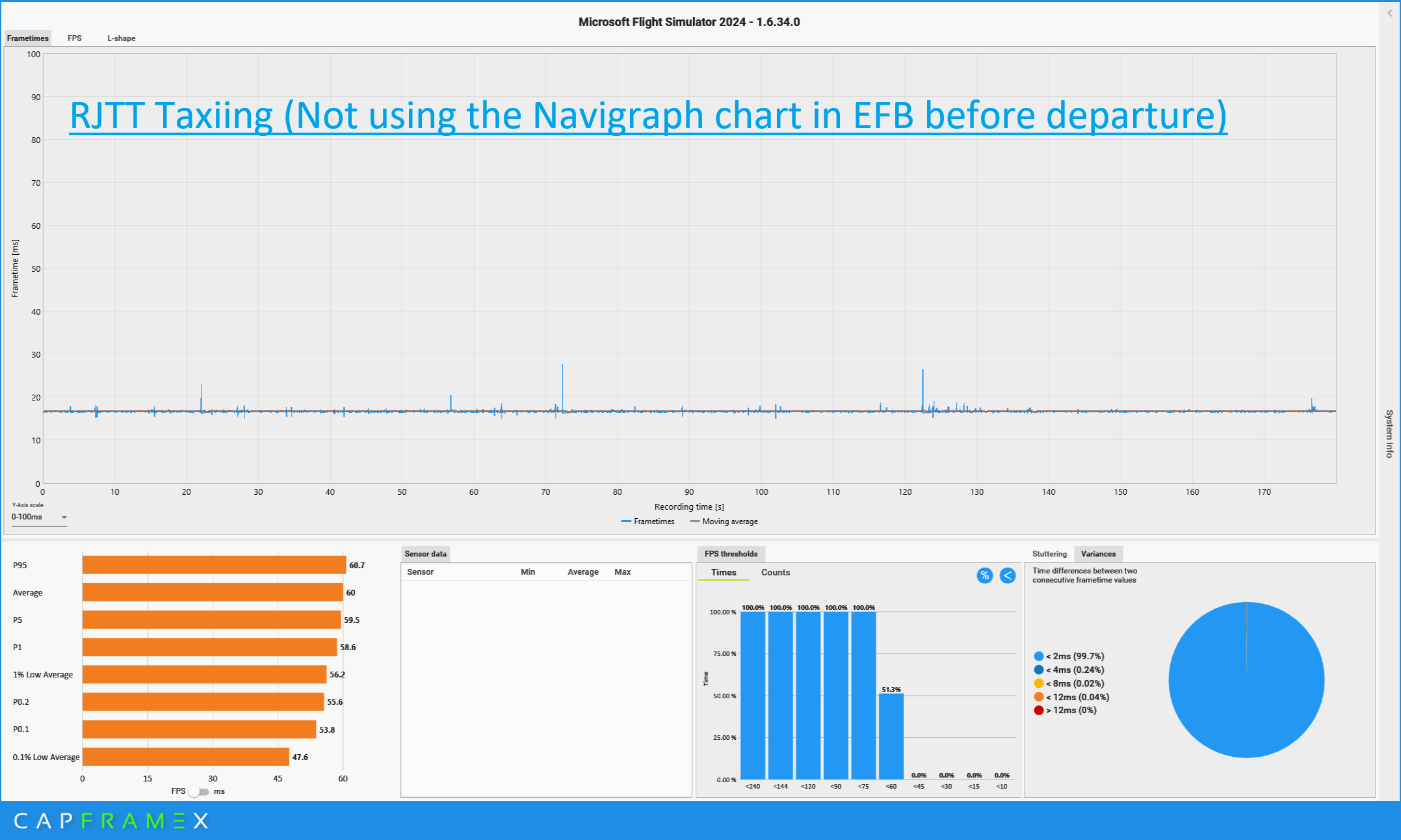
I’d like to share an interesting finding regarding the severe periodic stutters encountered during landing and taxiing.To get straight to the point: **Displaying Navigraph charts within the in-game EFB causes mysterious and severe stutters later in the flight.**There are two critical points to note:
Once you display a chart in the EFB except enroute one, the issue persists for the remainder of the flight, even after closing the EFB or stopping the chart display.
This issue does not occur when using the Navigraph external app or the FS2024 Navigraph Toolbar panel.
When monitoring the FPS display in Dev-mode, I noticed that opening a chart in the EFB initially causes small, periodic spikes in the Coherent GTUI Thread. As the flight continues —even after closing the EFB— these spikes worsen and eventually begin to impact the MainThread.These stutters are quite jarring. It doesn’t seem related to CPU/GPU performance, memory limits, or processing load. Instead, it looks as if the app is internally triggering a heavy periodic task that breaks the frame rendering cycle. At its worst, the sim turns into a “slideshow,” stuttering every second.I am not sure exactly what is happening under the hood, but the issue disappears if you avoid using Navigraph charts within the EFB (note: LIDO charts do not seem to cause this).
If you are experiencing inexplicable periodic stutters at your arrival airport, I recommend checking if you accessed Navigraph charts via the EFB during your flight preparation.
For your reference, I am sharing the frame time data captured during taxiing after landing, following a 1.5-hour flight from RJCC (New Chitose) to RJTT (Haneda).
Windows 11 25H2, FS2024 SU4, Ryzen 5 7500F, RX9060XT 16GB, 32GB RAM, WQHD Monitor, FENIX A320, FG x2, 60FPS Cap
A phenomenon caused by viewing a chart from 500 miles away two hours ago. It’s almost slideshow!
Normal
I’ve noticed this also, and reported it on the Navigraph Forum, but nothing really ever became of it.
For me, once I disable moving maps, the stutters stop completely. It’s got to be some kind of sim connect issue.
Thanks for the helpful comment. I’ve noticed that the spikes in the Coherent GTUI Thread sync up exactly with the aircraft position sampling on the moving map. Usually, closing Navigraph stops the spikes, but when the map is accessed through the EFB, they remain and disrupt the rendering at every sampling interval. Since the Navigraph App and Toolbar Panel work fine, the issue seems to be related to how the EFB handles the data internally.
I took everything but the navigraph cycle out of msfs 2024 BETA, I have notice much less stuttering without the apps installed. Hope navigraph can figure this out I enjoy using the charts app and flight following with msfs 2024.
I am experiencing severe periodic stutters specifically when using the Navigraph EFB Charts App (v1.0.7).
The issue triggers as soon as I open any chart from the Airport page within the EFB. Once the stuttering begins, it persists until I restart the simulator.
Interestingly, this does not occur with the external Navigraph desktop app or the Navigraph Charts In-Game Panel (v8.13), both of which run perfectly smooth.
At this stage, I am unsure whether this performance drop is caused by a bug in the Navigraph EFB app itself or a deeper issue with the FS2024 EFB implementation. Is anyone else seeing this specific behavior?
Environment:
-
Navigraph EFB Charts App v1.0.7
-
(Comparison) Navigraph Charts In-Game Panel v8.13: No issues
-
(Comparison) External Navigraph App: No issues
Hello! Malte from Navigraph here, hoping to shed some light on this situation.
Background & Insights
The stuttering described in this thread so far is very likely to be related to network requests. Due to the simulator’s technical design and the environment in which these products (EFB, Panel, most instruments) are hosted, network requests will always consume some of the resources the simulator needs for simulation. It is very likely that this is what’s causing the stutters.
I’ll elaborate a bit, but to be clear: the in-game panel and the EFB app both run the same code. Any differences between the two are very unlikely to be under Navigraph’s influence.
There are two main reasons why the panel and EFB make periodic network requests:
-
Showing your current position
In order to show an indication of your current position on the map in real-time, your current position in the simulator is retrieved once every second. This also applies when showing charts (plates), since we attempt to show your live position on top of those too!
-
Showing the map
To provide you with an up-to-date map, we need to download map images from our servers on the fly. The map is constructed using Slippy tiles, which let us download pieces of the map and assemble them for presentation. As you pan around, network requests are constantly made in the background. If you stop moving, no requests are made.
The effect that these network requests have on your simulation is not entirely deterministic! Some will notice more than others, likely depending on several different factors, including hardware, internet connection speeds, and software running in parallel. I cannot personally reproduce the issues on any of my installs, ranging from desktop computers to laptops.
Troubleshooting
If you want to narrow this down further, you can try to correlate network requests with stutters. There are a few ways to do this, some more technical than others!
- Try disabling “moving maps” manually and monitor the stuttering behavior
- Try panning the map for a couple of seconds, then stop (no moving maps) - any difference?
- Check the network requests in the CoherentGT debugger as they are made, and see if they correlate with any stutters you may experience
Summary
We can’t do much about stutters if they are caused by network requests. The application needs them in order to function! But there could be other things we are not aware of that would be interesting to look into. Feel free to check the troubleshooting steps above to see if you can narrow things down further!
Best Regards,
Malte
This is some great information. I have been puzzled by what is causing all the stutters in my game! I have a very powerful system (AMD 9800X3D, RTX 5090, 64GB Ram, etc.) and I was just going crazy with the stutters. Tried lowering all graphics and LODs to the bare minimum (Low End) and no impact! For a while I thought it may be AIG or AI traffic in general, but last night I got the stutters with FSLTL which was performing better the night before (but only in a short flight).
Your theory makes sense that over time the stutters get worse and the funny thing is they are very timely (meaning that they occur at a certain period) making the game like a smooth slide show!
I will try not loading the charts in EFB tonight and report back. Hope this will resolve the stutter issue which has been driving me crazy …
Oh and by the way, this wasn’t an issue before the more recent Navigraph updates. I did not have this sort of stuttering a couple of month ago (may be a few weeks ago). It’s more recent, at least for me. Please confirm.
I would like to start by thanking the Navigraph representative for taking the time to comment on this topic. For users facing these issues, receiving a direct response from a vendor provides a sense of trust and reassurance that is just as valuable as the technical solution itself.
The explanation regarding network requests provided in the comments is consistent with various observed phenomena and is very convincing. This is precious information for users who are otherwise left in the dark about what is happening “under the hood.” At the same time, I suspect that the network requests themselves may not be the direct root cause of this specific problem.
My reasoning is that the logical explanation provided should also apply when using charts via the In-game Panel. While network requests certainly consume some system resources, as long as they are processed normally, they do not lead to a “slideshow” experience in the latter half of a flight. In my case, I can display various charts through the In-game Panel and maintain smooth flight without any stutters.
The issue specifically arises when displaying charts via the EFB. Since the underlying code is presumably similar, I suspect that some abnormal processing related to network requests is occurring on the EFB side.
While I cannot pinpoint the exact nature of the anomaly, I have listed my observations below in hopes they might provide a clue:
-
Coherent GTUI Thread Spikes: Indirect evidence of per-second network requests can be seen as periodic spikes in the Coherent GTUI thread via the FPS overlay. When using the EFB, these spikes persist even after the EFB is closed. This does not happen with the In-game Panel.
-
Stutter Conditions: The presence of these spikes alone does not always cause stutters, unless the following conditions are met.
-
Triggering the Issue: Stutters occur specifically when displaying a chart from the “Airport” page in the Navigraph EFB. This happens even with static documents like Noise Abatement charts that require no movement/tracking.
-
Main Thread Interference: Stutters caused by Main Thread interference are only observable when the aircraft is in motion. When the aircraft is stationary, only the Coherent GTUI thread spikes are observed, while the Main Thread remains normal.
-
Post-Flight Data: While stutters are naturally not visible when stationary, capturing data with CapFrameX after a flight while parked reveals that the rendering process is periodically breaking down.
I hope these observations are helpful in identifying the cause. Thank you for your continued support.
this is why I use Navigraph charts only on an external tablet or I use the desktop app outside the sim. so happy with the performance and it´s not immersion breaking for me at all
Thanks to @SkySail4077 for their timely explanation. 
We kindly remind everyone to go to the Navigraph forums to take up the conversation further there so you can have more detailed conversations with the team.
1 Like
I don’t think its purely a Navigraph issue. I noticed the same issue when developing the Infinity Charts EFB app.
The MSFS EFB initializes the app even while the mission is still loading, before the user even opens the EFB. That results in EFB apps already making network requests while the game is still loading.
I think MSFS should lazy-initialize the EFB apps, once the user actually opens them. So that the EFB app developer does not have to implement extra logic to make the app performant. Because there are so many EFB apps out there, and it’s unlikely they are all aware of the issue and address it.
It’s not charts for me in PS5 its clouds, thw heavy stormy kind. As soon as my A330-300 is out of the clouds the stutters = actually severe stutters which literally stop my frames every 2 sec, disappear.
I confirmed that this issue has been resolved in Sim Update 5 - Beta 14 - 1.7.33.0.
That’s awesome. I didn’t think it was something they were even trying to fix.
The good result might just be by chance. Let’s wait a bit and see if it stays stable.
I have only ever noticed a large frame drop when I open the Navigraph Charts. Does not matter if its from in game EFB, the Navigraph charts in game panel or on the All in One Tablet. I mainly fly in VR.
It is possible its the network requests that are sent out as soon as I open one of them that causes the frame drops, and when I say frame drops its.. 36 fps to 2 fps and then slowly gaining until I get back to 36.
And where the problem was?
In sim or Navigraph issue? This is interesting to me.
Yeah I think this happens for everyone in VR. Certainly happens to me every time I open it.
Unfortunately, the issue doesn’t seem to be resolved yet. However, compared to before the update, the “severity” appears to have eased a bit. So far, I haven’t encountered the ugly stutters like the ones I showed at the beginning of the thread. Another new observation is that after closing the EFB, the stuttering gradually decreases over time. I am in the UTC+9 region, and there were a few times in the morning when no stutters occurred at all. In any case, as users, we have absolutely no idea what is happening under the hood. All we can do is share the issues we experience and their characteristics.