OK - Thanks. For those who might be looking for this setting, you’ll find it under Settings / VR / VR Graphics / Foveated Rendering:
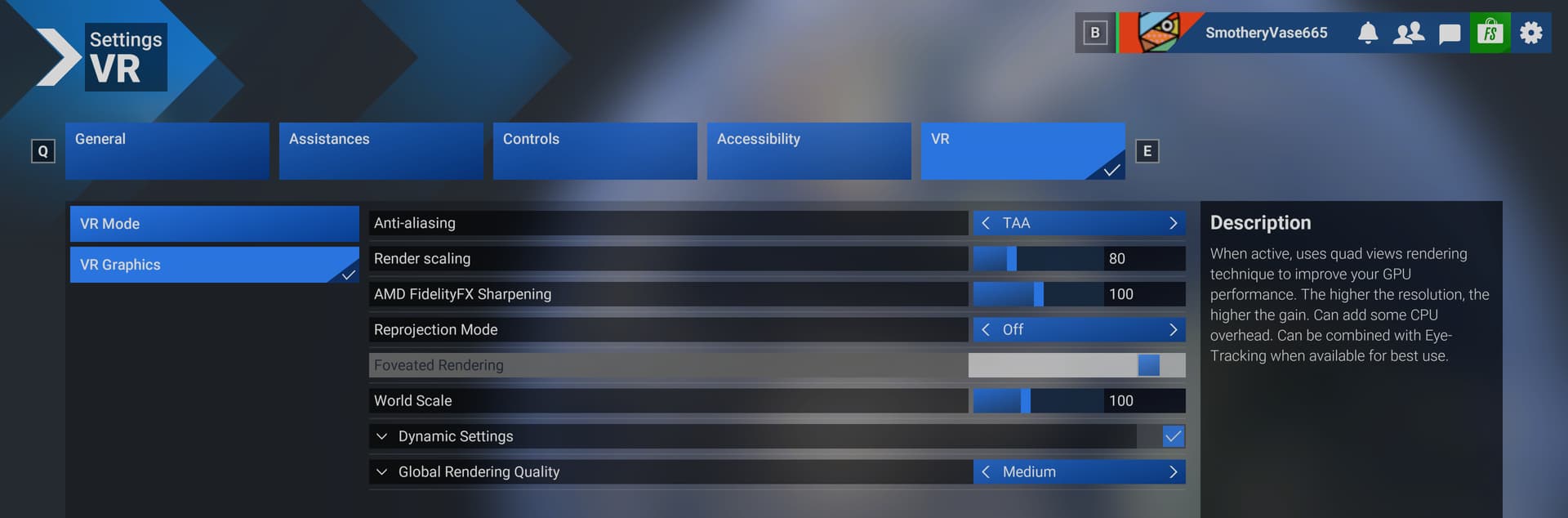
Very interesting. With D3D12 in the picture, its not clear to me how they implemented, ie: rely on platform extensions, which only Varjo does support with D3D12 today or do their own stereo composition. Hoping for the latter, for the sake of compatibility.
3 Likes
Works really good with Quest 3. From 55fps to 62fps. And i cannot see the lower rendering parts. So there must be way to make it even more agressive. Maeby some .xml somewhere where are the values…
I see, then it must be baked-in composition, since there is no D3D12 Quad Views support available on Quest.
Well with my Quest3 as soon as I switch to VR in VirtualDesktop it CTDs. Four straight times, so there is obviously some trick to getting it to work that I am not aware of yet.
Can you share your %ProgramData%\Virtual Desktop\openxr.log file?
Disable OXR toolkit.
1 Like
Yeah can’t seem to get it working with PCL. The Sim just crashes once FFR is enabled.
Sure no problem.
2025-03-25 20:26:05 +0000: VirtualDesktopXR (Standalone) - v1.0.5 (515059ce19d0d875d7c27e6b51086577bb3e05c4) (C:\Program Files\Virtual Desktop Streamer\OpenXR)
2025-03-25 20:26:05 +0000: Application: FS2020 (FlightSimulator2024.exe); Engine: Zouna
2025-03-25 20:26:05 +0000: Using Virtual Desktop runtime
2025-03-25 20:26:05 +0000: Streamer: 1.33.4
2025-03-25 20:26:05 +0000: OVR: 1.64.0
2025-03-25 20:26:05 +0000: Device is: Meta Quest 3 (23)
2025-03-25 20:26:05 +0000: Application: FS2020 (FlightSimulator2024.exe); Engine: Zouna
2025-03-25 20:26:05 +0000: Requested extension: XR_KHR_D3D12_enable
2025-03-25 20:26:05 +0000: Requested extension: XR_KHR_composition_layer_depth
2025-03-25 20:26:05 +0000: Requested extension: XR_KHR_win32_convert_performance_counter_time
2025-03-25 20:26:05 +0000: Requested extension: XR_EXT_eye_gaze_interaction
2025-03-25 20:26:05 +0000: Requested extension: XR_KHR_visibility_mask
2025-03-25 20:26:05 +0000: Requested extension: XR_EXT_eye_gaze_interaction
2025-03-25 20:26:05 +0000: Requested extension: XR_EXT_hand_tracking
2025-03-25 20:26:05 +0000: Requested extension: XR_FB_eye_tracking_social
2025-03-25 20:26:05 +0000: Requested extension: XR_KHR_visibility_mask
2025-03-25 20:26:05 +0000: Requested extension: XR_KHR_win32_convert_performance_counter_time
2025-03-25 20:26:05 +0000: Using Virtual Desktop runtime
2025-03-25 20:26:05 +0000: Streamer: 1.33.4
2025-03-25 20:26:05 +0000: OVR: 1.64.0
2025-03-25 20:26:05 +0000: Device is: Meta Quest 3 (23)
2025-03-25 20:26:05 +0000: Recommended resolution: 3072x3216
2025-03-25 20:26:05 +0000: Using Direct3D 12 on adapter: NVIDIA GeForce RTX 4080 SUPER
2025-03-25 20:26:05 +0000: Using D3D12 on adapter: NVIDIA GeForce RTX 4080 SUPER
2025-03-25 20:26:05 +0000: xrPathToString failed with XR_ERROR_PATH_INVALID
2025-03-25 20:26:05 +0000: xrPathToString failed with XR_ERROR_PATH_INVALID
[Deleted - was mistaken]
You seem to be running some additional API layers indeed. Perhaps OpenXR-Eye-Trackers (not needed with Virtual Desktop). Use Release v2025.03.08 · fredemmott/OpenXR-API-Layers-GUI · GitHub to do some cleanup
The only thing that I am running as well is OpenXR Toolkit, which I have to say has never cause me a problem before.
Are you saying that it seems to be incompatible with the option?
Open XR toolkit is doing same things (foveated rendering)
oxrtk is not compatible with quad views
MSFS 2024 has “foveated rendering” added today. No mention about quad views.
I doubt MSFS uses quad views in the way that is incompatible with OpenXR Toolkit (see my previous comments).
But yes I would still disable OpenXR Toolkit regardless
Your very screenshot says quad views rendering 
1 Like
My bad. I was mistaken
Ah yes of course - if they are doing it in engine then the same issue doesn’t apply because you just get the two frames sent out to the compositor right?
I’m amazed we’ve got this - looking forward to trying it out. Has anyone assessed CPU load with it on/off? Have they got instancing in too?