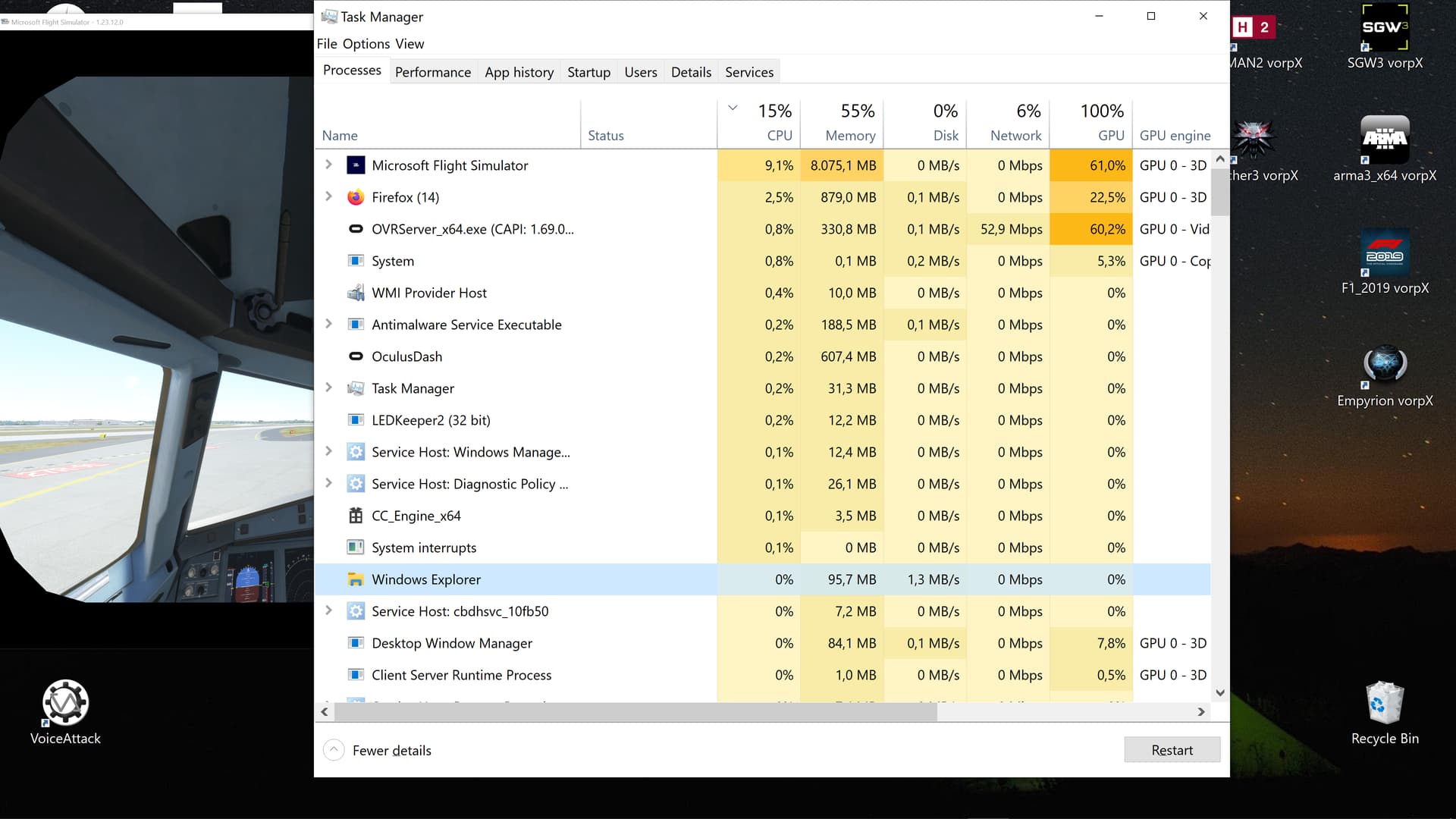
Oculus ovrserver_x64.exe eats up my GPU when playing Microsoft Flight Simulator in VR. ovrserver_x64.exe will jump from the usual 18% GPU to 65%, making the game unplayable. See screenshots (1st one in VR, 2nd one after exiting VR mode). Even after exiting VR mode in flight sim, the ovrserver_x64.exe will stay hung up. GPU is freed up only after closing flgiht sim, but picture in VR (just the PC Oculus menu screen) remains scrambled.
Tried with Oculus native Asgard’s Wrath (all max settings) and Sairento VR (Steam app, all max settings), works fine.
Clearly an issue between Quest and Microsoft flight sim.
Tried with settings high and very low, same result.
Cleared out the community folder and left all 3rd party apps off, same result.
Been this way since round about SU8. Don’t know if that is coincidental.
I couldn’t find this issue in the forums, and the respective helpdesks havn’t been able to help, so I was hoping that one of the many VR “veterans”/pros in the community have any idea what could be causing this. Also, is anyone else experiencing such an issue? I’ve tried everything including fresh install and all that.
FYI I run a RTX3060ti, 32 GB RAM, intel 10700K rig, so not too shabby. As you can see in the screenshots, memory is around 50%, while it’s just a walk in the park for the CPU. The GPU sits at around 80% total before the Quest’s OVR gets hung up, then jumps to 99/100% after. Insane that the Quest actually uses up more of my GPU capacity than the monster that is MSFS. 
Feedback would be awesome! Thanks.
Have you tried toggling window visibility from Debug Tool? There’s a bug on Oculus at the moment they didn’t fix for so long. If you make server terminal window pop up and not minimized it affects the performance.
Thanks a bunch for the feedback, @Silvera1657. 
I’ll give it a shot first chance I get.
Didn’t help, unfortunately. But thanks again for the idea!
hey Im currently experiencing this problem did you ever fix it and how?
Hi there, wecome to the forum
Never fixed it, but I found a workaround. I installed “Virtual Desktop” on my Quest 2. That way I can connect my PC via airlink without having to run the Meta OVR server. It’ll cost ya 20 bucks tho. 
Neither MSFS helpdesk nor Meta helpdesk could help me solve the issue.
Do you know if you can still use ASW on Quest2 with Virtual Desktop?
I don’t know.
I would think so.
I know there’s a SSW (Syncronous Spacewarp) setting within Virtual Desktop that halves framerates and extrapolates the missing frames, like ASW. You can set it to on, automatic, or off. Hope that helps.
I’m noticing this issue with my setup as well. I have an i7-10700k, 2070 Super and 32gb of ram. I can have the sim running well for a few minutes, taxy to the runway, perform my checks and by the time I’m rolling down the runway I’m down from solid 36fps to 15fps or so. So I disable VR to see if it improves, still running 15fps with Oculus running but not enabled. Next, Turn off Rift on my headset, still bad frames. Next step, close the oculus app entirely and I’m back to 60-65 fps in MSFS. So it seems like something is happening causing the oculus software to jam up the power on the pc. I haven’t been able to figure out what exactly triggers this, because sometimes I can do a whole flight and not have issues. Sometimes I can’t even get the plane started before it starts happening.
Today I have been attempting to use Virtual Desktop to test if running without the Oculus app will help, however with SteamVR enabled MSFS just crashes as soon as I start VR but I suspect this would make for a more consistent, smooth flight.
I know exactly where you’re coming from, man.
I’m no IT guy, but judging from experience it seems that these problems might be based on lack of VRAM. Might be worth it to flip on the developer mode in MSFS and check the data for your VRAM usage. I believe once that’s maxed out the Oculus app starts to mess things up. And it’s no secret that MSFS is constantly trying to fix memory leaks tht eat up your VRAM over time.
I happen to have switched to a 24GB VRAM card recently, and things have been much smoother.
Perhaps the Oculus app just needs way more VRAM than Virtual Desktop does.
If you’re maxed out I’m afraid you may have to dial down some settings.
As for the Steam VR issue, I own the Microsoft Store version of MSFS and have no trouble starting the sim and switching to VR. Make sure Steam VR has already been activated in the Virtual Desktop menu. Then if you hit switch to VR in the Virtual Desktop menu you should see the Steam VR surrounding in your headset. Only then do I launch MSFS.
Good luck with all that! 
I think this is a issue with the new nvidia divers.
I have win11, rtx 4090. And also after msfs I still have GPU usage 100% in taskmanager.
Nah dude, can’t be the drivers. Check the timeline. This issue has been around for over half a year. Plus GPU usage can spike at 100% without the VRAM being maxed out. I have the newest drivers and am doing fine with my 3090 right now.
Congrats on the 4090 tho, you lucky duck! 

How’s it been treating ya? Do framerates really double when using DLSS 3 in VR?
In the meantime I’ve sold my Reverb G2 (which I had for the 2160x2160 resolution for sims) and my Quest 2 (had it for all the other games) and got a Pico 4.
Gotta say: very happy. Best of both worlds. And the front end is sooo light. Love it.
Plus I actually made some money selling the other two and buying the Pico 4. 
Happy flights, y’all! 
NVIDIA released a Hot Fix that addresses high GPU usage after leaving MSFS.
Excellent link, @IDVANDER, thanks for helping @nils8107 out.
Loving how the community helps each other out. 

Just a reminder, the topic here is “Quest 2 OVR server consuming GPU”.
I know, I know, I digressed hard in my last post myself. Haha.
Change of topics happen so quickly in forums. Just trying to be considerate of the folks that are looking for solutions that relate to the topic.