 Alright, so I have fallen back into the “trying settings out” whirlpool
  and need some help!
I have decided to go all-in on getting TAA to behave globally (by that I mean, one set of settings I can leave and it will be fine even in New York with traffic, or flying fast and low in a jet in a group flight). I don’t care about higher than 100 TLOD so that is staying there (for now) and 72fps with interpolation (SSW) is fine for me. Running RTX4080 and AMD 7950X3D.
I have gone back to using OXRTK (with VD as the streamer) to try and relieve some pressure off the GPU by using Foveated rendering (50% at half and 66% at 1/4. FOV down to 78%). With my new “comfortable!” AMVR leather facial frame I don’t see any extra black border with that %, so that is fine too.
I noticed that if I set the resolution and other in-game options so that the GPU is always pretty much at 100% Usage (around 80-85% VRAM) it’s actually SMOOTHER than if I adjust things to around 80% Usage and 75% VRAM (that area). I guess this is because when it’s at 100%, in the eyes of MSFS I am GPU Limited, so less prone to CPU stutters. Even at 100% I am still maintaining 36fps flat (locked at 36 with RTSS and using SSW in VD with 72Hz, Ultra Quality – not Godlike).
It looks great, really sharp compared to Quality DLSS so I am just trying to optimise this now… as
I still get some hitches which brings me to my HELP QUESTION 
Can anyone give a real IDIOT’S GUIDE (  “me” ) to how the various resolutions and “sharpenings” work with each other. I am really not sure what is best for taking strain off the GPU whilst maintaining the best end result.
-
I think CAS in OXRTK looks best. NIS looked very scratchy. Not sure about FSR. But maybe I did not set up properly for those (see point 4). Any thoughts? Are any of those 3 options in TK necessary?
-
I am using Sharpening in VD AND CAS has it’s own. Are they impacting performance? Or fighting each other? Where is it best to sharpen or does it not make a difference?
-
I set the Resolution in OXRTX to something like 2500. How does CAS relate to this? I can make it higher (approx 3000) and still have 100% usage and no less fluid (in scenarios I have checked so far at least, for what THAT is worth with this sim lol) but still with those hitches.
-
I read somewhere that you can do something at DOUBLE the native resolution ( 2,064 x 2,208 pixels per eye, right?), then scale it down for headset, and it has almost ZERO impact on GPU Usage as the Nvidia cards have that scaling functionality built-in and running separate from the Cuda cores that do all the 3D rendering tasks? Can’t remember where I read it (another topic on this forum, I think from @PacyFire
), or what I need to do to configure it that way (if that is even a thing)? -
So could I set OXRTK to 4128x4416 and scale down (if so, how), or will that totally kill fps and exceed my VRAM?
-
VD also has Upscaling (Snapdragon tick box). Is that conflicting any of the other ways of doing it? Totally don’t understand the “chain” here of how it’s all processed.
I am pretty lost, and feel like tweaking a few pixels here and there are not getting me anywhere substantial. I need to make a bigger change and let the software and hardware work it’s magic, but not sure what I need to do where with all these layers of settings! 
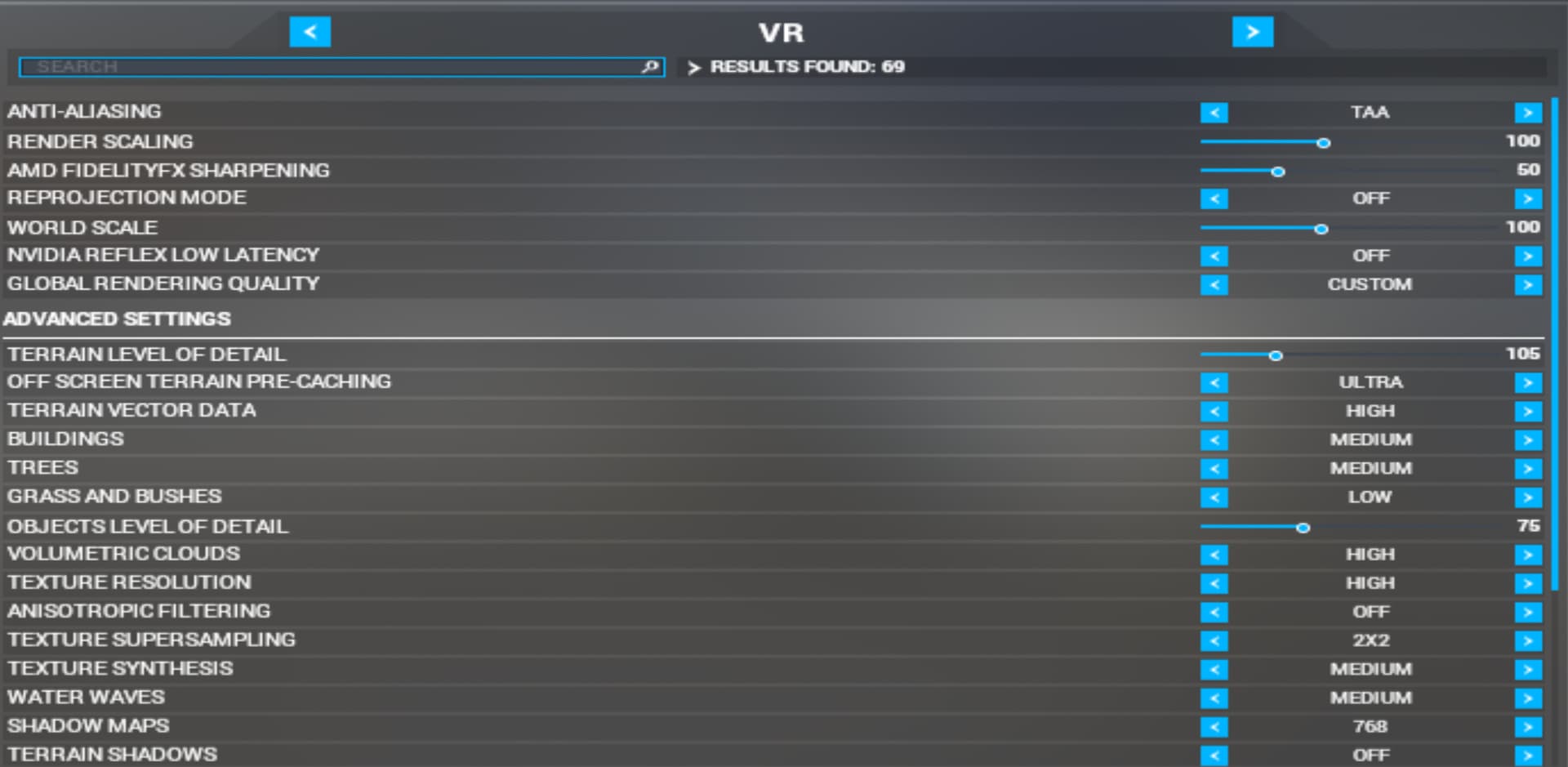
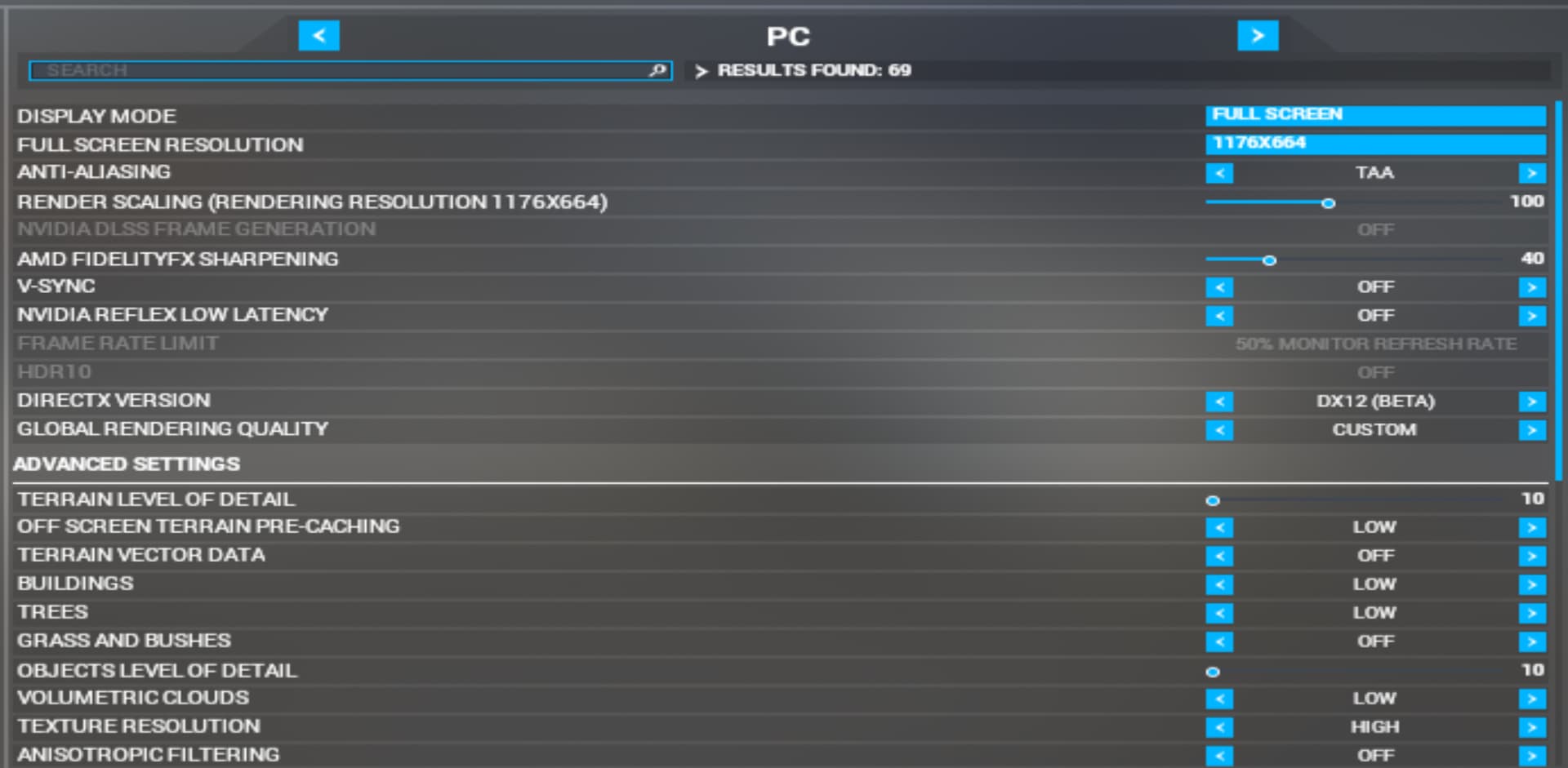
My current in-game settings:
This seems to be stable 36fps (so 72 in headset) anywhere I tested so far - countryside, dense forest, heavy photogrammetry, but turning fast sometimes makes a hitch

PC side:

Thanks all! 