So you used virtual desktop with a cable? I didnt think this was possible. Can you explain how you achieved this?
Did you try Cornhole’s suggested settings? Any results you’d care to share?
Hello Guys,
I always had the same exact problem occasionally. I am pairing the Quest 3 with a 4070ti. Always using a Link cable with Rift. Also have the OTT. Also running @72Hz.
When ever this happens I simply press the soft on/off switch and the problem goes away right away. The trade off is the immersion. But… I both received an nvidia driver update and oculusu update (v71) now the problem evolved to an other level. During a flight, I experience a momentary lag, then the ghosting starts and the game is so slow that unplayable and I can’t recover from there. I don’t know which of the updates ruined this but if any of you can confirm a similar problem or already know a solution I will greatly appreciate.
@NakdTrader Simply turn off and then on by pressing the momentary button on the headset to recover. This is only a walkaround fix but it works, at least for me. (or was working  )
Apologies for not reporting back sooner. I’ve basically given up with this in the hope that msfs2024 will not have this problem.
I did try something as an experiment. Installed the sim on a second lower specification but still decent computer (3080ti, 5800x3d, b550 motherboard) but got exactly the same problem. As soon as i limit the frame rate in anyway, i get the ghosting/double
Imaging/judder.
Thanks to @Cornhole2840 for your help. I did try your suggested setup using VD and it worked well (similar performance to @SunlitAlpaca141 settings using link cable), but i still got the judder when capping my frame rate. Asw eliminates the judder but as mentioned in my first post, I’d rather not use asw.
@Europa4382 , i will try this as well and let you know. Would be interesting if this works for my system.
@OldpondGL i completely agree with your comments about motion judder. I do think this is exactly what is happening. Say the headset is at 80hz and if I cap the frames to 40, i will have missing frames and the motion judders. When i use Asw, it fills in the missing frames and i get smooth motion. What i don’t understand is that some users like @SunlitAlpaca141 have a nice experience when they do what appears to be exactly the same thing (i.e. cap frames with no ASW).
The secret on how this works so well is to make sure your settings allow you to easily acheive more fps uncapped without ASW. In my case at 80Hz refresh rate with res slider full right I can acheive 45-55fps in even the most complex scenery (eg. low helo flying in Tokyo). When I use Force 45fps (which is actually 1/2 your refresh rate) without ASW I then get a very nice smooth 40fps. If your system isn’t powerful enough, you may want to try using a 72Hz refresh rate and cap it at 36fps without ASW.
Like everything PCVR, everyone’s system/settings/flying style and conditions will vary so you just need to find out what works best for you imho. No one-thing recomendations will work for all.
It just doesn’t make sense. My problem is not affected by settings or performance. I can set everything to minimum including the occulus slider all the way to the left and set everything in the sim to low and it still happens.
I have a 4090fe 7800x3d and b650 msi MB 32gb ddr5 ram. I never get less than 60 fps with a mixture of high and ultra settings. I am usually in the mid 70s.
72/80/90 hz makes do difference. Setting a cap to half these refresh rates causes the same motion judder.
I can reproduce the problem on 2 completely different systems (using the same quest 3)
Maybe i am just more susceptible to seeing the missing frame?
I can also confirm that the settings/performance do not related with the problem. I experience the issue at any settings. The problem is significant with MSFS. I do not remember any other title significantly. A fresh booted system happens to present less problem. Notifications can trigger the problem.
For me I usually experience the problem just after a momentary stutter in MSFS for what ever it stutters in the background I don’t know. It is very smooth in 2D.
When the problem occurs, even if I switch to 2D, problem still effects the oculus home until I turn it off.
The momentary power switch trick usually recovers.
I occasionally get a bit of a shimmering effect, usually to the left hand side of the cockpit, after briefly removing my Q3 headset and putting it back on again.
Pressing Ctrl&Tab and then again, appears to sort that issue, but this is probably not what you’re seeing.
@HawkMoth9135 HawkMoth9135, What hardware do you have? On my 4070ti 7800x3d I get the same thing, (its more left eye of oculus) and by taking headset off and putting it back on it fixes it, I do not get this issue with my sons 4080 7080x3d.
I’ve currently got a 5800x3d/RTX4080super/32GB RAM combination, with a Q3 via VD.
Yeah, I have a RT X 4070ti 16 gb. And my problem is with images rendered by the right lens. I remove the headset, clean my right lens with a microfibre cloth and that sorts out any shimmering etc Go figure.
MSFS2024 looks like inherited the same problem.
I experience the problem with a Quest 3 while using Quest Link with a USB 3.0 cable (tested 2.5Gbps). It always effects the right eye and it occurs every time after a short freeze/stutter. If it does not freeze stutters than there is no problem. But what makes it stutter that I can not figure it out. Sometimes it is OK and very smooth from the beginning to the end. Sometimes I struggle and fps is everwhere.
From my side. Changing both the ingame graphics and Quest Link setting, nvidia drivers nothing as far as tested have no effect. It can occur at any time.
Can’t say for msfs2024 but with msfs2020 I don’t have this issue with either my Q3/rtx4090/wifi6 using Air Link at 200mbps dynamic bitrate or my QPro/rtx4090 using the official link cable connected to my z790mb usb 3.2 gen2 type-c port using 650mbps encoding bitrate (2.5Gbps usb speed test).
With Link, maybe make sure to check your win10/11 device manager usb ports/properties and disable any power savings options. Also, disconnect any unnecessary usb devices so you don’t run out of usb bandwidth (even some close by Bluetooth devices like speakers). Otherwise, I think you might be using too high encoding bitrate (try 450-500mbps).
Sorry, all I can think of right now. Cheers.
Thanks for the reply. I have tested almost all of them except I do not use Airlink. Instead I am using Virtual Desktop XR and with VDXR I did not noticed but I am not happy with my 5 GHz modem so I still have to stick with the cable Link.
Hello,
Did you manage to solve this problem with ghosting and ASW enabled???
I have exactly the same situation. When ASW is enabled - the image is clear and the simulation is smooth, but I see these disgusting artifacts in the sky. When I disable ASW, the disgusting ghosting effect appears.
I have it in both MSFS and XP11/12.
I don’t have the strength to write to Meta Quest support anymore, because they just bounce the ball …
Maybe something new on this topic???
(I tried through VD, but my internet is interrupting = zero fun from the simulation).
Thank you for any help…
I can join the club here with the same problem with a brand new system 5090 13900k 64gb DDR5 Ram Quest3 with link cable or VD I get the same thing . I have a fricking 1gb internet dedicated ethernet cable with wifi 6 enabled . Still get that ghosting effect when I am inside the plane with the head movement … Enabling reprojection mode in MSFS 2024 settings kind of stabilizes it but it warps most of the objects that I am looking. You can clearly see it on the head of the Elevator stick. On my monitor everything is smooth but when I put the headset it is just like that. Whatever setting I have tried I couldn’t figure this out. I paid a lot of money for this system and I can’t even use the bloody game . I will download this other Flight sim game which is a war game with fighter jets and see if it resolves the issue.
Probably nothing will solve the problem. It’s a software bug in Quest 3. I also use XP11 and XP12 and I have the same.
ASW=ON → simulation smooth, but disgusting artifacts on cloudless sky or water. When ASW=off → simulation smooth, but disgusting ghosting effect (blurring of scenery)
Some time ago Meta informed that Q3 does not support RTX 40 series cards…
Then, supposedly the problem was fixed. As you can see, not completely.
I have exchanged dozens of emails with Meta support, they stubbornly claimed that the fault lies with MSFS or XP. Only at the end did they admit that it may be a problem with graphics cards, and that their engineering is working on the problem. Ha, Ha, Ha …
I really like Q3, but if I had known about this problem I would have bought another VR equipment.
It’s sad that with the 50 series… you have the same.
@ElevenTB I’ve had a rtx4090 for ~2.5 years now and never had any compatibility issues with my Q2, Q3, or QPro. The desktop rtx4000 series are still shown as being compatible so I think either you misinterpreted their response, and/or maybe they were just trying to get rid of you, lol!
In any case, the easy workaround with msfs2020 is to add a few clouds and/or disable ASW. Also, maybe make sure to try try the latest nvidia 572 drivers and properly enable dlss4 (google how to do this). I’m using 572.16 and with dlss overrides it working great with Link, forced 45fps (40fps for me with 80Hz refresh rate), asw disabled, and dlss/balanced. I only get a bit of ghosting with overly fast yaw movements (which I also get with my good old Vive Pro1 btw).
In any case, I’m sorry you continue to have issues with your Q3 mate and I hope ou either manage to resolve these (or at least find a simple workaround) and/or move onto a different platform. Cheers.
I have finally solved it guys after almost tearing all my hair out from my head. Cutting to the chase : If somebody read my previous comment about the solution it was not the only solution. I figured it out this completely this time. Do not use any other tool just a good Link cable and the updated Meta Software which has the new Link software . Make sure to update your Device too. The main problem was the resolution of the device. Quest 3 couldn’t handle higher graphics regardless of the refresh rate. I have spent hours doing this test using the debug tool. If the resolution is native resolution you don’t even need Force half frame rate option if your GPU is enough for a smooth gameplay. If you bump the resolution on oculus app or debug tool the stutters start. And when you enable Force45fps ASW disabled you get ghosting. ASW enabled smoother but some artifacts then from MSFS2024 settings enable reprojection mode and everything becomes smoother and somehow artifacts decrease. Here’s the smoothest settings I got also the reprojection enabled in MSFS VR settings . I am able to play Default Ultra mode DLSS Quality mode smooth as a butter. I have realized that since started playing this game in VR I have never played it the way it was supposed to and tolerated the micro stutters . But after buying 5090 I said enough is enough !!! Now I can’t believe how beautiful the game actually is. I have also bought an infrared light which helps me with smoother tracking in a darker room. I can turn of the lights and could still play the game with no problem.
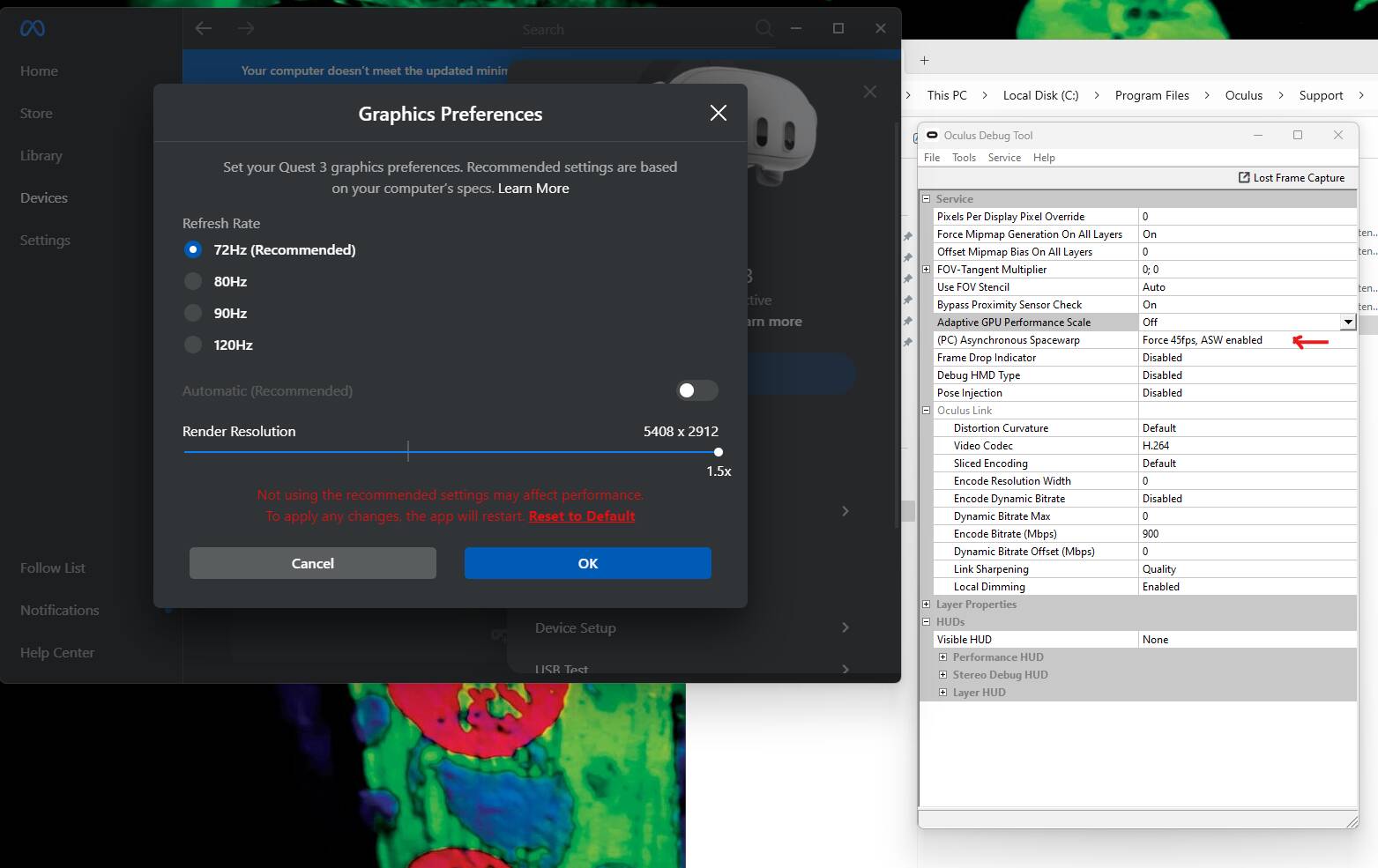
I think next step for me is to buy a proper VR headset something like MeganX so that I do not have to use these stupid tricks just to get a smooth gameplay…
I hope this helps to some of you guys. BTW Turbo mode did not help either with ghosting or stutters when the resolution was maxed .
Sorry for the necrobump. I signed up here just to say that i have the same issue in IRacing. I’m surprised that i saw someone describing the stuttering issue so well. Other than the reports from you, I haven’t seen more people with this issue.