Are you on Xbox, Steam or Microsoft Store version? MS Store
Are you using Developer Mode or made changes in it? No
Brief description of the issue: See the topic
Provide Screenshot(s)/video(s) of the issue encountered:
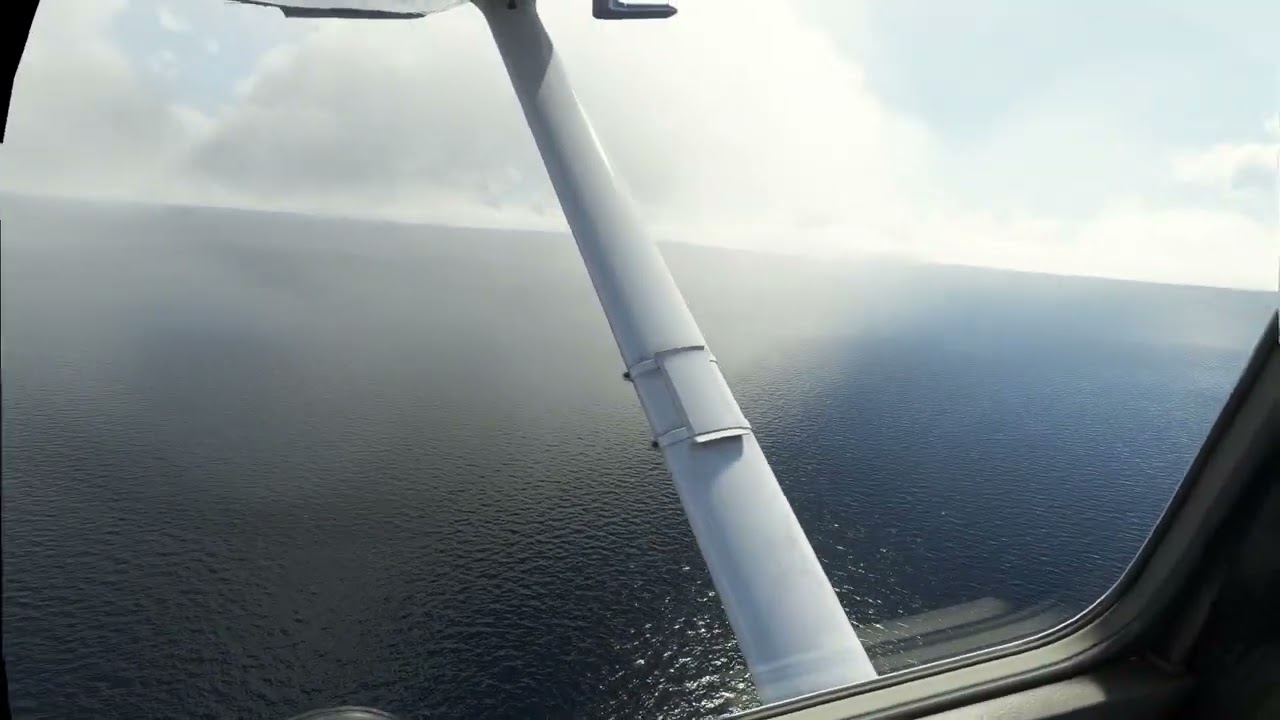
Detailed steps to reproduce the issue encountered: Enable Raymarched reflections in the graphics settings and load up a flight. You’ll then see (more or less clearly depending on how the light falls into the cockpit) how an attempt is made to create a reflection of the post dividing the cockpit windscreen. Disabling Raymarched reflections will immediately remove the graphical glitch.
PC specs and/or peripheral set up if relevant: Intel Core i7-8086K, Nvidia 3090 (511.79)
Build Version # when you first started experiencing this issue: After SU8
Find it interesting this hasn’t received a single reply so far. Sure I’m not the only one seeing this. I do know how a friend of mine has the same issue.
Guess most in here don’t care. Which to me is odd since the glitch is quite distracting from time to time, depending on how the light falls into the cockpit.
This is inherent to doing reflections in screen space, and has been discussed in many threads over the last year or more. It’s been this way since the launch of the sim, and is well known. Maybe someday ray-tracing will improve it, maybe it won’t, they haven’t committed to anything.
(Unless you mean something different from what is well known, in which case I recommend you add a screenshot!)
Not sure how you grab a screenshot in VR but what I do know is I haven’t seen this before SU8. Now I see it both in the TBM 930 (which is the aircraft I fly most) but also in other default aircraft. I talked to my friend and same thing for him.
So I’m not really sure what this is but as mentioned, the “glitch/reflection” goes away when disabling Raymarched reflections in the graphics options.
i have that always off, i dont care much about reflections in the cockpit, also on lower
hardware..i suspect that is why it is not more often mentioned.
actullay the sim works better on a bit lower settings.
As mentioned earlier, I don’t know how to grab a screenshot in VR and even less so a video. However, the white line you talk about could be what I’m referring to. Even when I’m not so sure I would call it a line. Very hard to describe the shape of it but I guess there might be a line in there somewhere
Yes, maybe the best option at this time is to simply disable reflections.
I noticed how you say cockpit reflections. I thought this setting wasn’t just for cockpit reflections but for reflections in general. Such as looking at shiny objects outside the aircraft etc.
That’s the reason I decided to keep the reflections enabled but maybe I should play around with this setting a bit more to see the actual effects having it disabled/enabled.
Here is the video, you can see in the window a white cut-off reflection (focus on the bottom of the window), that only appears in the left eye it seems and is completely wrong:
Sorry for the late reply, didn’t get notified a new reply was made. Which sadly seems to happen all to often in here.
Anyway, thanks for taking the time to make this video and I see what you’re referring to but it’s not the same I’ve been referring to. The issue I see is primarily seen when in the left seat and looking straight ahead. Doing so and when the light hits the cockpit in certain angles, you will see this very odd looking reflection. Which is far more prominent compared to what’s seen in your clip.
What’s the easiest way to record a video such as the one you made here in VR? If it’s not too much hassle, I might give it a go to be able to show what I’m really talking about.