Hi all,
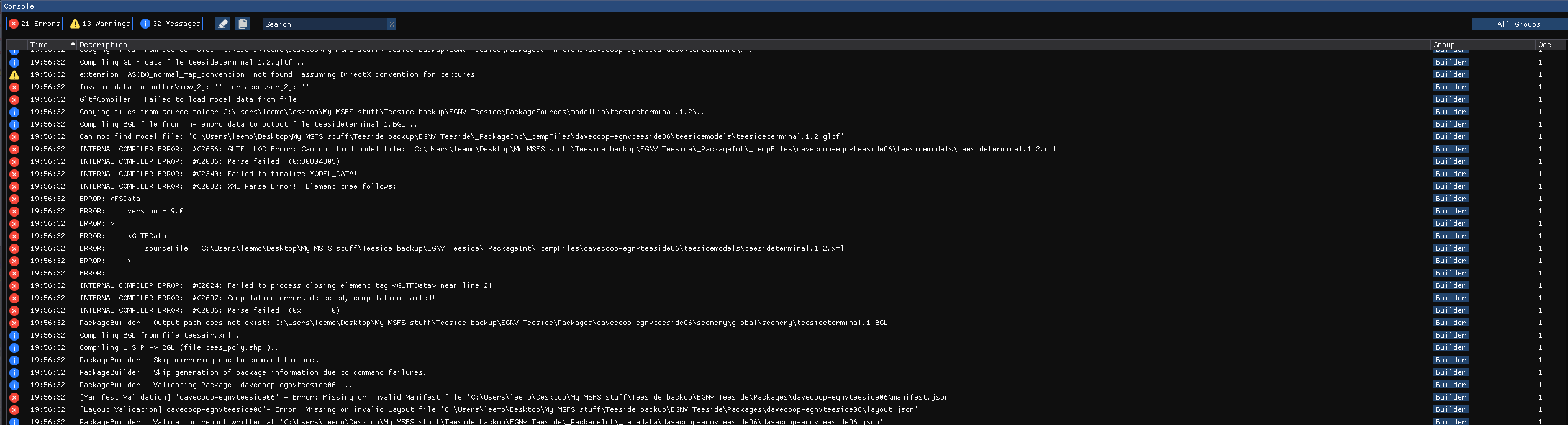
I have been working on this scenery mod for the airport 46U for some time now and have a quite flushed out v1.0 released on flightsim.to. Recently when trying to build out my v1.1 which basically just fixes a bunch of vegetation errors and replaces some buildings I found myself unable to build the package. Everything saves just fine yet when I clean and build my package I receive a number of errors pictured below.
This scenery mod does have custom buildings and packaged scenery from another library mod. My 1.0 version built just fine and includes the custom buildings but not the scenery library additions.
If anyone has any ideas what these mean or how to help it would be greatly appreciated.
Yup been having this issue since day one basically and there has been zero information on this. I really hope some clarity can be brought on this issue.
The first error is the most important. Missing manifest file can only be a consequence of the fact that the building does not complete. So, i doubt that the reason why the package was not built correctly is the missing manifest file. There must be another reason.
Thanks for the reply,
It’s strange because I have 4 other models which work great and built the latest one with th same settings in Blender, I haven’t change my MSFS SDK file structure so I am stumped lol
Nope, It’s custom model I made in Blender. Must be a problem with it as I exported another model and that went fine(shows in MSFS)
I got this line in the ‘Console’
WARNING: #C1103 GLTF : could not find the attached bounding box
I mean, that may take forever given the amount of stuff in it… However at the same time, MS and Asobo have somehow linked the wrong version of the SDK in the latest release so I mean, this is probably all mute as the SDK is almost utter ■■■■ currently.
This is exactly the same error I get. Were you able to solve it?
Made a model in blender, exported everything correctly (at least it should be correct according to several different guides) and it always says this different errors:
error in bufferView (checked the gltf with notepad++ and couldn’t find anything irregular)
Seem to have sussed it.
What I did was put my model into -'PackageInt-tempfiles-‘your project folder’-your modellib folder-and place your model into the model folder there.
Then try rebuild.