Regression: Exhaust shader effects visible inside Draco X cockpit in SU2 (w/ foveated rendering)

DESCRIPTION

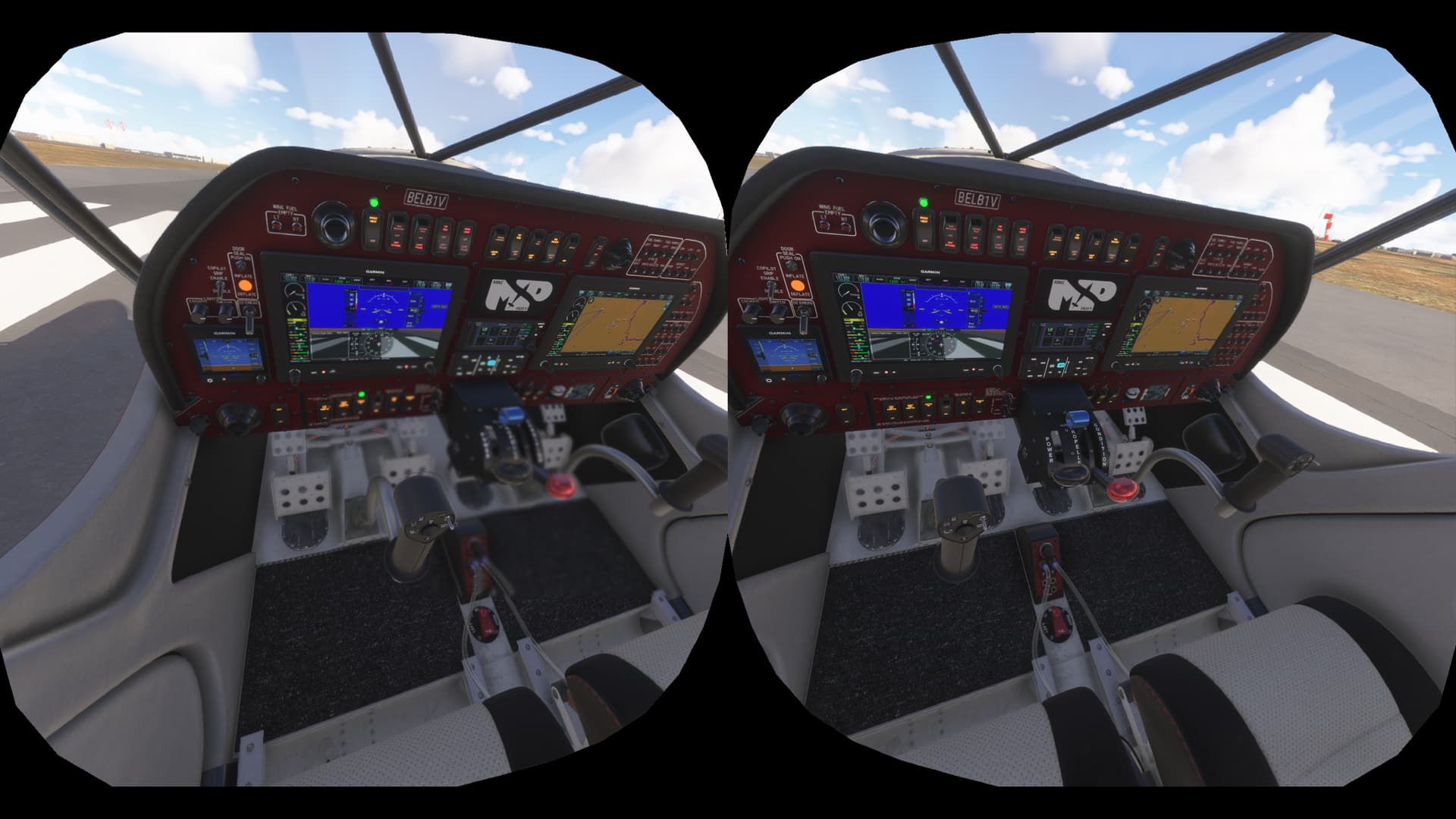
Description of the issue: When piloting the Draco X in VR, the exhaust shader is causing distortion effects to controls inside the cockpit. This issue was previously fixed in SU1, but has regressed and is reproducing in SU2. Note: only occurs when foveated rendering is enabled.

[PC Only] Did you remove all your community mods/add-ons? If yes, are you still experiencing the issue?
Yes, Yes

FREQUENCY OF ISSUE

How often does this occur for you (Example: Just once, every time on sim load, intermittently)?
100% repro

REPRODUCTION STEPS

Please list clear steps you took in order to help our test team reproduce the same issue:

  1. Load Sim
  2. Select Free Flight
  3. Select Patey Aviation Draco X and any airport for departure
  4. Start flight and switch to VR mode
  5. Enable foveated rendering
  6. Observe the area near the middle of the control panel and the throttle quadrant

YOUR SETTINGS

If the issue still occurs with no mods and add-ons, please continue to report your issue. If not, please move this post to the User Support Hub.

What peripherals are currently plugged in, as well as your VR headset? Please name all of them as there could be a potential conflict.

  • Quest 3S Headset (streaming via Virtual Desktop)
  • VKB Gladiator NXT Evo joystick
  • Thrustmaster TWCS
  • Thrustmaster rudder pedals

[PC Only] Are you using Developer Mode or have you made any changes to it?
No

[PC, MSFS 2020 Only] Are you using DX11 or DX12?
NA

[PC Only] What GPU (Graphics Card) do you use?
GeForce 4070 Ti Super

[PC Only] What other relevant PC specs can you share?
i7-12700K, 64GB RAM
GeForce Driver version: 576.02

MEDIA
[END OF FIRST USER REPORT]


:loudspeaker: For anyone who wants to contribute on this issue, Click on the button below to use this template:

Do you have the same issue if you follow the OP’s steps to reproduce it?

Provide extra information to complete the original description of the issue:

If relevant, provide additional screenshots/video:

Updated my initial report to indicate that this only occurs when foveated rendering is enabled. Turning it off makes the exhaust distortion in the cockpit go away, but it also significantly reduces my frame rate.

Do you have the same issue if you follow the OP’s steps to reproduce it?

Yes - every time
Provide extra information to complete the original description of the issue:
• OP describes it very well
My system: 7800X3D/RTX4090/64GbRAM/PimaxCrystalOG
SU3 beta 1.5.3

If relevant, provide additional screenshots/video:

Using the template below will greatly help the team reproduce the issue and ease the process of fixing it. Before posting, search for an existing report. If you are not sure it’s a bug, please first report in User Support Hub.

3 tags are required - add them in the tag section next to the title above:

  • One for iteration (msfs-2020 or msfs-2024)

  • One for platform (ms-store, steam, xbox , or xcloud)

  • One for aircraft if related (start typing in your aircraft name in the tag section and pick correct option)

Feel free to delete this quote section after adding your appropriate tags.

ISSUE DESCRIPTION

Heat blur is re-occurring in Draco X cockpit in VR. All of the area around the power controls shimmers greatly. Starts up as soon as fuel introduced at engine start.

FREQUENCY OF ISSUE

Each time in VR

REPRODUCTION STEPS

Please list clear steps you took in order to help our test team reproduce the same issue:

  1. Start Draco X

  2. Enter VR

  3. Start engine

YOUR SETTINGS

If the issue still occurs with no mods and add-ons, please continue to report your issue. If not, please move this post to the User Support Hub.

What peripherals are you using:

PC Store version . Not using developer mode.

RTX3090 on a Pimax Crystal Light with PimaxPlay 1.42

i9 13900K CPU, 64GB RAM, X56 HOTAS and Logi rudder pedals.

Please add a screenshot or video of the issue occurring.

same problem since SU3 with TBM930

See below an easy solution i’m using after SU2 without any other effect:

To remove the heat exhaust plume you can rename or move the file ‘FX_Heat_Exhaust.spd’ into another folder. I created another folder within that directory ‘FX Heat Exhaust Restore’ and moved it there. I’ve only tested this on the TBM 930 and I have no idea if moving this file will have unwanted effects on other parts of the simulation but it’s easily restored.

Drive?:\MSFS 2024\Microsoft Flight Simulator 2024\Content\Packages\fs-base-effects\VisualEffectLibs\Asobo\Base\FX_Heat_Exhaust.spd

I have had this problem since the very beginning (did not just occur in SU3). I also noticed that the fix of moving that FX_Heat_Exhaust file worked for the TBM, but not the Draco. I even tried moving two other similar files (including FX_Heat_Engine) but to no avail.

Yes I’m having that issue in the last Sim update 3. Anyone else?

Checking issue in latest SU4b and note heat blur is still evident but with twist!

In VR it only manifests if using Foveated Rendering (my setting 35). Turning FR off and no heat blur. Turn on FR and heat blur becomes visible but only inside the higher rendered box. Panning the view (in headset) the higher rendered box reveals the heat blur region as if through a window. The 2D mirror shows the full extent of the heat blur region.

Turning it off in SU3 got rid of the blur for me. Very new to VR and still learning settings - I got a Quest 3 just yesterday.

Interesting to note that the Asobo foveated rendering displays heat blur in the cockpit. Turned off FR in the sim and using PimaxPlay foveated rendering does not introduce heat blur in the Draco cockpit.

I noticed this was still present in the Draco x in SU4