dx12 is useless with any version of anything msfs related …at least in VR. I test it every few iterations of msfs now and then, and it’s just…really bad
1 Like
DX12 is smoother and more consistent framerate for me in MSFS VR with a 3080Ti OXR 100 Reverb G2. There’s a lot of variables of course, so people will see and prefer different things.
I just had a pretty good couple of flights with the new runtime tbh.
I’ll admit there was some ghosting on night lighting which I didn’t notice before so that may be new, but certainly the FPS “pulsing” is gone and I got a much more consistent experience.
Maybe there’s something in combination with the toolkit?
Do you have “shaking reduction” set? I turned it off due to it’s issues with the old runtime.
My team has run many performance tests for this release, I will even go and say more than for any other release before. Many different apps and combinations of in-game settings (DX11/12 when applicable, depth reprojection, motion reprojection). None of our testing showed any performance regression for 111, and certainly no “distortion” since none of the code in that area was touched.
I’m not saying that what you are saying is not real, but it’s certainly not “completely hosed”. There has to be one setting or driver or combination of setting causing your issue. We need to find which one. I have confirmed on least 3 different setups, running 3 different versions of Windows, we have absolutely no performance nor quality issue.
Thanks, this is one of the issue that we specifically targeted, so I’m glad that you are confirming better results. So far I’ve heard the same from a few more people but certainly too small population yet to know.
For people with issues (@ExeRay) can you try a couple of hidden settings to see if they affect your experience one direction or the other (please try settings individually before combining them)?
Please disable OpenXR Toolkit in order to reduce the number of variables at play.
Setting 1
Use regedit to create a new key… EDIT: Removed because I don’t want to start having people making those keys then forget to delete them.
This setting only has effect on the Preview runtime 112.
Setting 2
Use regedit to create a new key… EDIT: Removed because I don’t want to start having people making those keys then forget to delete them.
This setting only has effect on the Preview runtime 112.
Thanks.
1 Like
i have re-run it many times now with as much variables as possible. Anything i could think of. Such as turning off dev mode for example or any other overlay..i’ve tried changing every possible setting, including the ones in the toolkit. I have variable results with no specific thing i could find to be the cause. MR is definitelly worse for me after the update, i may have overdid it with “completely hosed” though. I can’t think of anything that could be interfering, especially since switching to non latest preview fixes the issues completely. One thing that is consistent and we could focus on is OXR toolkit’s fps counter. That’s the most obvious one. Try switching on the fps overlay in the toolkit and move your head around and notice if it’s sorta ghosting, dragging around the screen, and it may also have a little lag. If i switch to non preview version, this is instantly fixed. Performance wise there’s no impact or difference that i can see with the latest version. Framerate pulsing is still there for me, but it was never a huge issue for me. Even if it occurs i just alt tab to wmr portal and leave it in front for a couple seconds and it stabilizes. So i can confirm i see “pulsating” framerate in the latest version as well, but perhaps it’s less persistant. But since i switched to 3080ti and G2 i have very little problems with that anyway. MR though…has noticably more distortions though than before. Only problem with MR i have had before this is the one problem i can’t get rid of. The “shaking cabin” …in sync with my heartbeat. But it was already established this is a win11 problem. Most noticable distortions i see are when i open ingame menu in vr.
I can see what you mean in terms of the FPS display on the toolkit. It does have a little lag, like you said almost as though it’s framerate is lower than the game’s.
yes, this. And to some extent, this is also how the game looks when you move your head left to right in the cockpit. At least this was the case in a few instances when i tested it…even though my framerate is locked at 31 fps
One message you claim the issue happens with MR. The next message you’re now somehow implying it doesn’t. So which is it?
@mbucchia Hi Matt. I added the registry settings you suggested, exactly as specified and with a fresh boot and the toolkit disabled, but no change in behaviour. MR with the openxr preview on is still extremely stuttery with lots of artifacting, and very smooth with preview off. Interestingly the toolkit fps display shows that fps is still 30 or 31 all the time, but any panning of the view shows that fps display ghosting and juddering as you turn your head.
fwiw I’m running an nvidia 3090 with the latest drivers and all driver settings at default and the sim in DX11 mode. I have tried hags on and hags off, but it made no difference.
Thanks!
1 Like
was just about to go try the registry settings, but seeing @Ramasurinen already tried it, i’ll try tomorrow since it’s midnight here already. As for your question, i’m definitely implying the issue is with MR. I merely stated that i turned MR off to confirm it was in fact a MR problem.  Sorry, i’m not natively english, occasionally my choice of words may not be the best.
I’ve redone the same 111 vs 112 comparison that I did about 3 times in the last week (and more the week before)
- DX11
- Lowered settings in order to achieve framerate sufficient for motion reprojection (I was aiming for 22.5 rate, so I left enough headroom for that)
- This time, I even tried with HAGS on, because I realized that we did not test it.
My results are as follows (same as all my previous tests):
-
Motion reprojection with 111 is pretty much unusable in this scenario, with it kicking on and off. This is the bug we were meant to fix. When this happens, this means most frames are left without motion reprojection and therefore without artifacts. But the smoothness is obviously not here.
-
Motion reprojection with 112 works impecably on first try. Locks immediately to 22.5 and does not turn off. Of course this means lots more artifacts, since the reprojection is on.
My best guess at this point is that when you are testing with 111, you likely cannot achieve stable reprojection rate due to the bug. So you’re not getting artifacts… because you’re not actually using motion reprojection. But then with 112, the bug is fixed and you are now actually able to use reprojection, causing the “distortion” which is an inevitable aspect of motion reprojection.
So for short, motion reprojection is now actually working, and you’re realizing how hard it is to predict frames without causing visual issues.
The best thing you can do to check on this:
- Please as I asked like 3 times already, turn off OpenXR Toolkit. If I hear one more “looking at toolkit overlay”, I will ignore the post. Wrong thread to debug OpenXR Toolkit issues, let’s do one thing at a time.
- Use the WMR overlay instead
- Compare 111 (Preview off) and 112 (Preview on)

Solid blue = motion reprojection is actually active.
Blinking red = motion reprojection is not engaging continously. You are not using motion reprojection.
You should always be solid blue. Yes/No?
Pay attention to the following thing:
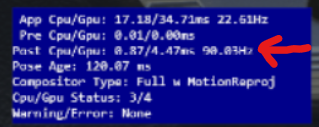
The 3rd line here should be as close as 90 Hz as possible, at all time. Yes/No?
ok, what you just wrote sounds off on so many counts (i don’t mean it offensively) that i’m going to go try this right now, before i respond to your post.
I’m testing with 30 Hz right now as well, so I fall exactly into the same frame timing, and still no issue. Just in case the issue was not happening with 22.5. I had to lower resolution a bit more to get the app GPU time under 30ms.
@mbucchia I have tried the registry settings, one setting at a time and both combined. It doesn’t appear to make a difference. OpenXR Toolkit is disabled.
An example of what I’m seeing with reprojection enabled is if I disable the preview runtime and look at my yolk and move it left to right, the yolk moves smoothly. If I enable the preview runtime and look at my yolk and move it left to right I can count the number of distortions it takes for the yolk to move from hard left to hard right because it appears to be rendering very slowly.
In both cases (111 and 112) I have the overlay enabled with a solid blue, and the 3rd line fluctuates between 89 and 90 Hz.
Thanks. Can you do me a favor and check something else?
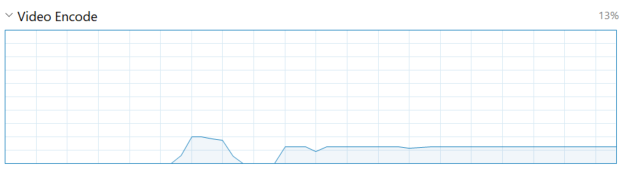
In your task manager, can you take a look at GPU stats, specifically the Video Encode graph? What does it look like? If it steady (after the initial switch to VR)?
TLDR first.
-
In both cases, 111 and 112 (with toolkit disabled) i am seeing solid blue with 90 hz constantly. I ran this at 100% G2 resolution across the board.
-
The only difference between 111 and 112 is a substantial increase in distortions with the latter.
Elaboration:
First of all. What you’re describing with your experience (with pulsating etc) speaks only of either the fact A) The hardware you’re testing this with is not on par with what’s required to run smooth. Or B) Your sim/system is not optimized properly to run it smooth. Pulsating in my experience only is occuring because the system somehow doesn’t have enough resources. What exactly it is that stabilizes it is far beyond my tech understanding of the problem however…whenever your sim stabilizes and you’re seeing smooth solid motion, there is never a possibility that MR is not active. If MR is activated, i fail to see how it wouldn’t be. It either is or it isn’t. The only other option is it for it to break below 22.5. So distortions are occuring with active MR (as proven with test you set up for us to do) and at stable MR. As far as usability and performance goes, i see no difference between 111 and 112. The only difference i notice are distortions. And as far as testing with toolkit goes…for some reason Toolkit is making the issue far less obvious somehow. I don’t know what exactly in the toolkit it is that’s making the image more stable. I’m guessing only the stabilizer function has such an impact. As far as beta10 goes, i’m still using the toolkit, the only difference is i’m no longer using NIS/FSR as it is no longer beneficial after DLSS got introduced. I’m sorry i can’t help more, i wish i could tell you a better argument, but i’ve tried as many different scenarios as i could think of and i can’t make the distortion issues better with 112.
Please don’t get offended, i’m just trying to help. You claimed 111 is unusable. That statement is very false. It’s completely usable and stable. I’m just trying to point out there’s something not right in your machine if you can’t run 111 stable. If you’d rather we go on pretending everything is great and dandy with 112 instead of reporting bugs, sure mate, no prob if it makes your life easier. I’m not here to complain, just to report.
1 Like
I’m the one actually providing experiments to run here so your statement is completely unfounded.
1 Like