When I am just sitting in an aircraft, how do I return to the Main Menu? Thanks
Press the escape key.
1 Like
I discovered that the Escape key only works in Full Screen mode, not Windowed mode!
It should do if the window has the focus.
I works in windowed mode; however, the click area may be hidden by the task bar. I often return to full screen mode before going back to the menu.
I accidentally deleted the “esc” key function to return to the Home Screen! What is it called, so I can reprogram it? Thanks!
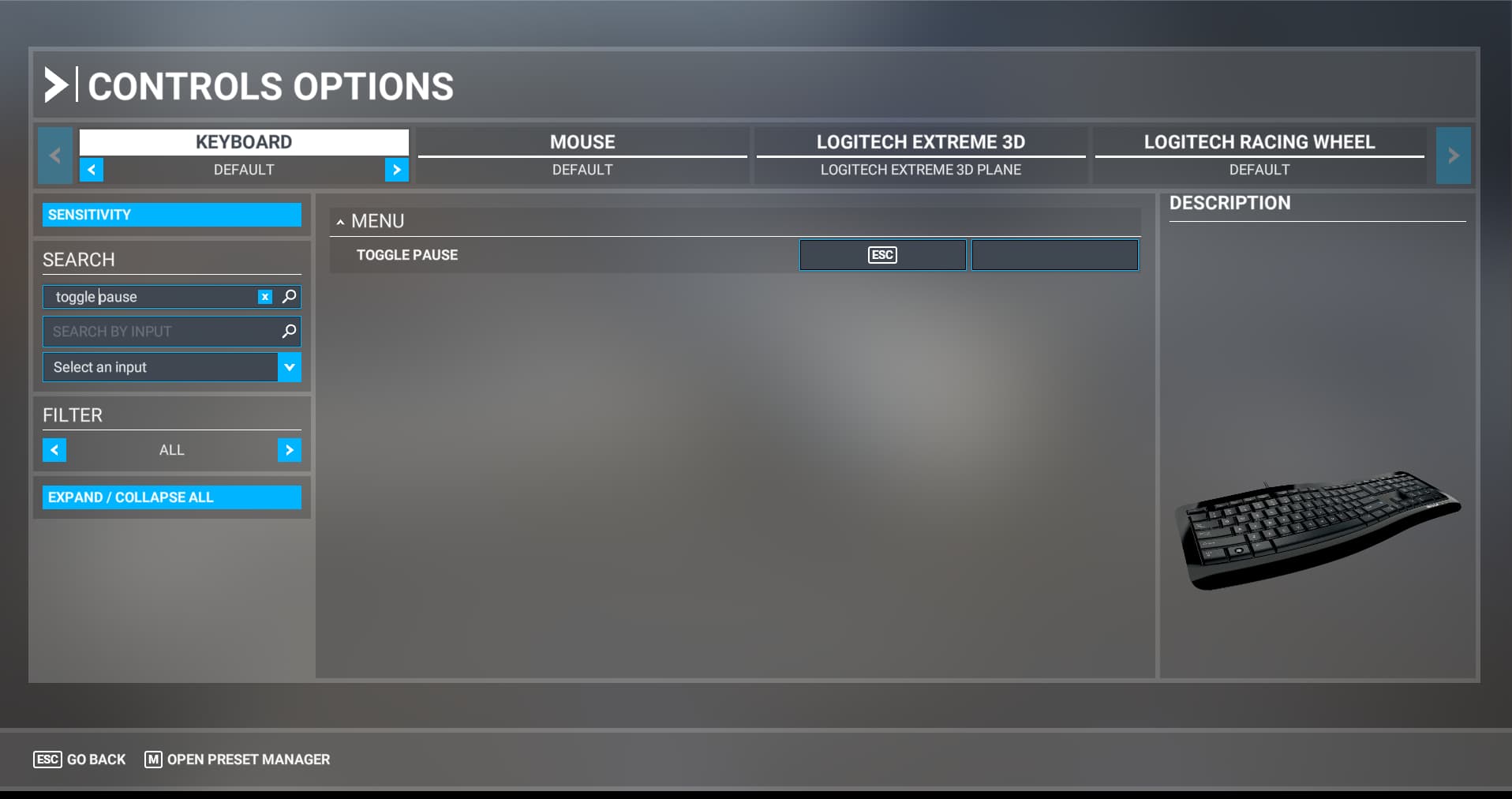
Thanks! I’ll give that a go
1 Like
Nope. So, here’s my predicament: I’m trying to open another window in Developer mode while I’m actively in the simulator, so I can record a wing-view while flying the plane in the other window. I’m not able to do that, because I accidentally deleted the key to whatever that description is. If you can do it, please input the key into the search of the Controls Option and let me know what the key does. That way I can search for it, and remap it.
I thought the more I used MSFS, the more I would like it. Unfortunately, the more I use it, the more I think I am coming up against Basic Level programming problems. MSFS 2020 touts itself as being around for 40 years; but it reminds me more about the issues that users reported with First Generation X-Plane and P3D flight simulators. The programmers would do well to get back to basics and study the Microsoft Flight Simulator programming and range of options of previous generations