ISSUE DESCRIPTION
Description of the issue:
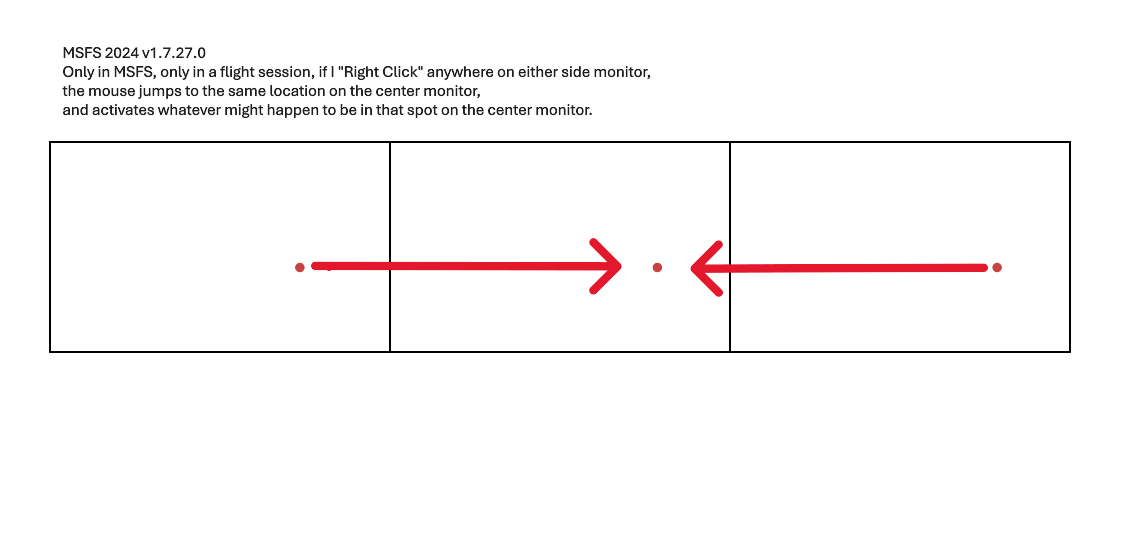
In a multi-window set up of MSFS 2024, Right-clicking the mouse on any side window, will pop the mouse pointer to the same location on the MAIN window, and, sometimes can activate whatever is under the pointer on the main window instead leading to unintentional input (and sometimes crashing the plane…)
This only happens in MSFS, not in Windows itself. I have a new default install of Windows 11 25H2 up to date and no customizations that would affect mouse behaviour. Right-clicking in WIndows itself, on side screens, behaves normally.
FREQUENCY OF ISSUE
How often does this occur for you (Example: Just once, every time on sim load, intermittently)?
Every time.
REPRODUCTION STEPS
Please list clear steps you took in order to help our test team reproduce the same issue:
-
In a multi-window set up of MSFS 2024, load in to any aircraft at any parking spot
-
Position the mouse pointer on either side window (not the main center window)
-
Right Click the mouse (as if to engage Freelook)
-
Note how the mouse pointer moves to the same X-Y coordinates on the Main Window?
YOUR SETTINGS
If the issue still occurs with no mods and add-ons, please continue to report your issue. If not, please move this post to the User Support Hub.
What peripherals are you using:
Microsoft Keyboard, Mouse, and Xbox Controller
[PC Only] Are you using Developer Mode or have you made any changes to it?
No
[PC, MSFS 2020 Only] Are you using DX11 or DX12?
DX12
[PC Only] What GPU (Graphics Card) do you use?
RTX 5090
[PC Only] What other relevant PC specs can you share?
9800X3D / RTX 5090 / triple Samsung S90D tvs