I fly the Cessna 172, the Caravan 208 and the Pilatus Pc-12 NGX on a PC. With the 172 and the 208, I can use the G1000 Autopilot and VVAV to fly all the way down to the runway. For a month, I’ve been trying to duplicate that result for RNAV approaches with the Epic 2.0 system in the PC-12. I’ve watched numerous videos and read everything I can find on the subject. I watched videos by Flight Simmers and Flight Sim Rookie where they made it work. I duplicated their flights and implementation steps but no success - never able to get APR to activate no matter the stage of the flight. I’ve done numerous test flights trying to solve the puzzle but no luck. Wondering if this is just a particularly buggy aspect of the PC-12. If anyone has had reasonable success with this and they can offer suggestions or any step-by-step info, I would appreciate it. I don’t mind doing the work to test any possibility.
Strange! Never have any issue with that. Can even do APR mode on pure VFR approaches. The triangle on the right has to be almost perfectly centered and localizer/runway heading should be established when engaging. I always disengage VNAV beforehand (goes into PIT mode and keeps pitch so no problem with that). Hope that helps. Otherwise maybe share screenshots of the situation it doesn’t engage in.
Personal Comments and Observations
I was a bit of a noodge over at Working Title Discord to get the Visual Approach capability enabled. It was a bit dissonant that a jet known for it’s relative rough-field capability couldn’t perform this under coupled AP.
But they coded it in like a champ.
What would help too is maybe a video right before you reach the FAF, with a particular focus on what’s happening in the PFD.
I’ll work on some screen shots but a couple of questions. Which triangle are you referring to and at what stage of the flight do you disengage VNAV - before reaching the Initial Altitude Fix, the Final Altitude Fix or some other point. Thanks
These are the triangles I am referring to. The „non filled“ are basically the virtual glideslopes based on FMS/gnss/baro data. The „filled“ one is driven by ILS. When they hit the „big“ marker in the middle it’s time to disengage VNAV and activate APR mode. And as said you should be established on runway heading. Works all the time for me. For ILS make sure that the ILS frequency is active on NAV1.
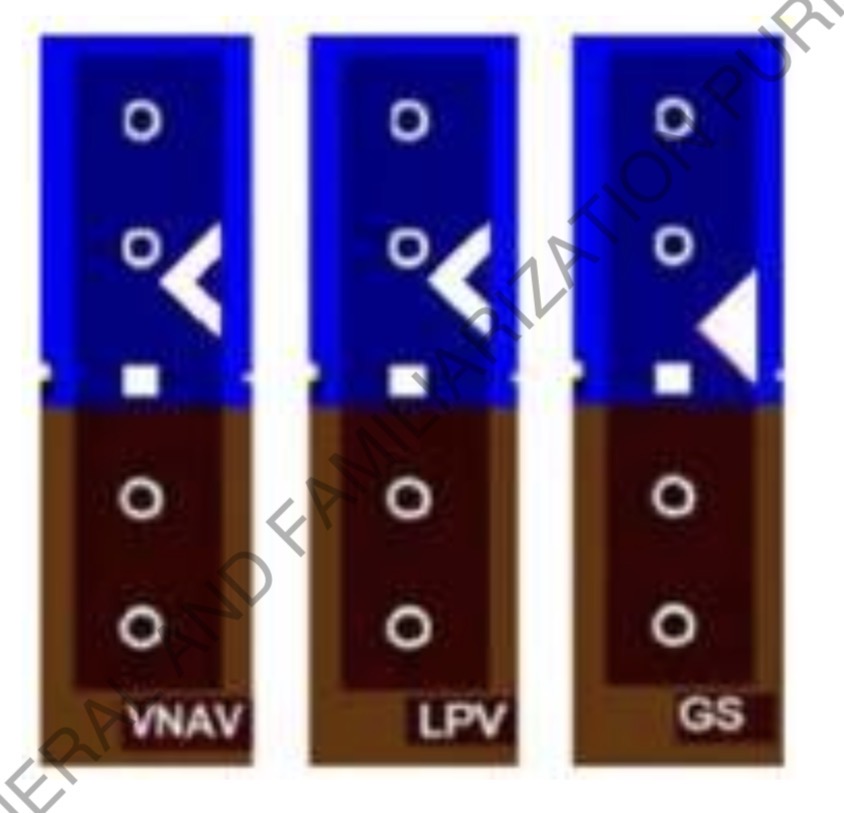
Thanks for your patience and assistance. I have never seen these triangles while flying the PC-12. Wondering where to find them. As an aside, your mention of activating APR mode even on pure VFR approaches motivated me to test that out. I flew a VFR free flight with the PC-12 and the APR actually engaged. Nearing the FAF, I had AP and VNAV active with the VNAV-associated altitude set 50 feet below the runway elevation. I armed APR, VNAV clicked off and the plane came down perfectly to the runway apron with me controlling the throttle. I then selected a medium cargo mission and followed the same process. Same positive result as the free flight. I was exhilarated - for a moment. I followed the blue arrows to Hold Short but it was not highlighted and there was no acknowledgement when I stopped beyond it. I used ATC to request taxi to parking. Blue arrows showed up but they led to a dead end - no parking circle. Killed the engine but no “Mission Successful” message. Tried everything but finally had to abort. One step forward and two steps back but I will keep trying if you can help me find the triangles.
Did you fly through the last Blue sqaure on Final and report it? If towered did ATC answer you? If Untowered did the Green highlight come on in your Mission Steps as ticked.
If you do not complete that message on Final and get a repsonse of some form your mission will not end.
A possible workaround.
You can try to take off again and resend to ATC your FP, if you get a response pick the runway in the coms box before sending to ATC that the mission told you to fly to.
Hi @VagueSteam1363
To loop back to your original question in free flight, I’ve had mixed results doing RNAV approaches in the PC12NGX.
I set up a flight ending with an RNAV into KSAR rwy 18. I’ve tested that approach many times in various aircraft, and know it works fine in all the other tests.
The initial flight down was normal, with the VNAV descending as required.
As I neared the IF/IAP, I made sure to delete the discontinuity shown in the flight plan, and got the option to activate the approach, which I did. (I don’t remember if this was from the test flight or one of the others I did, but they were all the same).
Here’s some shots of the actual approach, which ended normally. The “APR” functioned correctly when engaged, and provided both lateral and vertical guidance (no need for VNAV to descend once the virtual glide path (VGP) engaged.
This was a bit of a quick thrown together response, but I’ve got a bunch of other screenshots if you want any further information on specifics.
Now the bad news! I tried another approach to a place I haven’t gone into, and while it seemed to work for the most part, there were some hiccups. Specifically, the sim ended my IFR plan. So I had to cancel IFR and then request IFR again with the previous flight plan. That one worked mostly. There were some adjustments I had to make to get it all together again. I had another flight cancel IFR, and it deleted my flight plan in the EFB. So I rebuild the approach, sent it to ATC/avionics, and then requested IFR again. Worked for the most part, but required some adjustments to get it all done quickly enough to make the approach.
Regards
P.S. I’ll give this some more testing in SU6b 1.8.5.0 since they included this fix in the release notes:
“Pro Line 21 Integrated Avionics System
Fixed multiple issues where sending a flight plan to avionics from the EFB could result in an incomplete route.”
I can’t thank you enough for the tips and assistance. I flew 3 free flights and your method worked perfectly. I then flew a medium cargo mission - perfect result. I even put together a checklist (50+ steps) to insure I had it down pat. Flew another cargo mission - perfect result. Flew a third. Deep in the flight I noticed I didn’t have a TOD. Checked the flight plan and found the simulation had switched my VFR plan to RNAV. Tried everything to get it to accept my original plan but no luck. Rebooted and tried another medium cargo mission- same problem. For example, I select Runway17, Visual 17 and Straight and activate. It goes right back to RNAV17 and I don’t know how to fly it. I would rather fly the VFR version because it is simpler to understand since you gave me invaluable information. Ever had the simulation switch approaches on you out of the blue?
Glad some things are working better for you!!
As far as some of your comments, I’d add that I personally don’t test within the career mode. There are lots of folks that are much more into that mode, and much more experienced/knowledgeable than me of issues within career. Sorry!
So far, in free flight, I’ve not had the sim change approaches on me, but as mentioned, I have had it cancel IFR when I still wanted to fly that approach. In your case, is there a chance the airfield you were going into changed from VFR conditions to IMC? Obviously IRL that would require a change, but I don’t know if the sim will change conditions, and respond accordingly by changing your approach. But that is an interesting find on your part. I’ll start a VFR flight in free flight, and midway change conditions to IMC, and see if the sim recognizes the change and how it responds (if at all).
Regards
I appreciate the work you’ve done to respond and I will study the screenshots. I’ve tried RNAV approaches but they were so inconsistent I was hoping there was a better way. FellWinter8818 gave me some great info about how to fly VFR approaches all the way down to the runway. This method worked for me twice and then the simulator stopped holding on to my VFR approach info - started switching me to RNAV right after I input the VFR approach info. I’m spending all my MS2024 cash moving the PC-12 to flights that I am not able to complete because I need a lot of assistance to land safely.
There are some navdata/avionics changes listed in SU6beta, so I’m going to test some of those and see if it’s more reliable.
If nothing else, you might file a bug report (or see if there’s already one posted) concerning the sim changing your approach, especially since it’s repeatable.
Regards
Thanks for your comments. Last attempt, I was in a parking space doing the setup before requesting to taxi. I had set up a VFR flight in the EFB and sent it to ATC and Avionics, On the PC-12 MFD, I selected the origin runway and then selected the VFR (Visual) runway and the “Straight” option. After I activated, I double checked and the simulator had replaced my VFR info with an RNAV approach into my destination runway. I didn’t even get off the ground before it was changed. After a reboot and trying another mission, the same thing happened. Don’t know what is causing my VFR info to be replaced with RNAV.
As far as I can see your initial request is solved!
The other things you described are imho „career issues“ and might be worth a new thread. I usually had success with: filing FP from EFB to ATC and avionics before the mission and filing again only to ATC once in the cockpit but before engine start. Without the second filing I had issues with VFR flight plans too (e.g. runways different from the ones in the FP were assigned). IFR plans do not require the second filing in my experience.


