I’m having trouble with my Thrustmaster TFRP Rudder Pedals on my PC (Windows 11). I have MSFS 2024 setup on both my laptop and PC and am experiencing the same issue. Both computers are running the latest (non Beta) version of the sim.
When starting a new flight, the rudder will be all the way to one side, even though the rudder pedals are centered. If I hit Num+5 on the keyboard, the rudder will center, but as soon as I touch the rudder pedals the default position revert back to one side instead of centered.
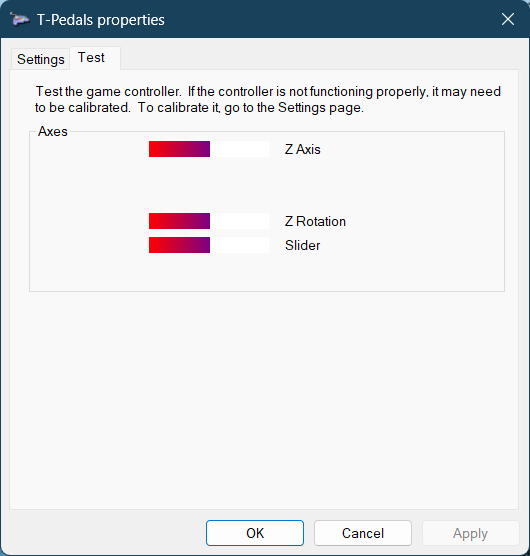
If I go to Game Controllers in Windows 11 and select properties for the pedals, I initially get this:
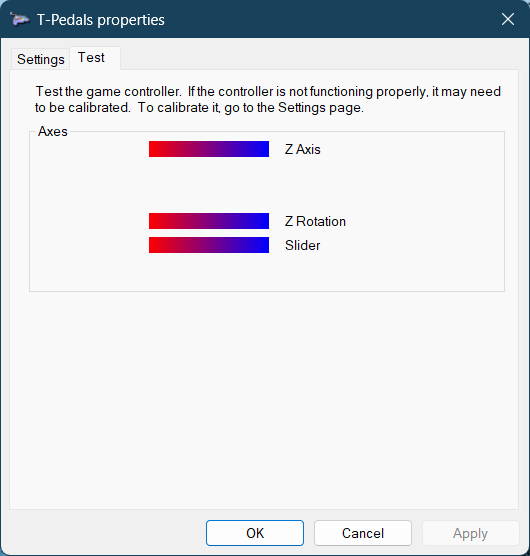
Which shows all the axis centered. However, if I move ANY of the axis (rudder, or either toe break), all the axis jump all the way to the right, like this:
Scroll down to Utilities, download and run Advanced Calibration Software V2.12
This should show you a better idea of where Windows is seeing the all deadzones and centre points, as well as allowing you to make adjustments.
For example my TFRP only reads about 80% of the Axis for pushing the rudder to the left, so I was able to use this software to adjust it to read 80% as max deflection, and still get full deflection in the sim.
I ran the Calibration Software as suggested. The axis values look good in that software, but as soon as load up a flight in the sim the rudder is full left again when the pedals are centered.
I think with these pedals you are best to use the Thrustmaster calibration tool rather than Windows, but you have tried that already.
Are they plugged into the PC directly, or into a Thrustmaster joystick or throttle? I’m sure I read that can make a difference, so try both ways if you can.
If none of the above work, and the issue is repeated whichever PC they are plugged in to then it sounds like a hardware issue, most likely a loose or failed potentiometer or possibly bad wiring.
Are they still within warranty? If so I would arrange to return them if possible, or at least try to contact either Thrustmaster or the seller for some customer support. If they are out of warranty, check YouTube - there are video guides on how to repair multiple different issues with these.
If you end up needing to replace them, I’d avoid Logitech or Thrustmaster in future and look to one of the brands better known for customer service and mechanical reliability such as Virpil, MFG or VKB. The VKB t-rudders are the lowest cost of these three and are superbly robust but don’t have toe brakes, so you would need another axis to be assignable for brakes.
Check out online marketplaces and auction sites, as occasionally a set of pedals from one of these makers will come up.
How many USB devices do you have and are they all connected directly to the PC or do you have a powered USB hub? can you correct it using rudder trim. I assume this is for any aircraft or is it for one particular aircraft?
[quote=“TinJungle791349, post:5, topic:718604, full:true”]
How many USB devices do you have and are they all connected directly to the PC or do you have a powered USB hub?[/quote]
When connected to my desktop PC, it is going through a powered hub, but when testing it on my laptop it’s plugged in directly with no other devices attached.
I’ve tried it on a few different aircraft and have the same issue. All of them have been small GA planes and I don’t think any of them have rudder trim. I’ll have to try one that does.
Pedals are plugged into the PC directly, not into another device.
If it was a hardware issue, wouldn’t I see the issue when using the Thrustmaster calibration tool as well. Since I’m seeing the problem inside the windows app and not in the Thrustmaster app, it seems like maybe Windows is causing the issue somehow.
That’s very odd - to appear OK in the TM calibration tool but not in Windows. It’s difficult to imagine that Windows is causing this though, or there would have been loads of reports of the same issue. Do the pedals work completely as expected using the TM software, and stay in the centre when they should? If so is there an outdated driver or something in play, or a conflict between the two calibration tool - can you select only the working one?
Also, is this something that has just happened and the pedals worked OK previously, or have they always done this?
I’m not familiar with the TM software and ecosystem, but have you checked all drivers, tools and Windows are fully up to date? There were a lot of guides and tools in the link that @Raynen provided above, so read through and check those if you haven’t already.
Hello.
Do you have your pedals plugged directly to your PC? If so, did you check if the adapter is correctly set on flightsim mode? (it has a small switch so that you can alternate between racing/flightsim).
Once verified, install the adapter driver presented here: T.RJ12 USB ADAPTER – Thrustmaster