I am dealing with a strange issue and I am struggling to find the correct answer. Sometime ago I decided to go with a regular SATA SSD for a dedicated 2TB storage just for flight simulation. My deciding factor between SATA SSD and M.2 NVMe wasn’t necessarily the price, but more stability and power efficiency and most importantly running temperature. For these reasons I decided to get SATA SSD.
It seems right now that I can get an NVMe at a lower price than the regular SATA SSD.
So I wanted to hear any experience on the use of NVMe for flight simulation and perhaps gaming when it comes to power consumption and temperature and most importantly if it will affect the temperatures of GPU and CPU??
Because it obviously feels like a really bad deal to get the less advanced option for a higher (even if just slightly) price.
No problems for me and I have two. The main one, a 980proEVO is protected by a rather nifty heatsink on my MSI B550M and always stays cool (low-mid 40s) and the other is only PCIe3 so doesn’t get very hot as it’s mostly used for storage (community and official) and for any recording.
NVMe SSDs don’t draw that much power. Keep in mind that the temperature of e.g. an SSD isn’t what heats other parts, the power draw is. You can have a low-end 85 C GPU drawing 75 W and a high-end, well-cooled 65 C GPU drawing 300 W, and the latter will heat the computer case 4 times as much as the former. The GPU itself is cooler, but that’s exactly because the heat is redistributed inside the case.
So even though NVMe drives often get hot at 80+ C, that’s not the figure to look at, power draw is.
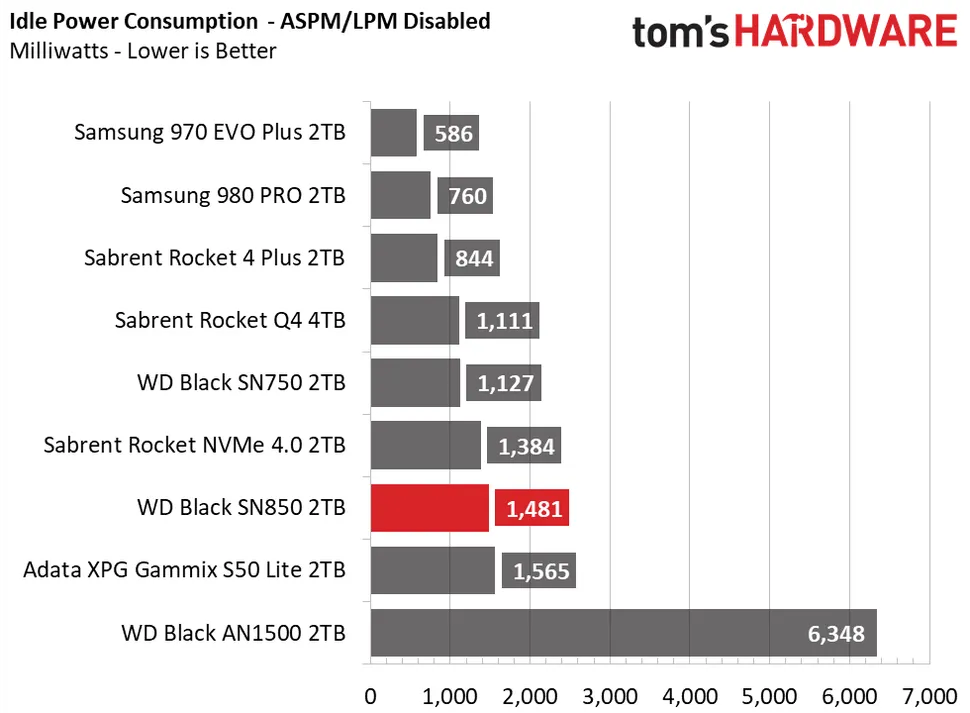
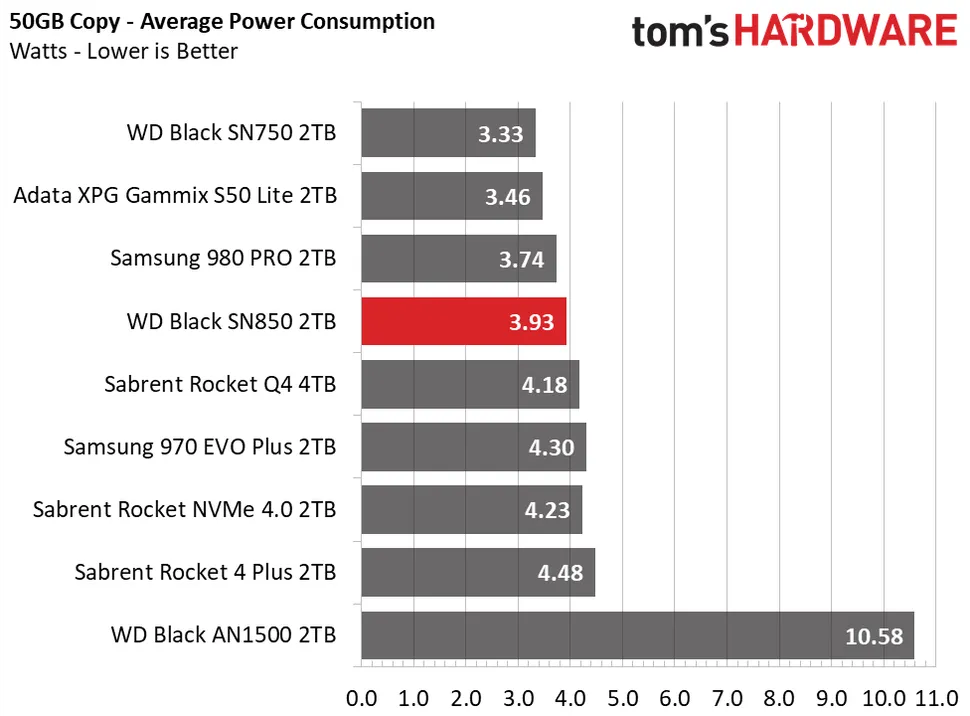
They’ll be idle for a vast majority of the time when playing, and in this Tom’s Hardware test we’re talking about 1.5 W when at active idle (waiting to process commands). At load just about 4 watts.
I couldn’t find reliable numbers for SATA SSDs, but even if they’d draw as little as 1 W at most, that tiny 0.5-3 W difference between the types wouldn’t make a measurable difference for your CPU or GPU.
The drive in question is a Samsung 970 evo plus, which it’s currently priced at €219 for 2TB. The 980 pro (over €360) is a bit much for what I intend to use it for I believe. I’d only really consider the 980 pro if there were near double the value. But I highly doubt it.
For what it’s worth though, I’m not sure how big of a difference it makes; MSFS loading doesn’t seem to be limited by disk speeds. In fact for whatever reason it loads slower on my new WD SN850 (7000/5000 MB/s) than my 2017 Samsung 960 EVO (3200/1800 MB/s). The newer crushes the old in everything including random reads, but in this case performance didn’t improve whatsoever.
Just to point out that many cheaper M.2 SSDs on offer aren’t NVme but are in fact NAND and may not be compatible … and even if they work they are still considerably slower. The same for M.2 slots on a mainboard - if NVme isn’t specified then be wary.
Performancewise for Windows and MSFS a 500GB NVme is plenty if you then use a normal SSD for your packages, only in sim menu to flight loading times should be affected and still way better than HDD.
That I’ll never understand It’s just so easy to have two files open on your desktop and drag what you need from one to the other (it’s also handy for diagnosing 3rd party mods). Yes there are other solutions but often they seem to have problems at sim update time.
About a week back (after SU7) I measured exactly 2 minutes to the main menu with Community empty, then 2 minutes 4 seconds with my usual mods (about 30-40 folders).
Just now it took 2m 33s, then on a second launch just after 2m 32s.
The fact that it didn’t differ more also points to the disk speed not mattering, since a lot/most of the files would be cached in RAM after the first launch (I have 48 GB).
My motto is, the quicker the better. I got a 980 pro and a 970 evo plus to run all my games and I never had any problems. I don’t have SSD’s in my system for years now and never had any problem with the NVME’s. So get some and get the fastest your board will support. You won’t regret it.
I’m expecting more importance once we have Direct Storage, as I see it default scenery can then bypass ram completely so photogrammetry etc. and should be cpu light then making server speed the only important LOD factor.

 (but it’s not that bad with a fast NVme drive)
 It’s just so easy to have two files open on your desktop and drag what you need from one to the other (it’s also handy for diagnosing 3rd party mods). Yes there are other solutions but often they seem to have problems at sim update time.