Severe FPS Drop at Night MSFS 2024 (All Airports, All Aircraft)

Hi everyone,

I’ve recently started experiencing a major performance issue in Microsoft Flight Simulator 2024, specifically during nighttime operations.

Issue Summary

  • During the day, performance is stable at around 116 FPS

  • At night, FPS drops significantly to around 90 FPS (or lower)

  • This happens consistently at all major airports, regardless of location or aircraft

Tested Locations

I’ve tested across multiple major airports, including:

  • VHHH (Hong Kong)

  • KJFK (New York JFK)

  • EGLL (London Heathrow)

  • OMDB (Dubai)

  • YSSY (Sydney)

  • EHAM (Amsterdam)

  • EGCC (Manchester)

  • EFHK (Helsinki)

The issue occurs universally across all of them.

Troubleshooting Already Done

  • Cleared the Community folder (no add-ons)

  • Tested with default aircraft only

  • Completely removed and reinstalled NVIDIA drivers using DDU

  • Monitored thermals and VRAM usage (everything normal)

  • No signs of CPU/GPU throttling or spikes

Key Observation

  • The issue is strictly tied to nighttime

  • Daytime performance remains perfectly stable

  • Night performance is consistently degraded regardless of settings or scenario

System Specs

  • CPU: i9-14900K (water-cooled)

  • GPU: RTX 5070 Ti

  • RAM: 32GB DDR4 @ 3600MHz

  • Storage: 4TB (2× SSDs)

  • Monitor: Alienware AW3418DW (G-SYNC)

Additional Notes

  • This issue started suddenly, without any clear change on my end

  • No recent hardware changes or known system instability

  • Performance drop feels rendering-related (lighting?) rather than hardware limitation

Any insights or suggestions would be greatly appreciated.

Yeah, the same thing happens to me, but I’m on xbox. At night when ever I have been flying for a couple of hours, My frames just instatly drop whenever I do anything. Even when I dont touch a thing my game becomes all stuttery like only updating once every 2 seconds. It makes it almost impossible to fly.

Same situation here. I lose 20 FPS in Night time compared to day daytime on ground.

Has anyone figured out a solution to this? I’m still going from 30 fps to 22-23 fps at night. I don’t think I’ve even done a night flight since I migrated from 2020 to 2024

I am also having this issue probably something like 25% fps drop during night. It is enough to just change time of day to when it is dark and all of a sudden there is massive fps drop. Wish this issue would get more attention

Why is this an issue or a bug? Isn’t it that at night millions of light sources have to be rendered additionally and therefore FPS goes down?

I’m not seeing this at ZBAA in SU6 v1.8.14.0. Framerates on my PC are hovering around 90 when ready on the ground at the airport, which is about the same as when I arrived during the afternoon yesterday. I’ve not checked the airports listed in the OP, though.

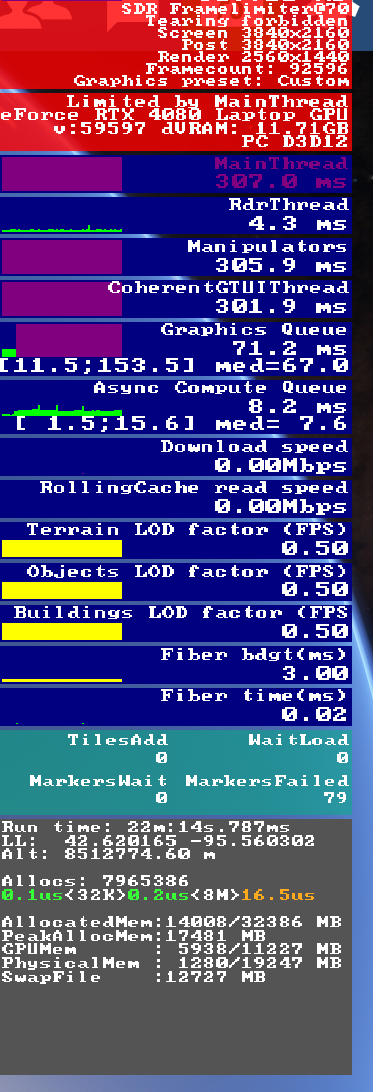
I am experiencing 2-5 fps when entering Career mode. Debug FPS is displaying “Limited by Main Thread” Latency is 300ms. Nvidia 4080 HTX is waiting on CPU. I9 intel processor.

First of all, your laptop is simply too weak to run 4K properly. Try setting MSFS to 2K and DLSS performance.

Secondly, there is a better driver available for your setup - 616.56, which is the one I’m currently using.

I have an Asus with I9 and nvidia 4080 HTX

That laptop is simply too weak for gaming at 4K. Try 2K with DLSS Performance or FULL HD instead.

Have to say, even with DLSS it doesn’t improve at all. Especially during takeoff and landing that a big thing, and even lags happen with taxi and cruising. Daytime receives consistent 40-45 ish fps on RTX 4060 but night time drop right to 10fps in stutterings

I think you are think of the wrong kind of fps drop. Its not going from 90fps to something like 30fps, its dropping from 90fps all the way down to .5 and even .25fps. The game stops updating(as in controlls don’t work, maps stop moving, in-game clocks stop counting, etc) and the simulator freezes. That could be an issue but I doubt it as why would putting in some dim lights make the whole simultor freeze.

Also something to note is this doesn’t happen every night, and I haven’t completly figured out how to force it to happen or how to stop it once it has started, but when it does it gets so bad that the simultor will crash, sometimes during flight.

It seems to happen during night and it doesn’t matter wheather you are on the ground or in the air, it just instatly goes to .5 fps and stays there.