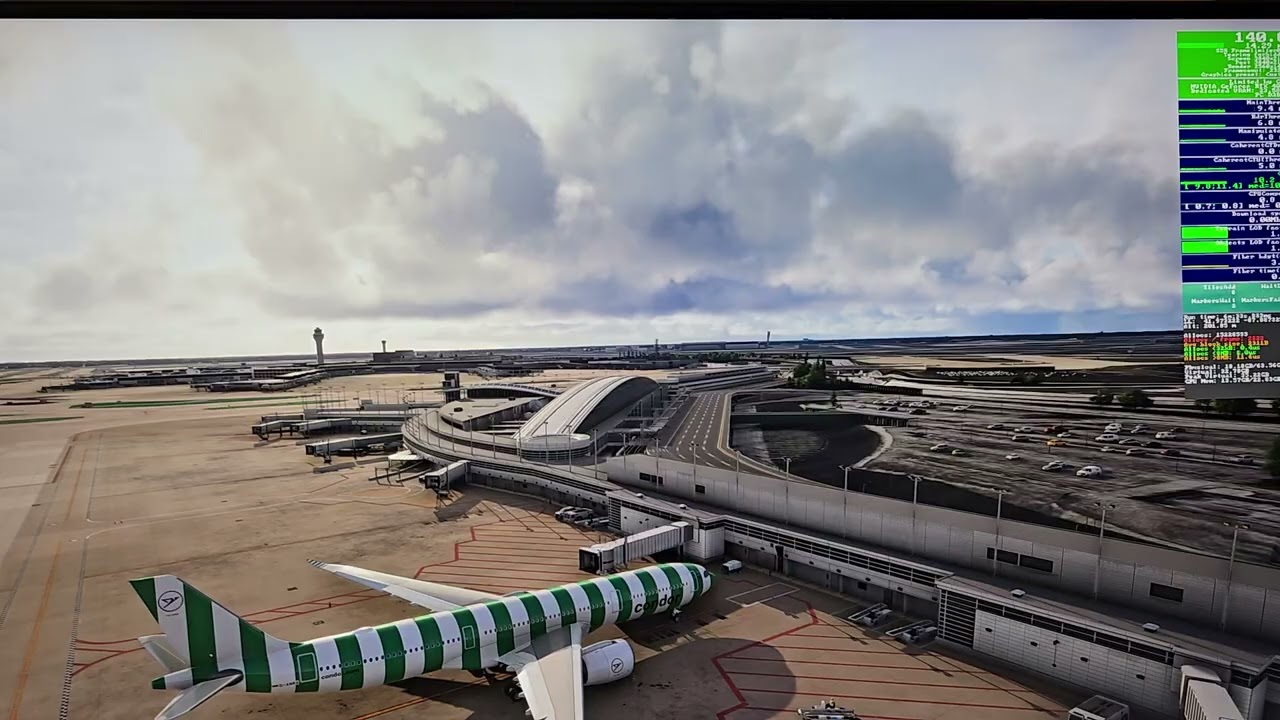
No, fortunately not. Maybe just with the A380 at LSZH if VRAM gets tight. What CPU are you using, and what are your LOD settings?
From what I can tell, the stutters while panning (in the screenshot) might be related to scenery or texture streaming. Even though it shows “Limited by GPU”, those red MainThread spikes suggest the CPU is briefly getting hit – probably when new scenery loads in during camera movement.
In similar cases, a few things have helped me or others:
Make sure the rolling cache is enabled, cleared, and on a fast SSD.
The 2.6 Mbps download speed shown is quite low – could point to limited bandwidth or streaming hiccups.
Dropping Terrain LOD might reduce the load and help with smoother panning.
Some scenery or airport add-ons seem to cause stutters when they come into view – something to watch for.
Also worth checking if Shader Cache is enabled in the GPU driver settings.
Just a guess based on experience, but it seems like the MainThread can still choke briefly on scenery loading, even with moderate settings.
I have a 9800x3d, 7900XT with 20gb of VRAM, 64gb of ram, M.2 SSD, my TLOD is set to 100.
Again I don’t think this is an hardware issue, just bad management of assets by the sim itself, as it seems to unload assets just by changing views and then it needs to load everything all at once when the camera view is reverted to the previous position (although the off screen pre cache is set to ultra).
Something is not quite right, the problem was not present or so obvious in SU1 so something might of change in the sim itself.
We have created an internal ticket to see if our team already has this logged, and if not they will attempt to reproduce the issue and create a new bug report. This item is now marked as feedback-logged. If there is an existing bug report or one is created, we will move this thread to bug-logged.
I can’t thank you enough for posting this.
I have been tearing my hair out over the last few weeks trying to resolve this exact issue and absolutely nothing I have done fixes it.
Every time I move the camera, or change view I get these huge stutters. The rest of my performance is completely smooth and beautiful.
I also agree the stutter is worse the longer you set the view in one position.
I have tried every single MSFS setting. I’ve run at high FPS, low FPS, capped FPS, uncapped FPS, Gsync on and off, every setting in NVIDIA control panel, changed hardware settings, BIOS settings and nothing gets rid of these stutters.
Sorry for the quality, I don’t have any screen recording set up so this is just a video from my phone of the monitor, but it shows the issue I have…
This! can we please fix this ? I don’t understand why I am getting stutters if changing view to either up or down in the cockpit. It’s clearly not what I’m gonna keep looking at for very long. Guaranteed stutter if you keep the view changed for more than a second or two.
I am having the very same issue, in Fenix A320. Only couple of seconds in a certain view (those views that I switch with a button-press, around cockpit), and it stutters when changing to other one. No matter the mix. Scenery is loaded.
This is very dissapointing. Why can the developers not fix this?
Why is the VRAM being purged of off screen assets by the second, regardless of actual utilization/capacity of VRAM available?
Are PC users paying the price for limitations of xbox and playstation hardware here, and code can not be altered to allow for full VRAM usage at least on some “ULTRA” setting?
SU4 is out for weeks, and despite this having even been vaguely commented on in the last developer stream by a dev., with apparent improvements seemingly coming for SU4, in reality, nothing has changed at all. If anything, for me, it has gotten worse…
This should not be considered a mere bug, but rather a major fault of the engine, that should be addressed with an adequate priority, as it vastly reduces playability
it’s honestly hard to believe that, as of today, nothing meaningful has changed regarding this issue.
For me it’s gotten to the point where I’m still playing MSFS 2020, because in MSFS 2024 this problem kills around 70% of the experience. It’s not just a small stutter here and there — once you notice it, you start seeing it all the time, especially when switching views or looking back outside after focusing on the cockpit.
And that’s the worst part: it completely breaks immersion. You’re trying to enjoy the flight, and then you get pulled out of it constantly by these pauses and micro-freezes.
Yeah agree. Don’t know why or how this hasn’t been addressed. I remember them talking about it in a dev stream that it was “planned” to be looked at but nothing since….still hoping. Kills the immersion tremendously
Not to mention, that there are a dozen threads around poor performance/stuttering/freezing here, that very probably all amount to and circle around the same core problem.
Incomprehensible, that devs do seem to turn a blind eye, when MSFS2024 is basically broken at this point.
I wouldn’t call it broken because of this issue. The game works, and for the most part, pretty well. But these are some issues that will need to be addressed. Hopefully soon.
In case anyone is interested, I finally managed to get rid of the annoying stutters when panning views!!! I went into my UEFI BIOS and switched OFF the AI OVERCLOCK setting which is labeled AI OPTIMIZED, I put back to AUTO. Before, it seemed I was bottlenecked by my CPU and now I’m running in green numbers on the IniBuilds A350!
I also upgraded my motherboard drivers (maybe that helped as well)
Some feedback on the panning and changing camera views stutter problem.
It definetely is because the sim loads und loads the scenery in a too heavy way. Sometimes when you look up even buildings in front of you disappear as they move out of sight.
The big thing here should be the off-screen scenery caching.
When set to ultra, it definetely should be ultra so the scenery stays loaded no matter where I pan my view to.
When changed to high, it can stay loaded all around, but maybe with a lower LOD so loading the better LOD shouldn’t make that much of an impact compared to loading it from 0 to 100 as it looks like is done at the moment.
When set to medium, the LOD change can stay but maybe the sim starts to fully unload some of the data which is “behind” my view to save resources.
Or if you wanna stay with the current system, why not implementing an “extrem” setting, where everything stays loaded like described before, if you have a powerful enough system for the setting.
Of course I am not a programmer, but I’m speaking of months and years of personal research regarding those stutters
And something I wanna add: Yes, lowering the TLOD lessens the stuttering, but we’re speaking of values of around 50 or lower until the stutter is mostly gone but I think I don’t have to tell you, that the sim looks awful with such low TLODs. Also this confirms that loading a lesser amount of data in that short amount of time results in less stutter.
I wonder if I is that because every single time I’ve had an FPS drop it’s been after moving the camera and it gives the same fps drop as if I’ve just put textures on ultra. Also when this happens check to see if it’s maxing out your vram
Having the same problem here. Stutters happen frequently when panning the camera or changing views, especially when using ChasePlane and switching between quick views.
I’ve tried tweaking various settings like TLOD, OLOD, Rolling Cache, Off-Screen Terrain Pre-Caching, Ray Tracing, etc. It happens consistently regardless of my setup, even with everything turned down to the absolute minimum, the stuttering persists.
It gets worse if I stay in one camera position for a while and then switch to another. This makes me suspect it’s an aggressive resource-saving mechanism (e.g., purging off-screen terrain and textures from VRAM/RAM after a few moments. Just a hypothesis).
Either way, it’s quite noticeable right now. Whenever I switch views, I observe a sharp spike in CPU and GPU usage, even though I still have plenty of VRAM and RAM to spare.