I removed everything in my community folder, and the performance is better, so it is something in the Swiss region that is causing problems with SU15. These are always a ■■■■■ to track down.
I’ll check when I get back home and fire up the sim… do you want me to check in VR or 2d? Any specific aircraft/airport combo? Let me know and I’ll test it out for you 
1 Like
worst?
worst ever?
absolutely horrifying?
I think I have to expand my negative benchmarks.
This update destroys the whole game for me by deleting all my key bindings. Inability? Unwillingness?
This is way beyond fun folks. I actually dont like to rebuild hundreds of bindings as well as to search for my backups.
There is a live without MSFS.
Leave.
3 Likes
Hey Deelee,
That woulr be awesome!!
I see very high use in AMS. combine with F28 or Fenix 320. I use not not standard AMS.
So dont know what heavy big airport you have. Heathrow Ini is also quite consuming.
Really appreciate cause I dont mind upgrading but should be usefull.
I run quest pro in 4500/4500 res all ultra and lod 100/200.
Really curious. Btw I fly only VR.
You think 64 is helping youre sim?
thks upfront 
I think the problem was mamu-designs project lifts. The clue was the stutters were mainly in Switzerland! I deleted the files and downloaded the most recent version and the stutters are mostly gone.
I was prepared to be disappointed with SU15 especially having achieved good overall VR performance for some months.
Just 1 test flight with a PMDG 737 EGLK to EHAM using my Reverb G2 and in heavy cloud was enjoyable and problem free.
This on a Win10 system with DX11 and I experienced consistent performance with better utilisation across all cores.
Early days and great relief so far.
1 Like
No problems here, running better than ever. No stutters and the graphics are better than ever.
Specs
I9 11009k processor
32 gb ram
Windows 11
Nvidia 3080 ti gpu
And plenty of add ons , liveries etc.
1 Like
Updated msfs update 15 today. Loaded ok but when I change any page like go back button ,go to world map or any change the program closes and you have to reload it. It worked perfect before 15 any help..?
I feel sorry for you…
On my side I’ve experienced only positive changes so far.
Loading times are like on steroids ( compared to what it was so far)
Have to add that I’ve first started the updated sim with an empty Community folder.
Next, shot down the sim, filled the community folder with the backup, started the sim again and was amazed..
The only minor disruption is that the Xbox app forces me to log in again but that has nothing to do with te latest update.
Happy 
Asobo messed up their A320neo with the centre fuel tank exhaustion. And the APU start up not getting back 8% unless your switch on the fuel tanks in COLD AND DARK - mate it was messed up long ago.
Same, for some reason the welcome tab has zero contents so I cannot fly at all. When I click the Welcome tab its just the plane background with exit to desktop and the new update information. Very annoying, I’ve tried a lot to get it to go back to normal but it hasn’t done anything. Can anyone help me?
Sorry to hear about these issues, definitely sounds like there’s some weird interaction between WMR and MSFS now taking place.
For me SU15 has been a definitive improvement in loading times and frame consistency (ie smoother, less stutters) which is all I really wanted. I do still get the occasional stutter but all in all it’s a noticeable improvement.
If I were you I would do one of these two things:
- Do a clean Windows reinstall, or
- Use this as an excuse to get a new HMD! The G2 was amazing for its time but has long been surpassed, especially in terms of lenses. And WMR has always been finicky
1 Like
Running great for me
Ok the game all got missed up, please if any solution or what to do.
This is not acceptable that the update comes to destroy instead of fixing things
Managed to get an error message out of it.
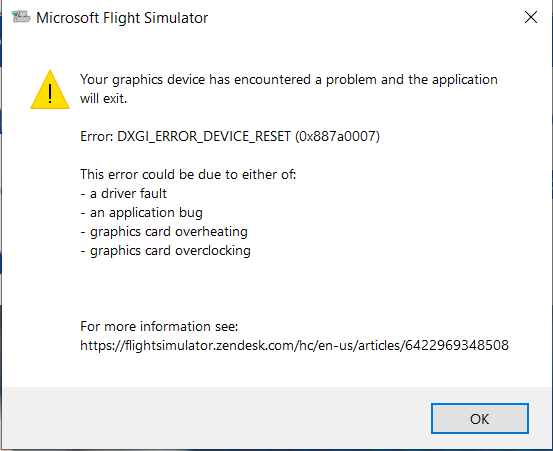
No overclocking present and it was showing about 1% usage at the time, latest driver etc etc. I must reiterate that this is all going wrong as FS2020 is loading in so changing settings from DLSS isn’t an option because it never gets that far.
On the rare occasion it does get to load in it actually works fine but then when you press the quit to desktop button it wont exit and freezes the whole PC again. doing a reformat and fresh install is also a big ask, its just one game, life is too short to spend a whole day messing around with this. and what happens in another few months when they mess it all up again, another day to get it running again with no guarantee it will? I don’t thinks so.
This is the message I get when I try to run with DX11. So I run the NVIDIA Experience optimization which I’m forced to run the sim with DX12 and I get major stuttering and black screens on approach. I ran the SU15 beta with DX11 no worries at all but with SU15 release version, I lost the ability to run DX11.
I also had some issues trying dx12 with the su15 release version and went back to dx11. Sounds like you need to either uninstall geoforce experience (I never install it), or at least take msfs2020 off its optimisation list. No way you should be forced to use dx12 since its still listed as experimental.
Haven’t tried uninstalling Geforce but i did take it off optimization. As part of beta testing group I ran the exact same settings I currently run with DX12 but with DX11 and i was happy with preformance so I felt nothing needed to be reported but as soon as retail SU15 updated I hit the major stuttering with black screens since it forced me onto DX12. Sounds like I need to do more config testing even if that means running the sim at lowest quality on DX11, see if it loads and then slowly raise settings one by one till I return to not launching with the above error again to hopefuly find the tipping point for the sim on my system 
Open a CMD window as Administrator, then run SFC /SCANNOW to check for corrupted Windows files.
Overall, I find it relatively stable. Still getting some annoying stutters. My true test, as always, is in heavy scenery cities with addons. Ultimately NYC with NYCity and FeelThere KLGA addons. Still stutters badly with terrible fps, then on final, total freeze and CTD! Drats!
So I gotta give a FAILURE (once again) to SU15!
(12900, 4090, 64g, Crystal, DX12 DLSS)