I was basically only flying the PMDG 737 and 777 for the whole beta process so I didn’t notice the performance regression straight away. I also had multiplayer set to live players only, all graphics options as low as they would go and had PG off which helped mitigate many of the problems. However, on SU4 I was religiously restarting the flight after loading in to fix the lost logbook entry bug. But what I found as soon as SU5 beta started and I joined it was that attempting to restart the flight after loading in was resulting in a “low memory” warning while on the loading screen that simply has “Free Flight” written on it and it would remain stuck on this screen with the spinning loading circle. Only way out of it was to go back to Xbox dashboard, quit the sim and restart the Xbox
I have an RTX 4090. Delete your GPU shader cache and see if that helps. I do that with each update myself. I’m not coming across stutters when i pan around (I use TrackIR to do so).
I had more good flying today in the c152 on my X Box - 4k HDR live traffic and live weather. No stutters that I remember (am I getting used to them?).
I hope the airliners that cause memory issues will all get optimized but I don’t think its fair to just say the beta is bad. It is true that my overall performance isnt as good as I remember it being for exactly one day on SU4 before they said something about the PS5 having some security issue or something?
SU5 introduced slightly degraded performance and this latest beta seems between the best and the worst. Maybe its the best we can hope for?
Good luck with that request . Never going to happen.
Just be patient, it will get better.
In the meantime, clear cache, uninstall sim an reinstall. Remove scenery conflicts before you do that. Something you may have bought is creating a problem unless you have a vanilla sim. Disable any 2020 planes or sceneries.
On PC I get the out of video memory message more often than before, especially when changing views or moving out of the cockpit. EHRD is a good testing environment for me.
Balance of detail while on the ground vs. in the air is off. I think it can be balanced better (TOD @ 200 is nice in the air and works performance-wise, but on the ground it’s overflowing VRAM and resources).
[Beta 1.7.30.0] Career Mode Performance & Stability Observations (PC MS Store)
Hello everyone,
My PC Build & Specs:
CPU: AMD Ryzen 5 5600X (Vermeer)
Motherboard: ASUS PRIME X570-PRO (Chipset AMD X570)
RAM: 32GB Patriot Memory DDR4-3200MHz (C16)
GPU: PowerColor Red Devil AMD Radeon RX 6900 XT Ultimate (16 GB)
Simulators : WD_BLACK SN7100 1TB (NVMe PCIe 4.0)
Sound Card: Creative Sound Blaster X-Fi
Network: Intel(R) I211 Gigabit Network Connection
Monitor: Samsung Odyssey G5 (32" 2560x1440@180, HDR)
OS: Microsoft Windows 11 Professional (25H2)
I have just completed a dedicated performance test of the Career Mode on the PC MS Store version, and the results are quite concerning.
It is becoming increasingly clear that Career Mode behaves as an entirely independent system within the simulator. Because of this, it cannot be tested under general simulation conditions; it requires its own separate, dedicated testing phase.
Here are the main technical takeaways from my test:
Performance vs. Stability Trade-off: My strong impression is that the overall stability of the current build was achieved at the expense of Career Mode resources.
Significant FPS Drop: The average framerate (FPS) has decreased substantially when running career missions compared to standard free flights.
Inherited Issues: While I didn’t experience any fatal crashes or global system locks during this short run, all the well-known bugs from previous builds are still fully present here.
We need more focused attention on how Career Mode handles system resources, as the current performance tax is too high for a smooth experience.
For those interested in the full telemetry and visual data, I have uploaded a detailed video test here:
I have often suggested Career mode needs a beta of its own. I couldn’t agree more about the behaviour of the sim and the aircraft in Career. They are different - Asobo knows this and yet it has been ignored since its inception - by and large.
It has got the odd fix here and there but they really need to look at the many wonderful suggestions to improve it and the bugs.
Haven’t used 2024 for a while since SU4 so I did a clean install. Overall this build has better FPS and VRAM management for me. Tested with A330 and Fenix A320. However the biggest issue for me is severe stutter when changing view, which is still there.
Just completed a flight EHAM to EDDM, both payware in Fenix A320 with Say Intentions and GSX Pro. The flight I tried the other day in SU5 public release. It was impossible to complete previously. Updated to the latest Beta and the flight was almost perfect. No major stutters. All add-ons installed. I9 13900K 64GB RAM RTX4090. A great improvement from my SU5 experience.
Also running full Airbus panels from WinCTRL and SPAD Next running other peripherals across network.
X Box X. 4k DolbyVisionHDR. live weather but no live traffic.
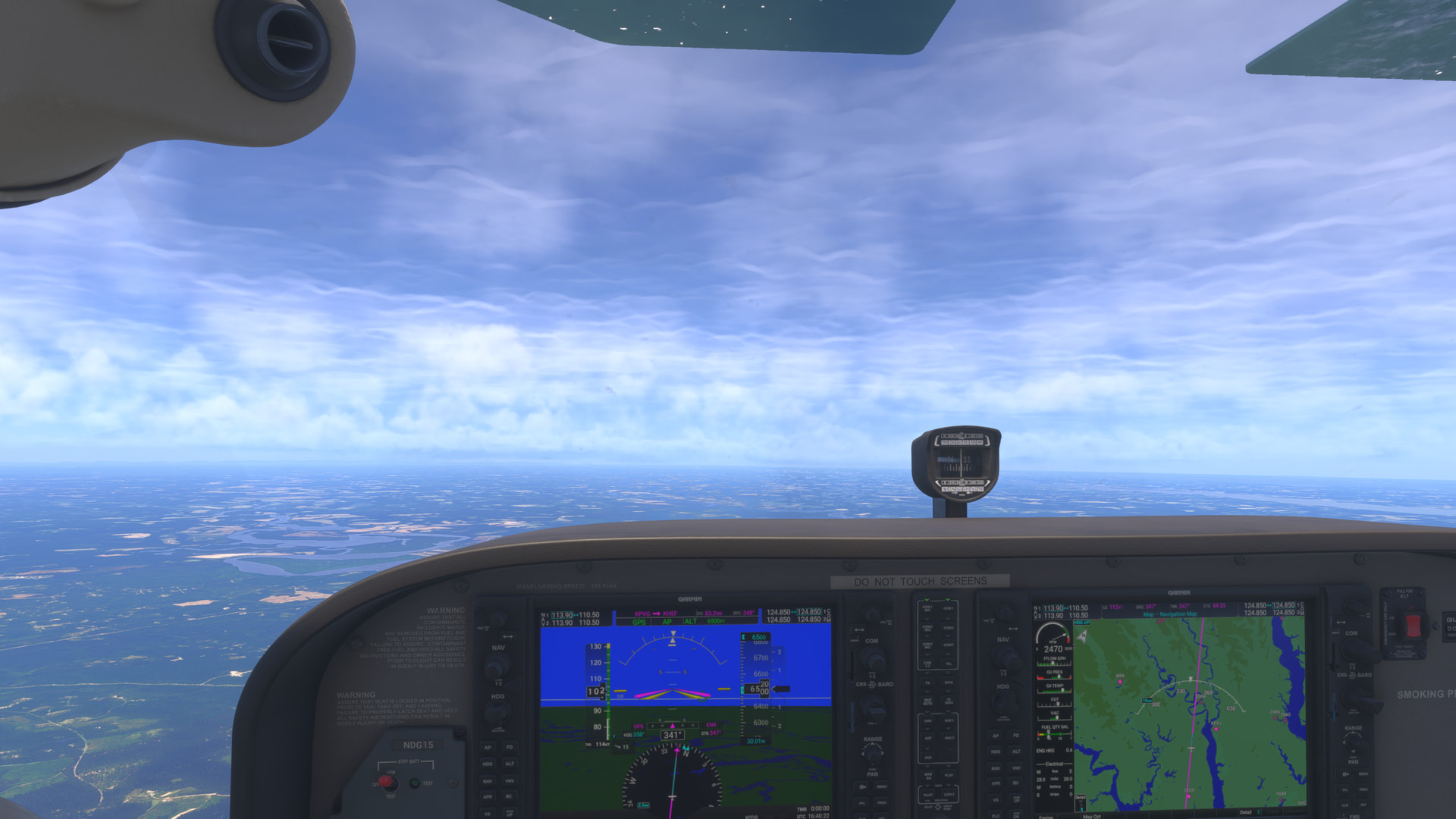
Flew the C172 G1000 from KPVG and was headed to KHEF but decided to change to go to W29 Bay Bridge. Clouds looked horrible and never really changed over the entire flight. I didn’t see the PG at departure but destination PG looked ‘not good’ and there were some stutters in the area but not as many as some previous flights. Surprisingly to me, I had three large stutters on approach from the east to land at Bay Bridge - seemingly as I dropped below about 1600 feet. The final stutter was at the end of the runway where the PG made a large shift as I approached.
I’m quite certain that if all areas of the Digital Twin were optimized/updated like both CU13 and the latest Australia update seem to have been, this sim would be nice and smooth. but clouds and their layouts (the entire atmosphere and lighting) really need work…
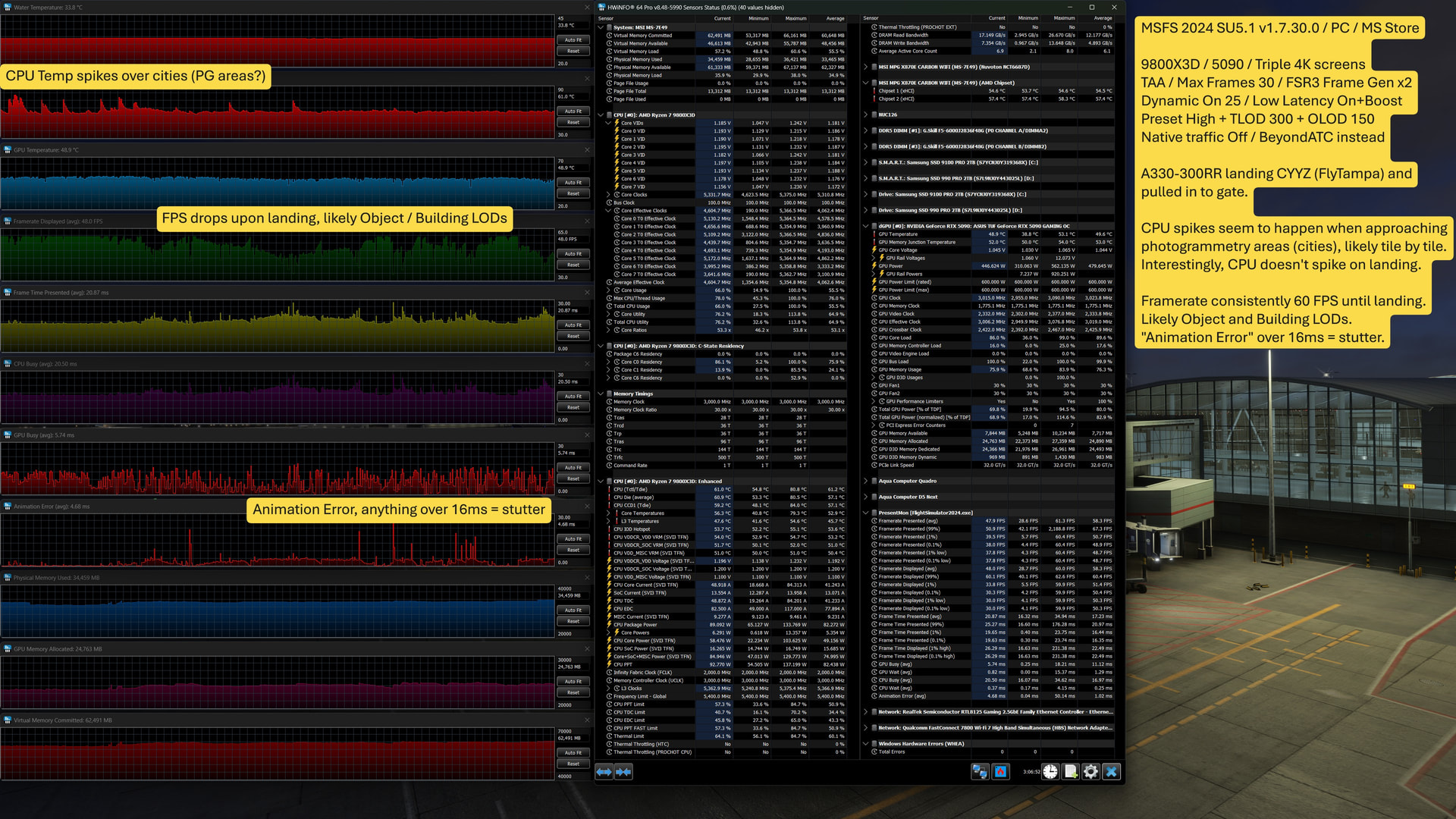
So this captures a pretty typical result for me in SU5.1 on a high end PC with triple screens. Regardless of hardware specs I think it shows 2 areas where MSFS can “spike” and hit limits causing issues for any level of hardware. Granted, on 3 screens I’m really pushing limits, but this just exposes some extremes of behaviour, I believe, regardless of hardware:
Approaching Photogrammetry Areas (cities)
Landing, Objects and Buildings LODs struggling to be processed
SU5.1 v1.7.30.0 / PC / MS Store
9800X3D / 5090 / Triple 4K screens
TAA / Max Frames 30 + FSR3 Frame Gen x2 (target 60 FPS)
Preset High + TLOD 300 + OLOD 150
Dynamic On, 25 / Low Latency Reflex On + Boost
Graphs capture A333-300 RR approaching CYYZ, landing, and taxi to gate.
During flight the CPU temp will spike approaching cities with Photogrammetry, I beleive the spikes indicate scenery tiles popping in with all of the objects, buildings, PG, etc, per tile. Even with the spikes, the FPS remains constant at 60, until landing.
Upon landing, the FPS starts to struggle, I believe because of the number of objects and buildings coming in to LOD range, plus other traffic. Interestingly, the CPU doesn’t seem to spike during this phase.
If Asobo can smooth out the 2 scenarios (CPU spikes with PG areas, and object / building loading upon landing) then I think things will improve for a lot of people.
Sorry it’s a bit hard to read because I used dark mode for evening flights, and the forum downsizes images so they end up a bit blurry.
I uninstalled the game but im still getting low fps, i cleared nvidia cache. I have a 5080 and im getting only like 100 fps on lowest settings and frame genertation isnt changing any thing.

 . Never going to happen.