Yeah I’m getting the same on series X
2 Likes
Hands down the worst it’s been since release imo for Xbox
1 Like
Can you kindly provide more information? What aircraft and in what location are you flying when you are experiencing these issues? What third-party add-on products do you have enabled (if any)?
Thanks,
MSFS Team
This is an odd one. It’s not occurring with every head movement, but does happen fairly regularly.
Off-screen terrain precaching settings have no bearing on their behavior – Low to Ultra, no change.
Stock build and anything bigger than a pc12 for me, happens more near pg and a starred airport, love traffic constatly drops as well
PMDG 737-800 and 777-300ER are the worst offenders for me. Landing at heavier 3rd party airports will cause the out of memory message just after touchdown followed by a CTD. Trying to restart a flight after loading in gives the message during the loading screen and it then gets stuck on that loading screen with the spinning circle. I had never seen that message before this beta. Have also flown the A20N which has generally been ok but some flights it will give me a lot of sound stuttering - and we’re talking flying over the Sahara here, not central London. I keep PG off and use 32Gb rolling cache. Only addons are aircraft and airports
Edit: all graphics settings are off or low as they go and no AI or real time traffic
I have my off screen pre caching set to 0 to turn it off completely
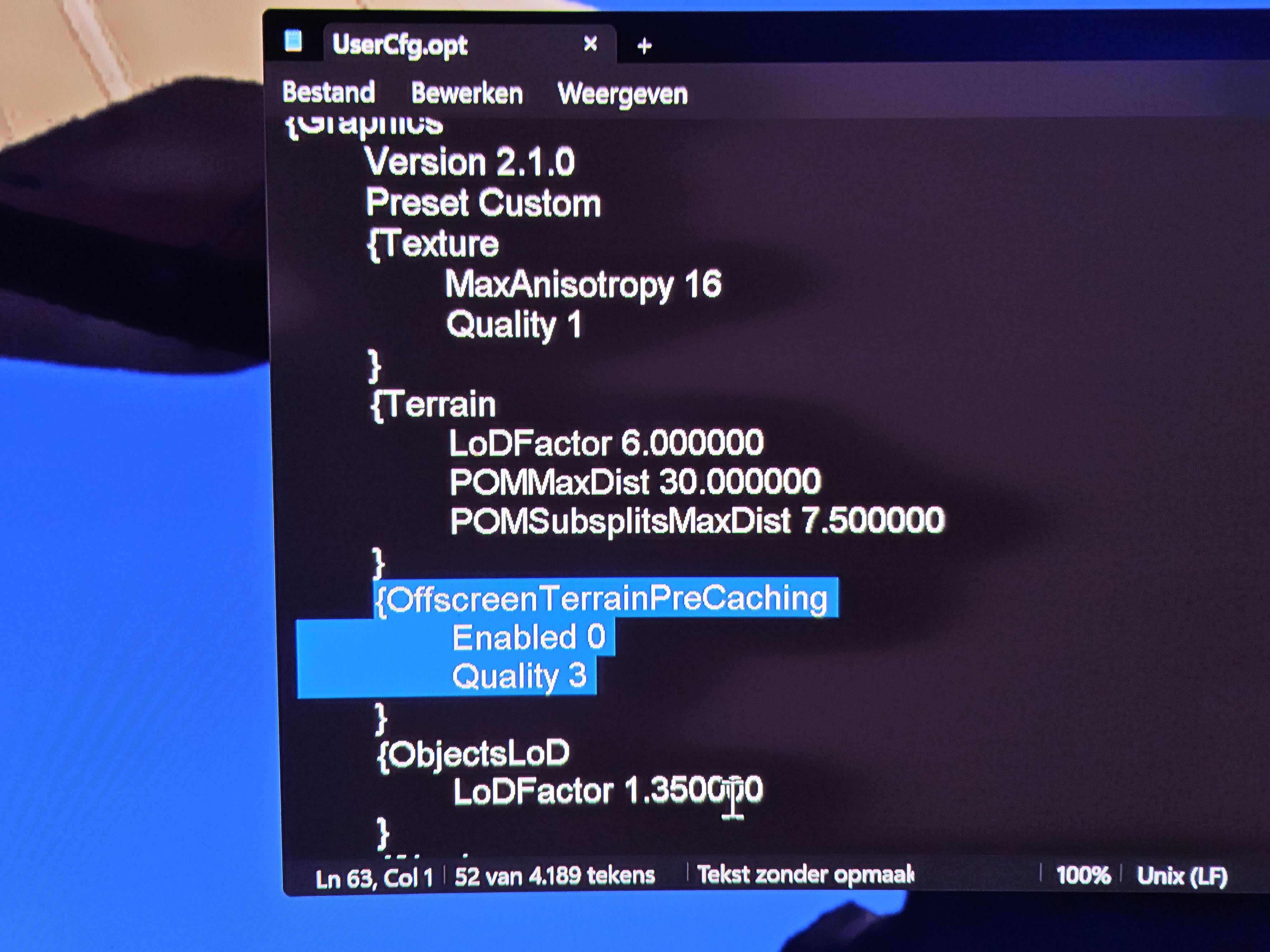
I think for me it performs better, maybe you can try
But keep in mind that it still show up as low, medium, high or ultra in the usual place.
1 Like
I absolutely love the performance! But the world somehow needs improvement, personally I feel Asia for example needs attention, and with Asia, I mean Japan is such a small part of Asia, there’s so much more that could use some more detail. More life outside of career mode would also be a nice edition to this or future versions(MSFS 2028 for example). With weather, the lack of interaction with the aircraft in rainy or damp or humid conditions, is still only dependant on 3rd party innovation, I think your advanced physics should also materialise, when rainbows are dynamic, so should vapor caused by friction also be visible. Another thing, I know you guys do not like war ect. but physics that are well simulated, should also be possible to cause real simulated damage, like in DCS. Not to spark a barbaric reaction in us, but as part of our simulation and testing and experimentation it would be a physics let loose, and it would add so much more to the overall experience and possibilities of its usage. Thank you for your amazing work, its really astounding how much you have revolutionized this sim already!
1 Like
That won’t happen due to licensing constraints with the manufacturers. Just like damage models in many car games are very limited. Only mods will allow this.
Like HIPPENCIL said. There needs to be more interaction with the weather and the cockpit window/outside aircraft, moisture / dirt or bugs and also being able to clearly see it, some times its hard to tell its raining.
THE SHAKING EFFECT IN HELICOPTERS IS EXTREMELY UNPLEASENT. The typical getting blown around and stuff is very nice and natural, but this random shaking the way it is doneg is extremely anoying and ugly making flying in rough weather very unpleasant. Maybe it can be implemented another way with out being so unpleasent and un natural looking. If its a real thing fine but i dont ever remeber feeling or seeing that while flying in real helicopters but that was a long time ago. It doesn’t happen all the time but alot of the time.
Also (aircraft )SKINS need to be seen by EVERYONE not just the people who purchased that Skin package from market place, then hardly any one in mutliplayer will ever see your actual skin. These legit marketplace skins they should be seen by all.
Also a quick way to communicate to people would be good instead of having to add them etc. But that might change im just saying incase.
More debree blowing is needed also when close to ground in helicopter, be good if initially there is ALOT of debree, then it quickly calms to very little specificly on concrete etc.
Also rain sounds need to be louder.
Couple of problems I noticed right off the bat after installing the ps5 beta this morning I hoped straight in and did a free flight with a Airbus A330 and the post I made some time ago about a problem with it has finally been resolved thank you guys for doing that but I did another test because I’ve seen some logs on some things being fixed on the Boeing 737 and I decided to go into career mode and test it out I went straight in and the first thing I noticed was the cockpit will lag out really bad sometimes it all becomes blurry or all the screens will just go black when switching to external view and back to cockpit as well as getting out and re entering the aircraft also another thing I noticed is for some reason and I don’t know if it’s just me experiencing this or anyone else has run into this issue but for some reason the yoke doesn’t respond like I can see it on the ground when I do my visual check to see if everything is working and it seems to be working but as soon as I get on the runway and start heading down and reach v1 and rotate nothing happens the yoke just moves around what ever way I manipulate it with the controller and then doesn’t do anything to the plane it self the only thing that works is the rudder pedals and for context I’m using my dual sense controller for my ps5 and gyro scope is turned off and I unbound it
Also I just realized I forgot to mention this my bad it was a career mode freelance mission with the 737 I did it a total of 4 times using a cold and dark setup everything was in the right spot that I configured from playing the main version on su4 same exact method of turning on