In the 40th anniversary edition the jetpad start shaking as soon as I select the inibuilds a310 as the active airplane model; I think it’s a bug.
Hi is SSA going to be updated according to MSFS 40th anniversary edition, i mean new aircraft types Helicopters and Soaring planes?
He just released 2.5.4 beta with support for gliders using the generic piston model for now and support for the Asobo Cabri G2.
2 Likes
“Invite invalid”
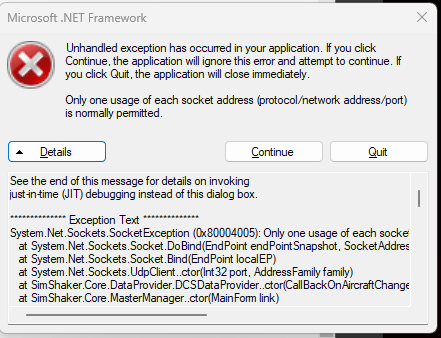
it’s telling me i need to register, but I’ve been licensed for a long time. Any ideas? I would doubt he is still responding to email but i did copy and paste the activation string and emailed it to him. after i re-installed the sound module (due to the .NET Framework - unhandled exception coming up) it is saying I’m not registered and that i need to tie it to may Microsoft email account or network card. Any help is appreciated!
Last week the Dev was responding within a few hours
Quick question,…is there a solution to use SSA with the two Flyinside helicopters in MSFS?
Flyinside uses a different (external) helicopter flightmodels for their models that don’t seem to play well with SSA.
I know this has been raised some time ago but I can’t find any solution.
they both work for me. although in the new 206 i dont feel the rotor until i’m going past 40kt
1 Like
Yeah…that’s what I have in the Bell 47 as well. I feel some shaking above 40 kts but it’s very irregular and it’s difficult to pinpoint what is generating it (turbulence, engine etc).
The feedback for other aircraft is much better.
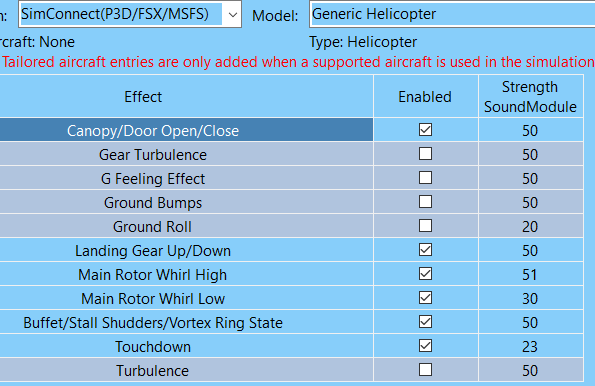
Thanks for your settings,…I will give them a try 
EDIT
What do you know…it works with your settings now. Excellent!..thank you so much.
I wonder if there was some kind of conflict in my old settings.
1 Like
Just to know… The H145 isnt implemented in beta 2.5.9? Its shown as Turboprop in the debug view.
Since yesterday I have exactly the same problem. It happened after a windows update. Were you able to solve it?
Hi, I have the same issue. Were you able to solve this?
Hi,
Did you get a solution to this? I have the same issue. In addition the engine vibrations are intermittent to the buttkicker, until I open a window over the Sim and then the vibrations come through properly. The moment I switch back to the Sim I have the same issue!
It is a new PC with windows 11. Thanks for any help.
Josh
Hello community, I have bought and installed the simshaker aviators program plus the sound module, the sound connects without problems, I have the simconnect status in green, however, I have an unpleasant noise that I am not able to eliminate, I don’t know the origin, I have two minilfe buttkickers with the butkicker g2 amplifier, I only get this unpleasant noise if I run the simshacker program plus the sound module, if I fly the fs2020 only with the w10 sound effects without running the simshaker I don’t get this noise, I just get it I have simshaker running plus its sound module, I leave you a sample video, please any help ???, thank you very much.
What type of values for generic piston, Ala 152 Cessna is everyone using. I feel like the force isn’t as strong as it was in the past? I’ve tried adjusting some values
I’m guessing here, but it looks like audio meant for the bass shakers is being fed to your vr headset speakers
…i think you need to tell the software to use your pc soundcard to output sim shaker audio exclusively. There is also a sound setting in msfs which might help set that sound path
Yeah i dont think it was the sound setting per say. I had everything at the default 50%, but i feel like even 65 to 75 isnt a huge leap. It worked well in the past.