Hi there.
Recently started simming and quickly found performance issues/a bug.
It seems as the sim is limited by “main thread”. I’m guessing this should be fine but the main thread is only running at about 60-80%.
Regardless of this, I can run Ultra 200% scaling at 30fps and Low with minimum scaling also around 30-35 fps. It makes absolutely no sense that reducing settings has no effect on performance. GPU usage around 30-40%, total cpu usage around 40%, sometimes lowe and only 12gb of ram being used.
The Specs that matter:
R5 2600x
RTX 2060
16gb DDR4 3000mhz
Set your LOD pramaters to 80. This should shift the bottleneck from main thread to GPU.
Don’t know if AMD chips have the same bios setting as Intel but I turned off “Enhanced Turbo” and that gave me an extra 10-15 fps and a more stable fps
Thanks for the replies.
I have just adjusted the settings a similar way you were quoting. Instead opting for Ultra with 140 LODs (instead of 200). I am now getting just under 40 fps stable.
I will enable/disable the CPU boost in my bios the next time I restart my computer and see if that changes anything.
Have you tried setting LOD at 80? I found a significant FPS increase after I changed from 200. (I had been using LOD settings of 500 which just about cratered my system.) Also, I’m no longer limited by main thread as the heavy graphics processing has been shifted to the GPU.
Doubt if it would give that much I turn that on and not a single fps changed on my 10700kf
I’m using an old 8700k so that could be the difference
I probably should have explained further.
I’ve overclocked my CPU to 4.6 and that gave me an initial bump in FPS but turning Enhanced Turbo off stabilised the frame rate. The FPS used to jump between 45 and 55 but after turning off Enhanced Turbo in the same areas it’s 57-60
For me it was especially noticeable when using planes with the G1000/3000 nav units
Mine is running @4.9ghz on all cores I have a feeling my GPU is the reason for no fps improvements. Needs a faster GPU will probably get a good 10-20fps bump moving up to a 3070 or even a 3080.
I have Ryzen 5800x OC to 5ghz, RTX 3070 OC, 32gb 14C 3600mhz ram, an independent ssd for flight sim.
I run 4k on high setting
I primarily fly JMB VL-3, Aermacchi MB-339PAN, and DC Design F-15E.
The sim works fine in most areas; however, patches of certain trees, in major cities kill performance.
It happens with all of the planes. Ironically, it’s worse with the slow VL-3. Perhaps the faster planes don’t allow the full texture to load, so less memory is filled?
Here is the GPS location of my slow areas at low altitude. You can punch these coordinates into the simulators “search”
France: 48.862091, 2.250891
NY: 40.778319, -73.970761 (usually okay after 1st and 2nd pass, slows down afterwards)
Going to experiment with a 3080 this weekend to see how it goes
Yes that’s the reason for your performance boost I am running an rtx2060super which is still less powerful than a 1080ti.I’d imagine even a 3090 would be a huge boost.
1 Like
My performance issues is on the GPU side.Reducing all the way down to 1080p my fps went up by 30 and it was not the case before these updates.Hmm never heard of a 5800x going @5ghz
I tend to find that flying over some cities when my FPS drops it’s because my system becomes CPU Limited
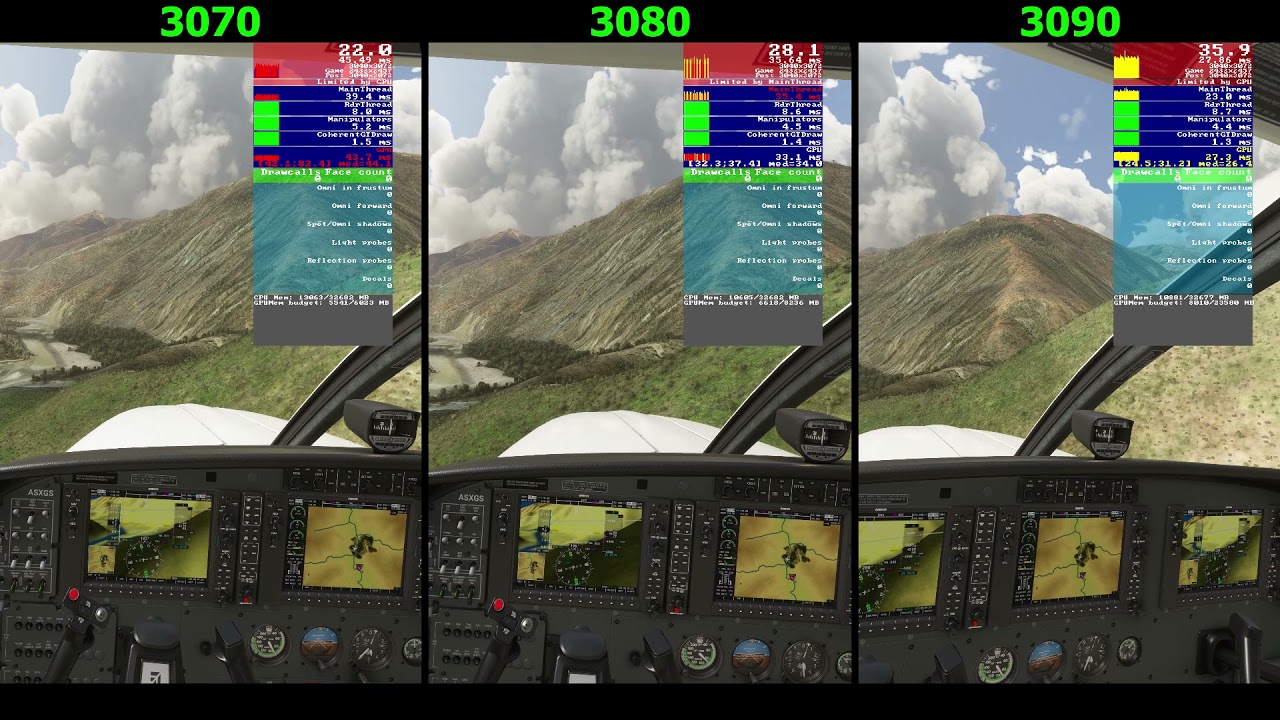
Turn on the developer options and display their FPS window and you will be able to see where the bottle neck is; whether you are CPU or GPU limited
It says GPU first… GPU utilization is 100%; however GPU temperature DECLINES. then the mainthread turns red and in alternates between GPU/CPU limit.
Someone posted a video showing that the mainthread value in not independent of GPU. in other words GPU strength can impact main thread values. It’s not clear if the relationship works in reverse given that they test used 1 cpu with three GPUs.
In other words, I’m saying that no one know what’s really bottlenecking what.
It’s a real S-show
The CPU and GPU share memory… therefore, shared memory or memory management may be the limiting factor… but I dont think anyone knows
just 1-2 core goes to 5 ghz 
Mine seems to always tell me I am limited by gpu which seems to be correct. Maybe throwing in something like a 6800xt or 3080 might take right back to limited by mainthread.
I’m have temporary access to a 3080 this weekend. I’ll try it out and post back.
Many people are upgrading hardware and finding that it makes no difference, so hopefully the experiment will help some people save money, time, and effort.
In the meantime, Asobo has admitted that it has only partially fixed the performance problem.
Magic will probably be done to the XBOX version.
Yes, I bet it will make anyone who invested in PC hardware, primarily for the sim, to cry. Including myself