 Thank you for using the Bug section, using templates provided will greatly help the team reproducing the issue and ease the process of fixing it.
Are you using Developer Mode or made changes in it?
No
Have you disabled/removed all your mods and addons?
Yes
Brief description of the issue:
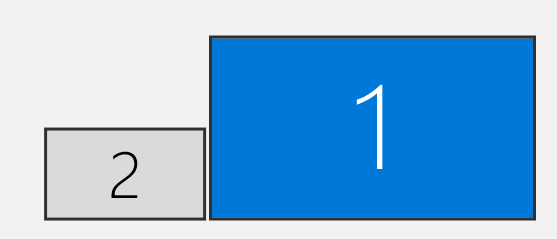
I have a multi monitor setup consisting of a 32" 4K monitor (monitor 1) and a 23" 1080p monitor (monitor 2). With the simulator in windowed mode and the window in focus, I am experiencing an issue where the cursor is locked to one screen or part of one screen (see detailed reproduction).
The expected behaviour would be one of the following:
- The mouse cursor is free to move across both monitors
- The mouse cursor is locked to the simulator window and cannot move out of its bounds while the window remains focused.
Provide Screenshot(s)/video(s) of the issue encountered:
Monitor setup:
Detailed steps to reproduce the issue encountered:
Szenario 1 (both monitors with 100% scaling)
- Simulator window is moved to either of the 2 monitors and focused (size of the window is irrelevant)
- If the cursor is still on monitor 1 it is free to move across monitor 1, but as soon as it is moved to monitor 2, it is locked to this monitor and cannot leave it
Szenario 2 (monitor 1 with 150% scaling and monitor 2 with 100% scaling)
- Simulator window is moved to either of the 2 monitors and focused (size of the window is irrelevant)
- If the cursor is still on monitor 1 it is free to move across monitor 1, but as soon as it is moved to monitor 2, it jumps to the bottom half (approximately) of monitor 2 and remains locked to the bottom half of of that monitor.
Build Version # when you first started experiencing this issue:
 For anyone who wants to contribute on this issue, Click on the button below to use this template:
Do you have the same issue if you follow the OP’s steps to reproduce it?
Provide extra information to complete the original description of the issue:
If relevant, provide additional screenshots/video: