I think the OP’s particular issue might be trying to maintain 100-120 FPS. Even with FG this may not be achievable. But there is a lot of variability in performance that is based on aircraft and location too.
Just my own testing but without Frame Generation, with the default Ultra settings (no traffic) on 1 screen at 2K or 4K I would get roughly 57 FPS (A330 at KJFK). Of course this number dips when you move around an airport, objects and even parked aircraft enter the LOD sphere of your aircraft, etc.
I would get about 80 to 90 in the same scenario with no cap + FG (which has its own overhead) - then you need to ensure VSync and/or VRR is configured to avoid both tearing and stutters if using 120 Hz. Is it possible it’s as simple as VSync being misconfigured?
So just for my own set up, I choose to target 60 FPS instead, and use the Max Frames of 30 + Frame Gen x2 and VSync Half so each frame has more time, and that seems to absorb all of those dips when at busy airports and solved it for my particular PC.
I think the v595 ‘generation’ of the NVIDIA drivers (for lack of a better word) was problematic for sure, but the current 596 seems ok for me, and I haven’t noticed less performance if there is any (I do update DLSS via Swapper, which makes a difference for me).
Informal results of testing combinations of settings on 1 screen
Full results and settings here.
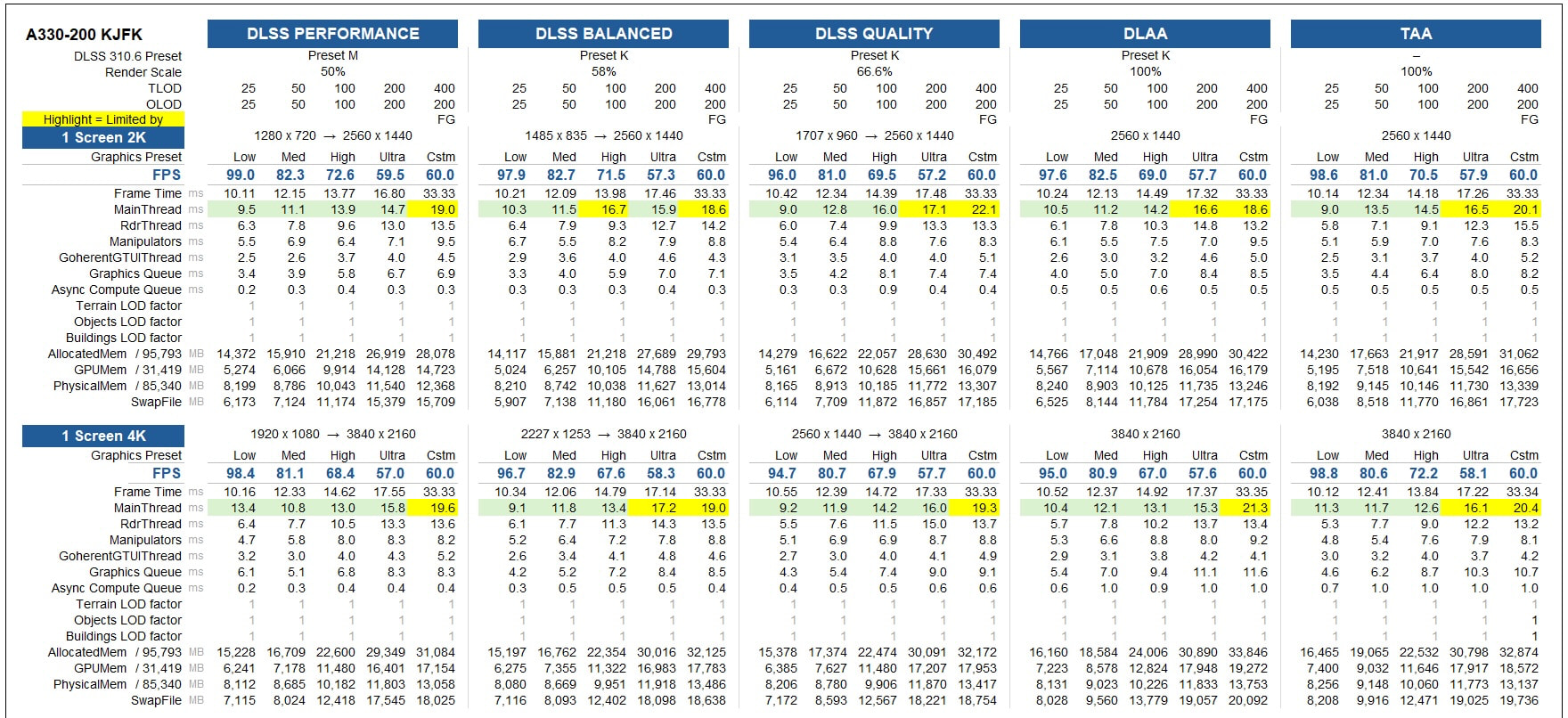
(The “custom” setting is Frame Cap 30 + Frame Gen x2, on 9800X3D and 5090. I used FSR FG because I was comparing with triple screens, but if I was using 1 screen I’d use DLSS FG.)