SU3 Beta: Vision Jet still Showing Fuel Pump ON CAS


ISSUE DESCRIPTION

Description of the issue:

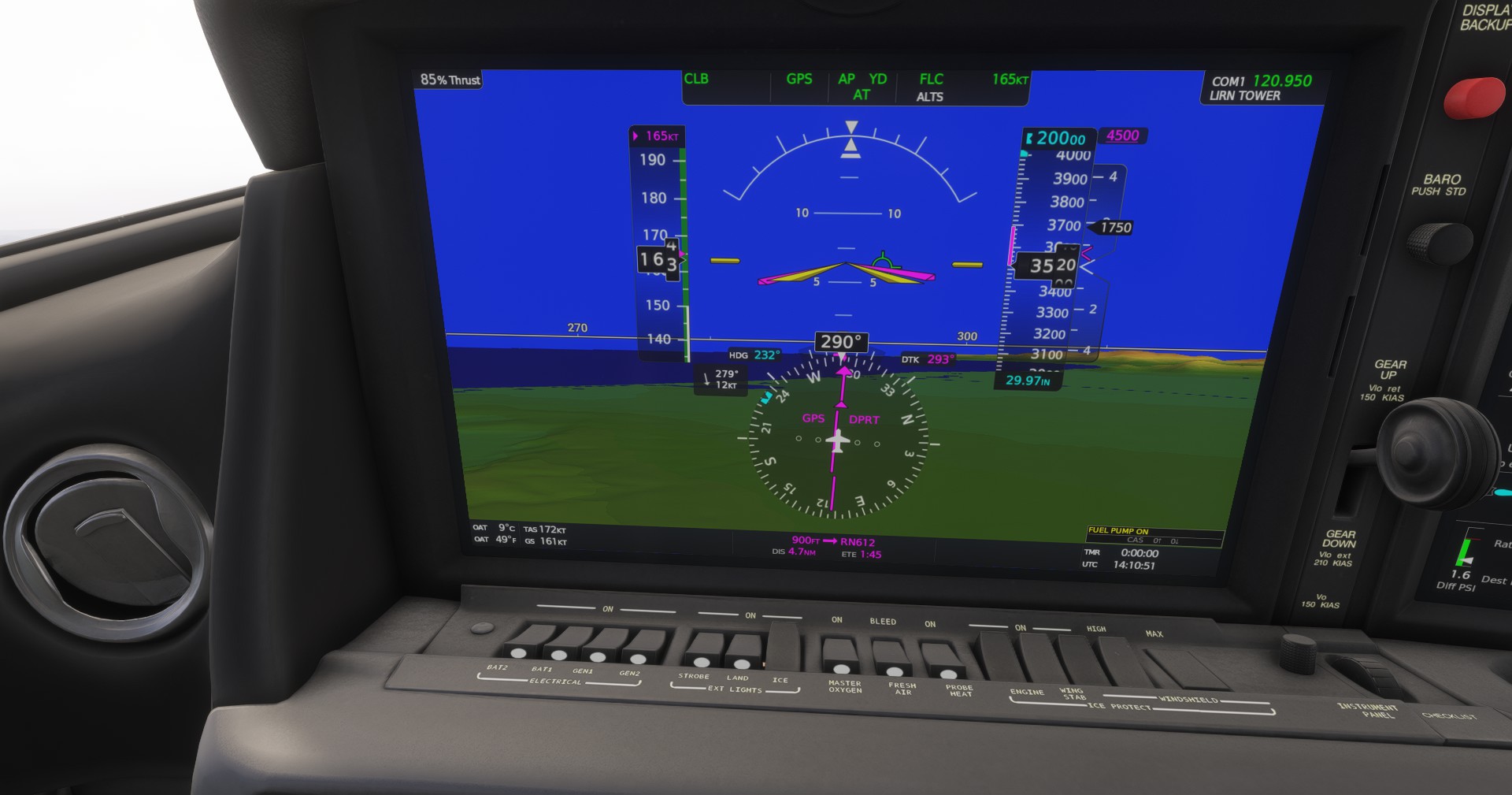
Vision Jet showing Master Caution CAS Message “FUEL PUMP ON” - this is not a discrete control available to the pilot, it’s controlled by the FADEC startup process as the jet’s engine is started and operated. It should extinguish after a normal start.

Did you experience this issue before you joined the Beta?

No

If applicable, which aircraft is experiencing this issue:

Asobo/WT/Lakshya Vision Jet

[PC Only] Did you remove all your community mods/add-ons? If yes, are you still experiencing the issue?

Yes and yes.

FREQUENCY OF ISSUE

How often does this occur for you (Example: Just once, every time on sim load, intermittently)?

Every time on sim load.

REPRODUCTION STEPS

Please list clear steps you took in order to help our test team reproduce the same issue:

1.Select Asobo/WT/Lakshya Vision Jet in Free Flight
2.Load into the cockpit and start from Cold & Dark State.
3.Follow normal engine startup procedure.
4. Note CAS message stays illuminated with no way to clear it.

YOUR SETTINGS

If the issue still occurs with no mods and add-ons, please continue to report your issue. If not, please move this post to the User Support Hub.

What peripherals are you using, if relevant:

N/A

[PC Only] Are you using Developer Mode or have you made any changes to it?

No and no.

[PC Only] What GPU (Graphics Card) do you use?

Intel ARC 770 16GB

[PC Only] What other relevant PC specs can you share?

N/A

MEDIA

Please add a screenshot or video of the issue occurring.
[END OF FIRST USER REPORT]


:loudspeaker: For anyone who wants to contribute on this issue, Click on the button below to use this template:

Do you have the same issue if you follow the OP’s steps to reproduce it?

Provide extra information to complete the original description of the issue:

If relevant, provide additional screenshots/video:

We are unable to reproduce this issue with the provided steps. Do you have any more details regarding this issue that might assist in reproducing?

I flew the plane in a Free Flight Mission, nothing unusual I can recall about it. It was from a Cold & Dark start, Live Weather in the Northeast. I followed the checklist to bring the jet to life.

One thing you may wish to try on repro is download the current build. I can’t recall if I did or did not already download it using the new feature in My Library. Not sure if that matters.

I had backed out of SU3 because of too many CTDs, and it occurred to me just now on SU2 RTM.

I was able to video it here after the caution illuminated.

I was on climb out from KPVD, I had just pitched up for take off and was climbing out when it illuminated. The video picks up from where it illuminated onwards for about 90 seconds. It still remains lit now while the flight continues. I paused the sim mid-stream to confirm my recording was enabled and then unpaused it.

I’ve been able to recreate this in Career if using CTRL-E as the shortcut to get to ready-to-taxi.

We’re still not able to reproduce this on our machines, even with CTRL+E.

In the Vision Jet, the yellow FUEL PUMP ON CAS comes on when the system senses a low fuel pressure event; once it does the pump will latch to the on position for safety and alert the pilot until the aircraft is powered down. It is possible that the fuel system simulation inside the sim itself is causing a transient low-pressure situation in the motive flow line even though it should not be given the conditions shown (we have seen such issues at times on 2024). On the plus side, it’s good that the system logic is catching this low-pressure event! In that sense it is working as intended.

We can look into how we can work around this sim-side bug but it’s a bit difficult to do when it isn’t happening on our side; probably would be something for SU4.

1 Like