SWS Kodiak 100: download missing most of 3d model, streamed working fine

ISSUE DESCRIPTION

Description of the issue:

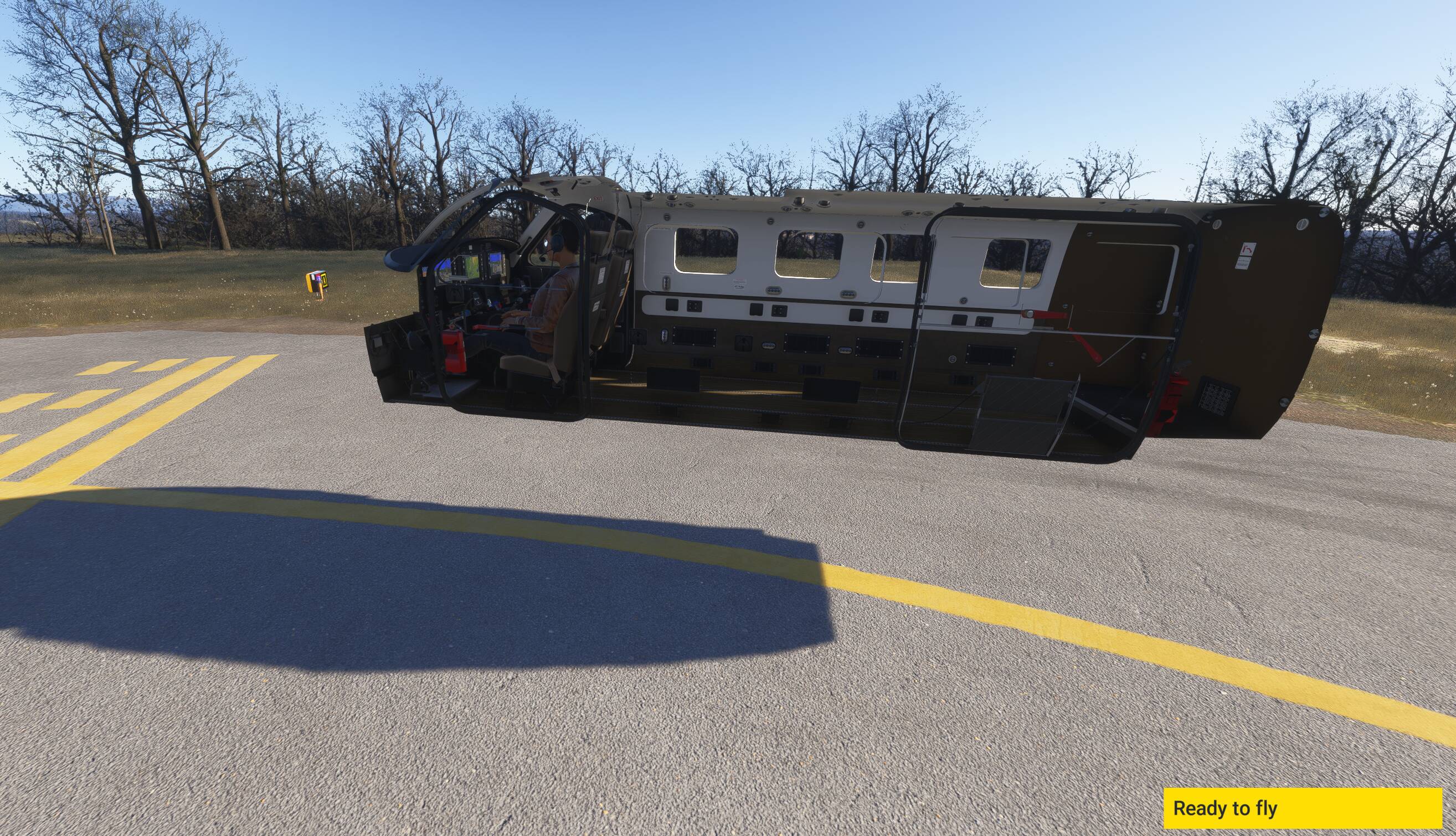
When the SWS Kodiak 100 is downloaded locally, the 3d model is missing everything except the interior of the plane. Wings, fuselage, landing gear, tail, etc are all absent.

When the Kodiak is set to a streamed aircraft, the full model is present.

This issue first appeared for me when I upgraded to SU 4 final, was working in early SU4 beta builds. May also have been triggered by 1.5.7 release of Kodiak 100.

FREQUENCY OF ISSUE

How often does this occur for you (Example: Just once, every time on sim load, intermittently)?
Every time.

REPRODUCTION STEPS

Please list clear steps you took in order to help our test team reproduce the same issue:

  1. Purchase SWS Kodiak 100 from the MS Marketplace Storefront.

  2. Enter the Marketplace → My Library → Streamed, locate the Kodiak 100

  3. Click to select the Kodiak, Download, wait for download to complete, then Install.

  4. Attempt to fly the Kodiak in Free Flight

  5. Observe hovering interior (see photo).

  6. Return to Marketplace → My Library → Installed

  7. Click to select the Kodiak, Uninstall.

  8. Attempt to fly the Kodiak in Free Flight again

  9. Observe full aircraft.

YOUR SETTINGS

If the issue still occurs with no mods and add-ons, please continue to report your issue. If not, please move this post to the User Support Hub.

What peripherals are you using:
Virpil Joysticks & Throttle Box, TrackIR

[PC Only] Are you using Developer Mode or have you made any changes to it?
No

[PC, MSFS 2020 Only] Are you using DX11 or DX12?

[PC Only] What GPU (Graphics Card) do you use?
AMD 7900 XTX

[PC Only] What other relevant PC specs can you share?
MEDIA

2 Likes

Hi @WhisperDark730,

Thank you for this report. We’ve moved your topic into the User Support Hub.

The Bug Reporting Hub is for posting suspected or confirmed bugs that other users are able to reproduce without duplicating an existing bug report. Using the template or providing all the relevant information about your bug and sim setup is required in order to provide valuable information, feedback, and replication steps to our test team.

If you are not sure if your issue is a bug or need further input from the community, please use the User Support Hub category. If the community can replicate your issue, first search the Bug category to see if there’s an existing topic. If it already exists, contribute to that report. Duplicate bug reports will be closed.

If you believe it is a new report and no duplicate exists, then create a new bug topic using the provided topic template.

All issues caused by or involving third-party addons/mods should be reported to the third-party developer. Assure that no addons/mods are used when reporting issues in Bug Reports.

Can confirm the problem. Download and saving locally gives you only the cabin, not the rest of the aircraft. In both cases the heatblur is still visible in the cabin with engine on in V R.

Hello DementedCorn327,

Multiple other users have also observed this issue, and I’ve not been able to find anything that looks like a duplicate report.

Several observations are mentioned in this thread: Kodiak 100 problem after update , I’m hoping they will come over to confirm an actual bug report. There’s also been several observations in the SWS discord, and again they are being encouraged to come and confirm this bug report.

I can also confirm the missing 3d model objects when downloading the Kodiak 100 locally.

All issues with 3rd party addons must be reported to the 3rd party developers and are not in scope of the Bug Reporting Hub . If the 3rd party developers think the issue is on FS2024 side then they will report it to Asobo through the dedicated Dev Support forums they have access to.

They are aware of the issue and confirmed it is on the FS2024 side.

Ok, that’s good. So I assume devs are working on a fix.
If you can replicate the issue with a 1st party aircraft then you can always create a report in the Bug Reporting Hub.

I don’t believe this is an issue with the aircraft itself, I think this is a bug with either the ‘download locally’ function, or with the Content Distribution Network that MS is using to provide the downloaded aircraft code.

And I talked with a SWS developer, and he agreed that this needed to be reported to Asobo, as it didn’t appear to be a bug with the aircraft itself.

1 Like

I cannot confirm if it is a global issue or not but certainly SWS developer has more info about this since they said to have reported it to Asobo.
As mentioned above, you can report the issue to the devs (check 1st if there is no existing report for the same) through the Bug Reporting Hub but it must be a 1st party aircraft for which you can replicate the issue.

1 Like

Hello,

This is a Marketplace-side issue, as the aircraft works well when:

  • Streamed from the marketplace
  • Installed in Community (non-Marketplace build)
  • Installed in Community (Marketplace build) - this can only be verified by me

Therefore this is not an aircraft problem. We have reported bugs pertaining to aircraft distributed through FS2024 to Asobo, but it would be good if it is also recorded here and double-checked as the problem only occurs through MP.

3 Likes

@WhisperDark730 , @SiRRiPPERORiG : thank you for your feedback. Report has been feedback-logged so proper follow-up will be done with the corresponding team.

2 Likes

Thank you sir.

1 Like

Is there a link to the Dev Support forum thread for this issue?

Here it is: https://devsupport.flightsimulator.com/t/streamed-aircraft-errors/16998

1 Like