GPU might run cooler and consuming less power by not creating frames which are irrelevant for the visual impression. For some that limit lies at 30 FPS for some others higher. .:. As often. Matter of taste.
Even with my system I cap at 40 FPS because I have found it frees up my CPU and GPU to do other things in the background like ensuring that photogrammetary is fully downloaded and displayed to ensure that the view I have is best quality. If you just let it run wild at max FPS, the GPU/CPU sometimes have no cycles left for other things.
My system is 5950 CPU with 6900XT GPU and 64gig memory.
The V-sync switch is found in the sim in the Graphics settings page under “Data.”
I cap mine at 30fps but my graphics card is a 2080 and I’m in VR. I don’t want to be too aggressive here.
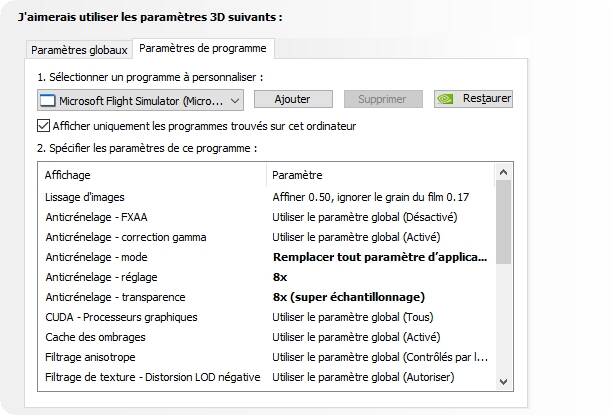
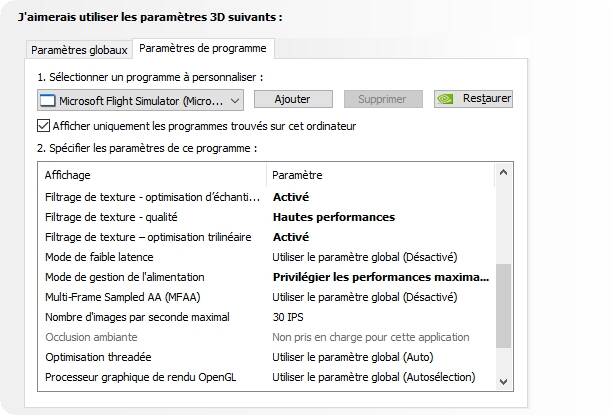
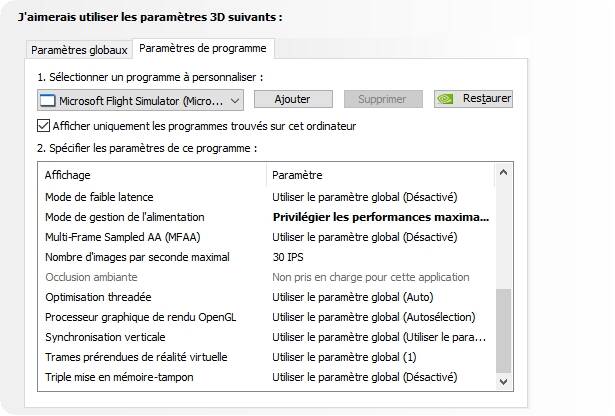
Experiment with it. For some it is buggy. If it works for you, great. Alternatively you can use the Nvidia Graphics panel to limit it (but for some that doesn’t work either so be warned. ).
I use it on my system as well with a 5950X and 2080 Super FTW3. I have it capped in the Nvidia control panel at about 6-8fps over the Gsync floor for my LG monitor which is 48fps as it’s a freesync with “gsync compatible” model and LG’s ultrawides apparently don’t have a very low floor for either freesync or Gsync. I mostly do it because as long as I’m in Gsync I don’t care as that keeps things smooth and leaves headroom for things like streaming which uses part of the main GPU to composite the scene whether or not you’re using CPU or the dedicated GPU chip for the actual stream encoding.
Ryzen 9 5900x, 3080t, 32gb 3200 ram…..locked at 30…smooth as silk…all settings on max……4K 55” tv monitor…plus 2 1080 monitors for pop out screens, Air Manager and Little Nav Map….resolution at 90%.
I found that capping it at 30 in the Nvidia control panel gives me super smooth experience, much smoother than 50fps when uncapped. Lower gpu temps. VSync at 30 inside the sim wound randomly drop frames creating stutters.
Great question and answers. Think I’ll also try using vsync and 30. Does fluctuate between in the 30s and up to high 40s. Be curious to see any impact.
This shouldn’t really be necessary though, as it is a modern sim and doesn’t build scenery exactly like P3D. The gpu should be able to push what it can, without causing those issues, especially with the new update freeing so many resources up from the cpu. The goal with the new sim is also to finally leave those old tweaking days behind. Start & Fly, instead of tweak & cry. (Like in the fsx days)
Prior to SU5 I did not have CTDs.
With the latest hotfix, 7 out of 8 attempts to use MSFS ended with the computer freezing or a CTD.
Capping FPS on my rig eliminated most CTDs.
That was the main benefit.
I limit my FPS to 57 via Radeon software because my 4K screen runs Freesync between 40 and 60 FPS, so I cap 3 below the limit for a smooth and stutter free experience.
Fps limited to 30 . Vsync off. Considering the price of CG, I prefer to save it, and I am very satisfied
ASUS ROG STRIX Z270F / CPU Intel I7 7700K 4,2 GHz/ GTX 1080 STRIX 8 Go/ Mem 4 X 8Go DDR4
In fsx, p3d there was, in fs2020, besides stressing the system less and using less power, not really. Also Nvidia inspector and other external tools are completely unnecessary and just hassle for the sake of it, in some cases can even introduce issues..