The game has crashed error 0x0000005 The game does not start

:wave: Thanks for using the Bug section, using the templates provided will greatly help the team reproduce the issue and make the resolution process easier.

Are you using developer mode or have you made any changes to it? >
no

Have you disabled/removed all your mods and add-ons? If the issue persists without mods or add-ons, please continue reporting your issue. Otherwise, please move this post to the User Support Hub.

I deleted everything to start over with a clean install.

Brief description of the problem:

I flew with msfs less than 12 hours ago, I restart my pc, I launch msfs and I have this message "the game has crashed error code 0x0000005. I tried several solutions like seeing if there are updates, I checked the files / repaired. But nothing works still this same message. I then decided to completely uninstall and reinstall … But still this ā– ā– ā– ā–  message !!

Provide screenshots / videos of the problem encountered:
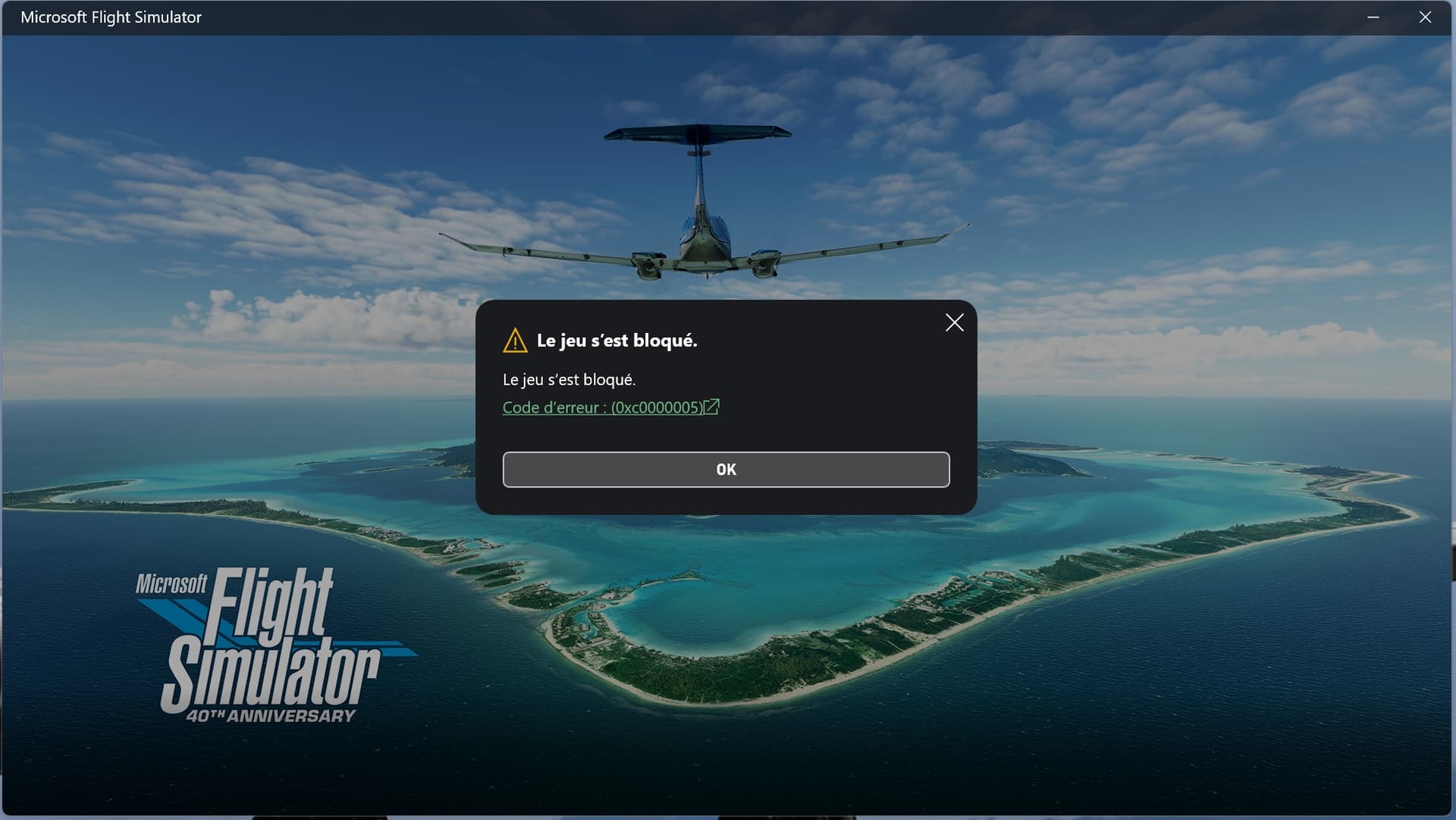
Detailed steps to reproduce the problem encountered:

I don’t know. Launch msfs and it does it by itself!

PC specifications and / or peripheral configuration, if applicable:

I9 12900KF 4.9Ghz, RTX4080, Asus rog strix Z690-G Gaming, 32GB DDR5 RAM

Build version number when you started experiencing this issue:

1.37.19.0


:speaker: For anyone interested in contributing to this issue, click the button below to use this template:

Do you have the same issue if you follow the OP’s steps to reproduce it?

Provide additional information to supplement the original issue description:

If applicable, provide additional screenshots/videos:

1 Like

Did you restart the pc after installation?
I had the same problem yesterday, I reinstalled the game and when I launched it, I still had the same problem. I updated the applications in the store, logged out and logged back in, and restarted the PC.
Then it worked.

1 Like

I tried all of that and nothing works

1 Like

Hi @FuryVekant ,

Thank you for this report. We’ve moved your topic into the User Support Hub.

The Bug Reporting Hub is for posting suspected or confirmed bugs that other users are able to reproduce without duplicating an existing bug report. Using the template or providing all the relevant information about your bug and sim setup is required in order to provide valuable information, feedback, and replication steps to our test team.

If you are not sure if your issue is a bug or need further input from the community, please use the User Support Hub category. If the community can replicate your issue, first search the Bug category to see if there’s an existing topic. If it already exists, contribute to that report. Duplicate bug reports will be closed.

If you believe it is a new report and no duplicate exists, then create a new bug topic using the provided topic template.

All issues caused by or involving third-party addons/mods should be reported to the third-party developer. Assure that no addons/mods are used when reporting issues in Bug Reports.

Hello, I haven’t found any topic, I’ve tried a lot of solutions and nothing works I really need help … I’m clearly going to explode! I’m fed up it worked perfectly yesterday and a few hours later nothing works! I haven’t touched anything! I completely uninstalled the sim and nothing works all because it goes through a ā– ā– ā– ā– ā– ā–  Xbox application! I’m more than fed up!

Here are some existing topics about that error code:

In the User Support Hub :
https://forums.flightsimulator.com/search?q=0xc0000005%20%20in%3Atitle%20%20%23user-support-hub

In the Bug Reporting Hub :
https://forums.flightsimulator.com/search?q=0xc0000005%20%23bugs%20in%3Atitle%20status%3Aopen

If it is still does not help, I would recommend to create a zendesk ticket to get direct support from the technical team: https://flightsimulator.zendesk.com/hc/en-us/requests/new

Hope it will help.

I did a reinstallation and nothing works.. I will open a ticket.. thank you

i have same issue

1 Like

I search, I search… all day I tried countless solutions and nothing works

1 Like

I really tried all the ā€œpossibleā€ solutions, nothing worked … I used the strong method .. I formatted Windows! AND it works again! Good luck to those who have this problem!

I’m glad you are back flying again!
Backups are your friend here -both for the OS & MSFS:

Also game keeps crashing. here is my error log.

Faulting application name: FlightSimulator2024.exe, version: 1.1.10.0, time stamp: 0x00000000
Faulting module name: nvwgf2umx.dll, version: 32.0.15.6636, time stamp: 0x674f613e
Exception code: 0xc0000409
Fault offset: 0x0000000000f20d71
Faulting process id: 0x0x42FC
Faulting application start time: 0x0x1DB4978B31FD148
Faulting application path: C:\Program Files\WindowsApps\Microsoft.Limitless_1.1.10.0_x64__8wekyb3d8bbwe\FlightSimulator2024.exe
Faulting module path: C:\Windows\system32\DriverStore\FileRepository\nv_dispi.inf_amd64_9425e4c3b1ac1c47\nvwgf2umx.dll
Report Id: 24c777c9-956a-4bee-ba73-a497fe97a690
Faulting package full name: Microsoft.Limitless_1.1.10.0_x64__8wekyb3d8bbwe
Faulting package-relative application ID: App

System information:
processor: Intel(R) Coreā„¢ i9-14900K 3.20 GHz
ram: 64.0 GB (63.7 GB usable)
graphics card:nvidea gtx 4080 super
windows 11 pro