You guys could use spad.next to send a simconnect event, pause (the amount of time it takes engines to spool) and then turn back to norm. 25 curly Ls though
Hello,
can you search for the work folder or the ini on your drives? The plugin definitively writes that info, and I’m sure it goes somewhere…just to be sure: that this only happens when you use the custom fbw version!
When you found the file please let me know, then I can add it to the description.
Question from my side: I received today my add-on package. Did anyone got the gear lever working yet?
Any ideas how to map spoiler arm/disarm?
Thanks 
I actually downloaded the development version without specifying custom FBW… I’ll have a look in the doc on how to select this.
There you find the link and also the link to the docs for it:
flybywiresim/a32nx: The A32NX Project is a community driven open source project to create a free Airbus A320neo in Microsoft Flight Simulator that is as close to reality as possible. It aims to enhance the default A320neo by improving the systems depth and functionality to bring it up to payware-level, all for free. (github.com)
1 Like
Yes found it and downloading now. Thanks a lot !
Just a quick one : could you please briefly explain how MSFS takes the A32NX as a priority towards the default A320 ? I had believed to see the A32NX showing as a new airplane as it is the case in FSX, P3D, XP… is there a specific parameter that you include to prevent MSFS from loading the standard plane once the A32NX is installed in the Community folder ?
Thanks.
ok found it :
"The original A320 will still show, this is normal. The updates to the Community folder only overwrite specific aspects of the default aircraft. A completely new aircraft is not created.

We are working on a fork…so at some point you’ll see a new plane in the future.
I see… BTW, I found now the configuration file.
Thanks a lot for your help and again thank you for what the team brings to the community !
ps : Love the ATSU function. Do you think, it will be possible in the future to print messages on a local printer ? (as it is with the Fslabs and a POS printer) ?
1 Like
I’m sure there will be people adding this at some point. For the moment we are working on bringing other stuff that seems really really needed like:
- LNAV / VNAV
- Custom FBW
- Custom Autopilot / ATHR
- Other systems like hydraulics
1 Like
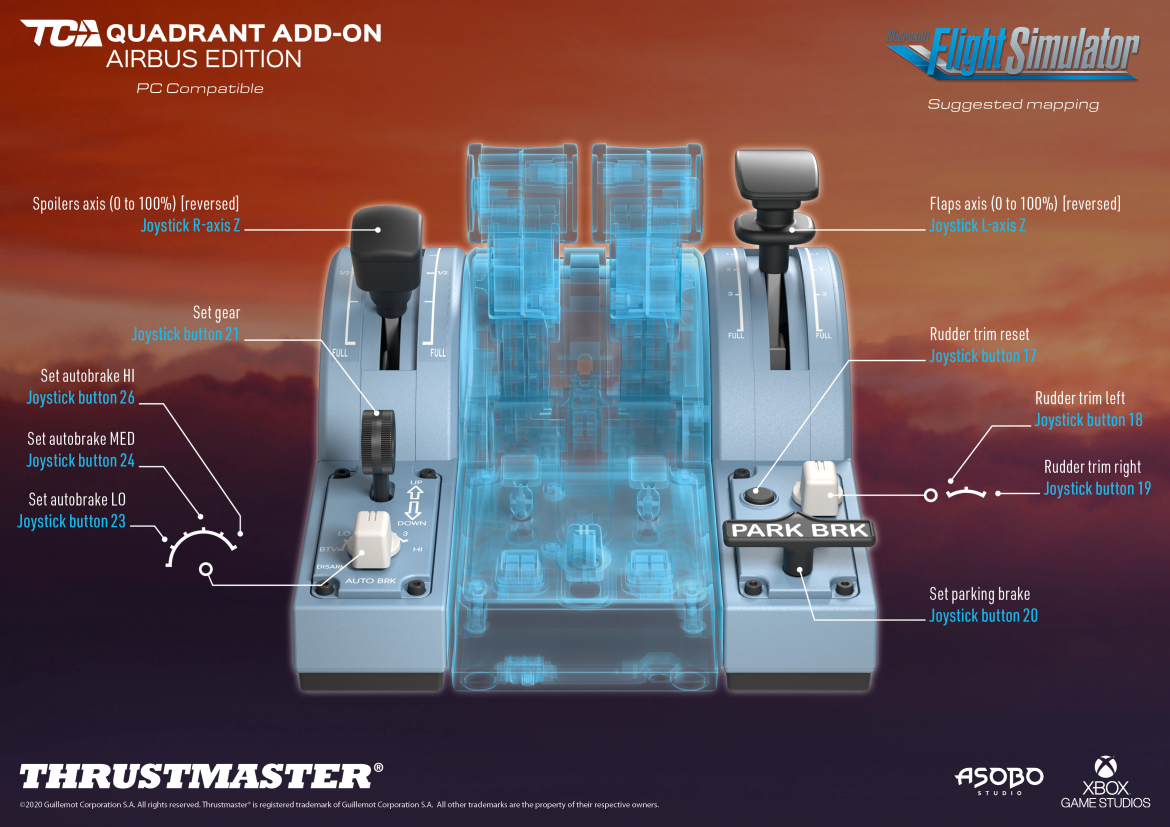
Does it help? Get my this or next week so please tell if it’s a solutions.
@ Fmgc320 You are great… that’s it!.. I’ve now uninstalled the 2020_TFHT_5 drivers, restarted, then did the reset as described above (I next went into the controller settings, go to properties, settings, hit “reset to default”.).. Fixed it… Thanks, mate.
Update: Fixed only the 787… the default A320 is still off… need to use A32NX.. 
Update 2: No, my fault, I still had another sensitivity profile setup.. once I went to default in FS2020 it all went fine…happy now.
Well, that‘s how it‘s mapped by default, and there is even an error in it. Gear is button 21 and not 20 (20 is parking brake).
But it does not work, only for gear up…could be a sim issue…
OK, blöd. Maybe a new firmware is necessary because the add on is not mentioned in the history of the firmware yet…
Hello all
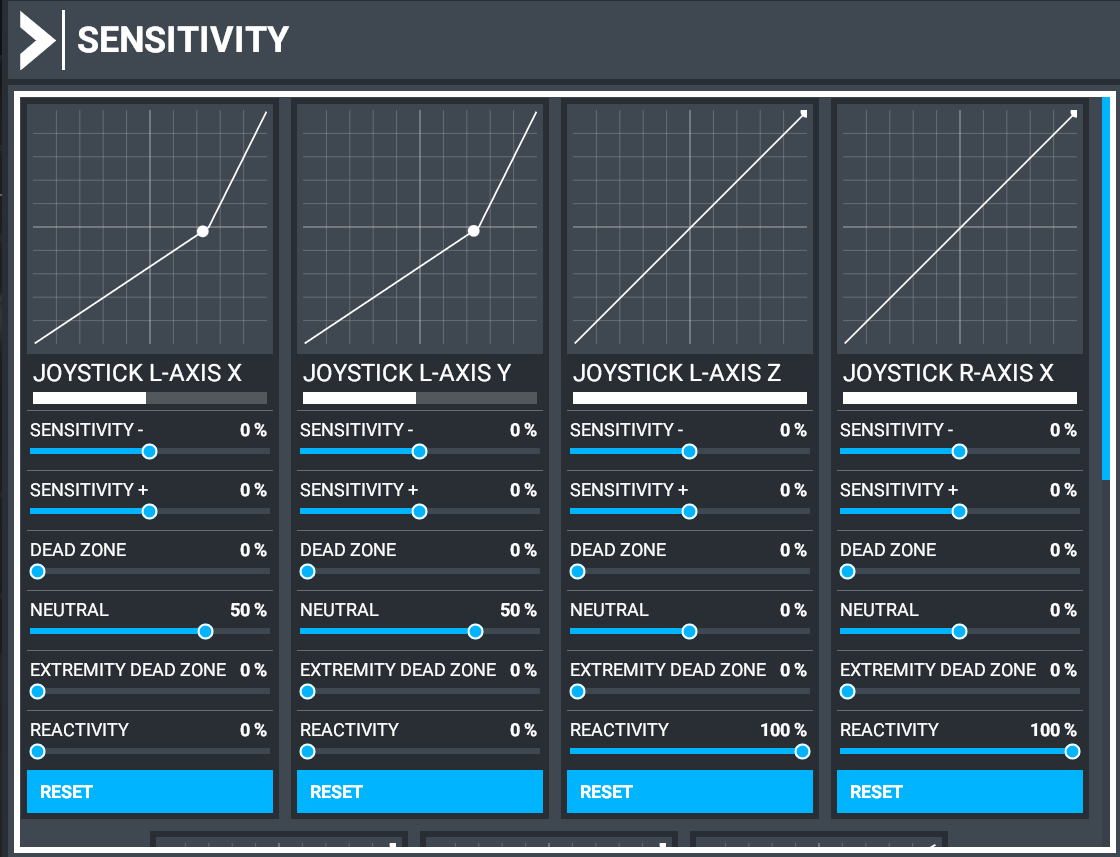
Finally after spent a few hours testing and adjusting my TCA Quadrant it’s working100%.
This is my final settings
Got my TCA Quadrant working perfectly now (except the engine switch buttons…) : followed the following settings from https://github.com/flybywiresim/a32nx/tree/fbw/docs :
[Throttle]
Log = true
Enabled = true
ReverseOnAxis = true
ReverseIdle = true
DetentDeadZone = 2.5
DetentReverseIdle = -0.90
DetentReverseFull = -1.00
DetentIdle = -0.42
DetentClimb = 0.06
DetentFlexMct = 0.53
DetentTakeOffGoAround = 1.00
Thank you !
2 Likes
Do you have the new A320NX realesa?
My TCA is full functional including the engine buttons.
If you reset to default I believe there are default binds for it? I don’t have the add on but noticed I have binds set on my quadrants profile. Wonder if those work for you?
Yeah, but they also do not work (the profile „DEFAULT“)…
Does the TCA Addon has a way to arm the spoilers? From my understanding they don’t even have the virtual button on the spoilers to bind. The lever doesn’t even pull up as well, right? It’s just a normal lever.
That means, you need to bind the spoiler arm/disarm to another button.
I’m thinking the fire button (the black ones just beside the engine mode switches. I think that’s a free button, maybe you can bind the toggle speed brake/spoilers arm/disarm to there.
As for the gear, have you check on the virtual buttons for the gears? When you move it up, does it have a virtual button triggered? If you move it down, does it trigger a different virtual button as well?
If so, that means you need to bind Set Gear UP to the up virtual button, and Set Gear Down to the down virtual button.
But if the gear lever only have one virtual buttons Either On when move up or Off when move down. Then it needs to be bound to a different gear bindings.
There’s a lot of trial and error and experiments when getting a new hardware. I know it took me 2 hours the first time I got my hands on the TCA quadrant.